JDK8 中的 ZoneId、ZoneDateTime、Instant、DateTimeFormatter、Period 和 Duration

ZoneId 时区

1
2
3
4
5
6
7
8
ZoneId zoneId = ZoneId.systemDefault(); // 获取系统默认时区
System.out.println("zoneId = " + zoneId.getId()); // Asia/Shanghai
System.out.println("zoneId = " + zoneId); // Asia/Shanghai

Set<String> availableZoneIds = ZoneId.getAvailableZoneIds(); // 获取 Java 支持的全部时区 id
System.out.println("availableZoneIds = " + availableZoneIds);

ZoneId zoneId1 = ZoneId.of("Asia/Shanghai"); // 根据时区 id 获取 ZoneId 对象

ZoneDateTime

1
2
3
4
5
6
7
8
9
10
11
ZonedDateTime zonedDateTime = ZonedDateTime.now(zoneId1); // 根据时区获取带时区的日期时间
System.out.println("zonedDateTime = " + zonedDateTime); //2023-09-07T17:19:35.243171400+08:00[Asia/Shanghai]

ZonedDateTime zonedDateTime1 = ZonedDateTime.now(Clock.systemUTC()); // 世界标准时间
System.out.println("zonedDateTime1 = " + zonedDateTime1); //zonedDateTime1 = 2023-09-07T09:22:13.064384800Z

ZonedDateTime zonedDateTime2 = ZonedDateTime.now(); // 获取系统默认时区的 ZonedDateTime
System.out.println("zonedDateTime2 = " + zonedDateTime2); // 2023-09-07T17:23:03.864487500+08:00[Asia/Shanghai]

zonedDateTime2.withYear(1);
zonedDateTime2.plusYears(1);

Instant 时间线上的某个时刻(时间戳),精确到纳秒

1
2
3
4
5
6
7
8
9
10
11
Instant instant = Instant.now();
System.out.println("instant = " + instant.toString()); //2023-09-07T10:25:26.357256800Z

long epochSecond = instant.getEpochSecond(); // 总秒数
System.out.println("epochSecond = " + epochSecond); //1694082326

int nano = instant.getNano(); // 不够 1 秒的纳秒
System.out.println("nano = " + nano); //357256800

instant.plusSeconds(1);
instant.minusSeconds(1);

DateTimeFormatter

1
2
3
4
5
6
7
8
9
10
11
12
13
14
15
16
DateTimeFormatter dateTimeFormatter = DateTimeFormatter.ofPattern("yyyy-MM-dd HH:mm:ss");

LocalDateTime localDateTime = LocalDateTime.now();
System.out.println("localDateTime = " + localDateTime); //2023-09-07T18:32:46.794010300

// 格式化方案 1
String format = dateTimeFormatter.format(localDateTime);
System.out.println("format = " + format); //2023-09-07 18:32:46

// 格式化方案 2
String format1 = localDateTime.format(dateTimeFormatter);
System.out.println("format1 = " + format1);

String datetimeStr = "2023-09-07 16:16:16";
LocalDateTime parse = LocalDateTime.parse(datetimeStr, dateTimeFormatter);
System.out.println("parse = " + parse);

Period 计算日期间隔

1
2
3
4
5
6
7
8
9
10
11
12
LocalDate localDate = LocalDate.now();
LocalDate localDate1 = LocalDate.of(2022, 12, 12);
Period period = Period.between(localDate, localDate1);

int periodYears = period.getYears();
System.out.println("periodYears = " + periodYears); // 0

int periodMonths = period.getMonths();
System.out.println("periodMonths = " + periodMonths); // -8

int periodDays = period.getDays();
System.out.println("periodDays = " + periodDays); // -26

Duration 计算时间间隔

1
2
3
4
5
6
7
8
9
10
11
12
LocalDateTime localDateTime1 = LocalDateTime.of(2023, 8, 6, 15, 15, 15);
LocalDateTime localDateTime2 = LocalDateTime.of(2023, 9, 7, 18, 18, 18);
Duration duration = Duration.between(localDateTime1, localDateTime2);

long days = duration.toDays();
System.out.println("days = " + days); //32

long hours = duration.toHours();
System.out.println("hours = " + hours); //771

long minutes = duration.toMinutes();
System.out.println("minutes = " + minutes); //46263

JDK8 中的 LocalDate、LocalTime 和 LocalDateTime

1
2
3
import java.time.LocalDate;
import java.time.LocalDateTime;
import java.time.LocalTime;

LocalDate:本地日期(年 月 日 星期)

1
2
3
4
5
6
7
8
9
10
11
12
13
14
15
16
17
18
19
20
21
22
23
24
25
26
27
28
29
30
31
32
33
34
35
36
37
38
39
40
41
42
43
44
45
46
47
48
49
50
51
52
53
54
55
56
57
58
59
60
61
62
63
64
65
66
67
68
69
70
71
72
//0、获取本地日期对象
LocalDate localDate = LocalDate.now();
System.out.println("localDate = " + localDate); // 2023-09-07

//1、获取日期对象中的信息
int localDateYear = localDate.getYear(); // 年
System.out.println("localDateYear = " + localDateYear); // 2023

int localDateMonth = localDate.getMonthValue(); // 月(1-12)
System.out.println("localDateMonth = " + localDateMonth); // 9

int localDateDayOfMonth = localDate.getDayOfMonth(); // 日
System.out.println("localDateDayOfMonth = " + localDateDayOfMonth); // 7

int localDateDayOfWeek = localDate.getDayOfWeek().getValue();// 星期几
System.out.println("localDateDayOfWeek = " + localDateDayOfWeek); // 4

int localDateDayOfYear = localDate.getDayOfYear(); // 一年中的第几天
System.out.println("localDateDayOfYear = " + localDateDayOfYear); // 250

//2、修改信息 withYear() withMonth() withDayOfMonth() withDayOfYear()
LocalDate localDate1 = localDate.withYear(2035);
System.out.println("localDate1 = " + localDate1); // 2035-09-07
System.out.println("localDate = " + localDate); // 2023-09-07

LocalDate localDate2 = localDate.withMonth(10);
System.out.println("localDate2 = " + localDate2); // 2023-10-07
System.out.println("localDate = " + localDate); // 2023-09-07

LocalDate localDate3 = localDate.withDayOfMonth(17);
System.out.println("localDate3 = " + localDate3); // 023-09-17
System.out.println("localDate = " + localDate); // 2023-09-07

LocalDate localDate4 = localDate.withDayOfYear(360);
System.out.println("localDate4 = " + localDate4); // 2023-12-26
System.out.println("localDate = " + localDate); // 2023-09-07

//3、把某个信息加多少 plusYears() plusMonths() plusDays() plusWeeks()
LocalDate localDate5 = localDate.plusYears(1); // 增加 1 年
System.out.println("localDate5 = " + localDate5); // 2024-09-07

LocalDate localDate6 = localDate.plusMonths(12); // 增加 12 月
System.out.println("localDate6 = " + localDate6); // 2024-09-07

LocalDate localDate7 = localDate.plusDays(366); // 增加 366 天
System.out.println("localDate7 = " + localDate7); // 2024-09-07

LocalDate localDate8 = localDate.plusWeeks(1); // 增加一周
System.out.println("localDate8 = " + localDate8); // 2023-09-14
System.out.println("localDate = " + localDate); // 2023-09-07

//4、把某个信息减多少 minusYears() minusMonths() minusDays() minusWeeks()
LocalDate localDate9 = localDate.minusYears(1); // 减去 1 年
System.out.println("localDate9 = " + localDate9); // 2022-09-07

LocalDate localDate10 = localDate.minusMonths(12); // 减去 12 月
System.out.println("localDate10 = " + localDate10); // 2022-09-07

LocalDate localDate11 = localDate.minusDays(365); // 减去 365 天
System.out.println("localDate11 = " + localDate11); // 2022-09-07

LocalDate localDate12 = localDate.minusWeeks(1); // 减去 1 周
System.out.println("localDate12 = " + localDate12); // 2023-08-31

//5、获取特定日期的 LocalDate 对象
LocalDate localDate13 = LocalDate.of(2035, 9, 7);
System.out.println("localDate13 = " + localDate13); // 2035-09-07

//6、判断两个日期是否相等,在前还是在后 equals() isBefore() isAfter()
System.out.println("localDate13.equals(localDate) = " + localDate13.equals(localDate)); // false
System.out.println("localDate13.isBefore(localDate) = " + localDate13.isBefore(localDate)); // false
System.out.println("localDate13.isAfter(localDate) = " + localDate13.isAfter(localDate)); // true

LocalTime:本地时间(时 分 秒 纳秒)

1
2
3
4
5
6
7
8
9
10
11
12
13
14
15
16
17
18
19
20
21
22
23
24
25
26
27
28
29
30
31
32
33
34
35
36
37
38
39
40
41
42
43
//0、获取本地日期对象
LocalTime localTime = LocalTime.now();
System.out.println("localTime = " + localTime); //16:14:01.281273700

// 1、获取日期对象中的信息
int localTimeHour = localTime.getHour(); // 时
System.out.println("localTimeHour = " + localTimeHour); // 16

int localTimeMinute = localTime.getMinute(); // 分
System.out.println("localTimeMinute = " + localTimeMinute); // 14

int localTimeSecond = localTime.getSecond(); // 秒
System.out.println("localTimeSecond = " + localTimeSecond); // 1

int localTimeNano = localTime.getNano(); // 纳秒
System.out.println("localTimeNano = " + localTimeNano); // 281273700

//2、修改信息 withHour() withMinute() withSecond() withNano()
LocalTime localTime1 = localTime.withHour(1);
LocalTime localTime2 = localTime.withMinute(1);
LocalTime localTime3 = localTime.withSecond(1);
LocalTime localTime4 = localTime.withNano(1000);

//3、把某个信息加多少 plusHours() plusMinutes() plusSeconds() plusNanos()
LocalTime localTime5 = localTime.plusHours(1);
LocalTime localTime6 = localTime.plusMinutes(1);
LocalTime localTime7 = localTime.plusSeconds(1);
LocalTime localTime8 = localTime.plusNanos(1000);

//4、把某个信息减多少 minusHours() minusMinutes() minusSeconds() minusNanos()
LocalTime localTime9 = localTime.minusHours(1);
LocalTime localTime10 = localTime.minusMinutes(1);
LocalTime localTime11 = localTime.minusSeconds(1);
LocalTime localTime12 = localTime.minusNanos(1000);

//5、获取特定时间的 LocalTime 对象
LocalTime localTime13 = LocalTime.of(22, 22, 22);
System.out.println("localTime13 = " + localTime13); // 22:22:22

//6、判断两个时间是否相等,在前还是在后 equals() isBefore() isAfter()
System.out.println("localTime13.equals(localTime) = " + localTime13.equals(localTime)); // false
System.out.println("localTime13.isBefore(localTime) = " + localTime13.isBefore(localTime)); // false
System.out.println("localTime13.isAfter(localTime) = " + localTime13.isAfter(localTime)); // true

LocalDateTime:本地日期、时间(年 月 日 星期 时 分 秒 纳秒)

1
2
LocalDateTime localDateTime = LocalDateTime.now();
System.out.println("localDateTime = " + localDateTime);

LocalDateLocalTime 有的 LocalDateTime 都有!!!

1
2
LocalDate localDate14 = localDateTime.toLocalDate();
LocalTime localTime14 = localDateTime.toLocalTime();

如何才能在Java中优雅的操纵时间?

Windows 10 安装配置 PL/SQL

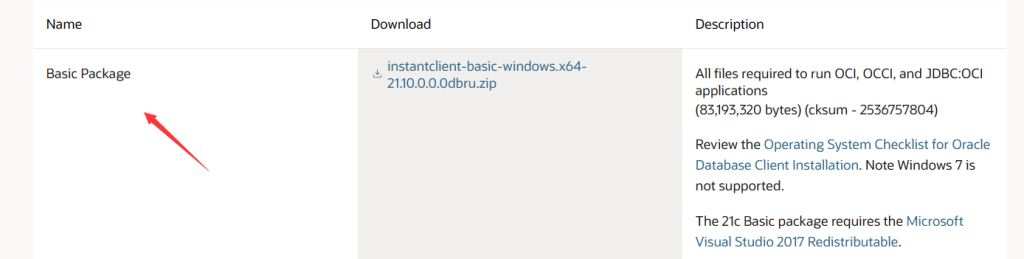
先安装配置 Oracle 客户端,下载 Oracle Instant Client Downloads for Microsoft Windows (x64) 64-bit

下载后解压,例如我的目录是:D:\Program\OracleClient,

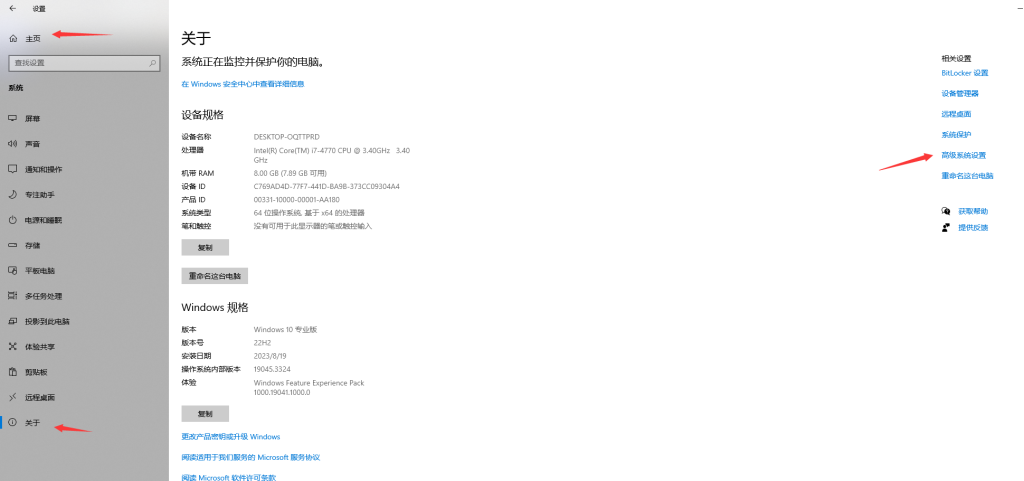
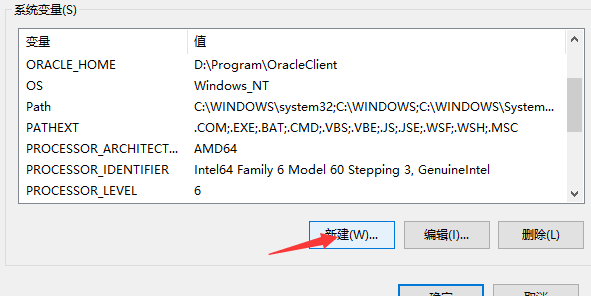
配置环境变量:

path 中添加 D:\Program\OracleClient

如果下载的 OracleClient 版本比较高,比如这里使用的 Version 21.12.0.0.0, 注意下载链接的 Description 最后一项:

The 21c Basic package requires the Microsoft Visual Studio 2017 Redistributable.

如果没有安装,启动 PL/SQL 客户端会报错:

1
2
3
4
5
6
不能初始化 "..\oci.dll"

Make sure you have the 64 bits Oracle Client installed.

你确认已安装了64位Oracle Client 吗?

其他语言、日期格式配置:

1
2
3
4
5
6
7
8
变量名:NLS_LANG
变量值:SIMPLIFIED CHINESE_CHINA.ZHS16GBK

变量名:NLS_DATE_FORMAT
变量值:YYYY-MM-DD HH24:MI:SS

变量名:NLS_TIMESTAMP_FORMAT
变量值:YYYY-MM-DD HH24:MI:SS

下载安装 PL/SQL,注册码网上也有😀。

下载地址:https://www.allroundautomations.com/try-it-free/

一个可用的 PL/SQL 15 注册码:

product code : ke4tv8t5jtxz493kl8s2nn3t6xgngcmgf3
serial Number: 264452
password: xs374ca

D:\Program\OracleClient\network\admin 目录下创建 tnsnames.ora 文件(如果没有的话),在 tnsnames.ora 文件中配置 TNS,然后打开 PL/SQL 测试连接数据库。

Laravel Tips:控制器中 CURD 方法不能满足需求时如何给方法命名?

使用 Laravel 时可以方便的用 Artisan 命令创建控制器,比如 php artisan make:controller PostController

1
2
3
4
5
6
7
8
9
10
<?php

namespace App\Http\Controllers;

use Illuminate\Http\Request;

class PostController extends Controller
{
//
}

但这样创建的控制器类中没有任何方法,可以添加 -r 参数来创建包含 CURD 方法的控制器,例如 php artisan make:controller PostController -r

1
2
3
4
5
6
7
8
9
10
11
12
13
14
15
16
17
18
19
20
21
22
23
24
25
26
27
28
29
30
31
32
33
34
35
36
37
38
39
40
41
42
43
44
45
46
47
48
49
50
51
52
53
54
55
56
57
58
59
60
61
62
63
64
<?php

namespace App\Http\Controllers;

use Illuminate\Http\Request;

class PostController extends Controller
{
/**
* Display a listing of the resource.
*/
public function index()
{
//
}

/**
* Show the form for creating a new resource.
*/
public function create()
{
//
}

/**
* Store a newly created resource in storage.
*/
public function store(Request $request)
{
//
}

/**
* Display the specified resource.
*/
public function show(string $id)
{
//
}

/**
* Show the form for editing the specified resource.
*/
public function edit(string $id)
{
//
}

/**
* Update the specified resource in storage.
*/
public function update(Request $request, string $id)
{
//
}

/**
* Remove the specified resource from storage.
*/
public function destroy(string $id)
{
//
}
}

然而我们实际的业务中肯定不仅仅是 CURD 操作,比如我们需要添加搜索(search) 功能,那么要在控制器中添加一个 search() 方法吗?之前看到过 Laravel 作者的推文,他认为良好的项目架构应该充分利用默认的几种方法,不要添加多余的方法导致控制器过于臃肿,如果要实现其他业务,应该创建新的控制器,比如添加 search 功能,通过在 PostController 前面添加限定修饰的方式创建新的控制器,比如,php artisan make:controller SearchablePostController

1
2
3
4
5
6
7
8
9
10
11
12
13
<?php

namespace App\Http\Controllers;

use Illuminate\Http\Request;

class SearchablePostController extends Controller
{
public function index(Request $request)
{
//TODO
}
}

也有人习惯使用单动作控制器 ,所有的控制器都只实现单一功能,那就更好办了,php artisan make:controller Post/SearchController --invokable

1
2
3
4
5
6
7
8
9
10
11
12
13
14
15
16
17
<?php

namespace App\Http\Controllers\Post;

use App\Http\Controllers\Controller;
use Illuminate\Http\Request;

class SearchController extends Controller
{
/**
* Handle the incoming request.
*/
public function __invoke(Request $request)
{
//
}
}

EditText inputType & TextField keyboardType

1
2
3
4
5
6
7
8
9
10
11
12
13
14
15
16
17
18
19
20
21
22
23
24
25
26
27
28
29
30
31
32
33
34
35
36
37
38
39
40
41
42
43
44
45
46
47
48
49
50
51
52
53
54
55
56
57
android:inputType="none" //输入普通字符

android:inputType="text" //输入普通字符

android:inputType="textCapCharacters" //输入普通字符

android:inputType="textCapWords" //单词首字母大写

android:inputType="textCapSentences" //句子首字母大写

android:inputType="textAutoCorrect" // 自动更正

android:inputType="textAutoComplete" //自动完成

android:inputType="textMultiLine" //多行输入

android:inputType="textImeMultiLine" //输入法多行(不一定支持)

android:inputType="textNoSuggestions" //不提示

android:inputType="textUri" //URI格式

android:inputType="textEmailAddress" //电子邮件地址格式

android:inputType="textEmailSubject" //邮件主题格式

android:inputType="textShortMessage" //短消息格式

android:inputType="textLongMessage" //长消息格式

android:inputType="textPersonName" //人名格式

android:inputType="textPostalAddress" //邮政格式

android:inputType="textPassword" //密码格式

android:inputType="textVisiblePassword" //密码可见格式

android:inputType="textWebEditText" //作为网页表单的文本格式

android:inputType="textFilter" //文本筛选格式

android:inputType="textPhonetic" //拼音输入格式

android:inputType="number" //数字格式

android:inputType="numberSigned" //有符号数字格式

android:inputType="numberDecimal" //可以带小数点的浮点格式

android:inputType="phone" //拨号键盘

android:inputType="datetime" // Datetime

android:inputType="date" //日期键盘

android:inputType="time" //时间键盘

在 Jetpack Compose 中设置:

1
2
3
4
5
6
7
8
9
10
11
12
TextField(
modifier = modifier.fillMaxWidth(),
value = "",
onValueChange = { },
label = {
Text(text = "密码")
},
keyboardOptions = KeyboardOptions(keyboardType = KeyboardType.Password),
visualTransformation = if (isPasswordVisible) VisualTransformation.None else PasswordVisualTransformation(
'*'
),
)

Ubuntu 安装 glibc

下载地址:http://ftp.gnu.org/gnu/glibc/

1
2
3
4
5
6
7
8
9
10
11
12
13
cd ~

wget http://ftp.gnu.org/gnu/glibc/glibc-2.37.tar.gz

tar -zxvf glibc-2.37.tar.gz

cd glibc-2.37

mkdir build

cd build

../configure --prefix=/opt/glibc-2.37

安装过程中遇到如下错误:

1
2
3
configure: error:
*** These critical programs are missing or too old: bison
*** Check the INSTALL file for required versions.

”缺啥补啥“😀:

1
sudo apt install bison

继续运行:

1
../configure --prefix=/opt/glibc-2.37

最后:

1
sudo make && sudo make install

参考:

https://sourceware.org/glibc/wiki/Testing/Builds

https://blog.csdn.net/mengzhongsuiyi521/article/details/88432237

Response from xxx was null but response body type was declared as non-null

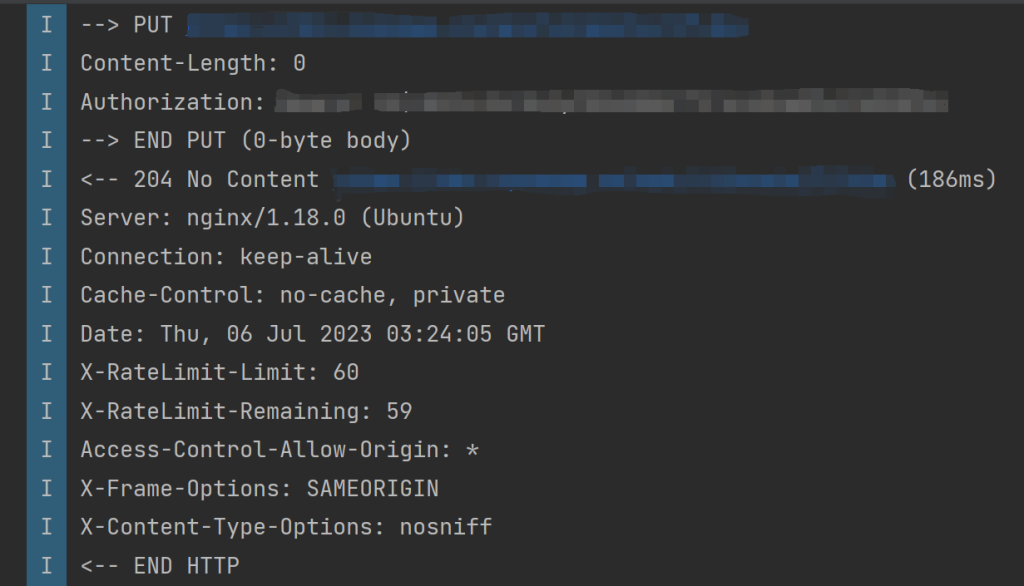
Android 使用 Kotlin、Retrofit2 请求网络,服务器端提供的 API 对于关注、点赞之类的请求以 HTTP 的状态码 204 返回,然后处理返回值遇到错误:

1
Response from xxx  was null but response body type was declared as non-null

尝试了各种写法:

1
2
3
4
5
@PUT("posts/{postId}/like")
suspend fun likePost(
@Path("postId") postId: Long,
@Header("Authorization") authorization: String
)
1
2
3
4
5
@PUT("posts/{postId}/like")
suspend fun likePost(
@Path("postId") postId: Long,
@Header("Authorization") authorization: String
): Any

等等,都不能正常使用,最终的方案:

1
2
3
4
5
@PUT("posts/{postId}/like")
suspend fun likePost(
@Path("postId") postId: Long,
@Header("Authorization") authorization: String
): Response<Unit>

引入的是 import retrofit2.Response

Laravel 使用 Vuepress 搭建文档

安装 Vuepress

1
npm install -D vuepress

编辑 package.json :

scripts 标签中添加:

1
2
3
4
"scripts": {
"docs:dev": "vuepress dev docs",
"docs:build": "vuepress build docs"
},

配置 VuePress:

1、在项目根目录下创建 docs 文件夹

2、在 docs 目录中创建 .vuepress 文件夹

3、编辑 docs/.vuepress/config.js,示例如下:

1
2
3
4
5
6
7
8
9
10
11
12
13
14
15
16
17
18
19
20
21
22
23
24
25
26
27
28
29
30
31
32
33
34
35
36
37
38
39
40
41
module.exports = {
base: '/docs/',
dest: 'public/docs',
title:'Your App Docs',
description:'Your App official documentation',
head: [
['link', { rel: 'icon', href: 'https://yourapp.domain/icon.ico/svg/png/jpg/jxl/etc' }],
],
themeConfig: {
nav: [
{ text: 'Home', link: 'https://yourapp.domain/', target: '_self' },
// versions
],
logo: 'https://yourapp.domain/yourappheaderlogo.svg/png/jpg/jpeg/jxl/etc',
displayAllHeaders: true,
activeHeaderLinks: false,
searchPlaceholder: 'Press / to search',
lastUpdated: false, // string | boolean
sidebar: [
{
title: "Getting Started",
collapsable: false,
children: [
['/introduction', '介绍'],
['/installation', '安装'],
['/configuration', '配置'],
['/providers', 'Providers'],
],
},
{
title: "Features",
collapsable: false,
children: [
['/features/multiple-users', '多用户'],
['/features/two-factor-authentication','双因子认证'],
['/features/cli','Cli'],
]
},
]
}
}

4、在 docs 目录下创建 introduction.md 等文件

5、编译文档

1
npm run docs:build

6、设置通过 Laravel 路由访问文档

创建 DocsController

1
php artisan make:controller DocsController

编辑 DocsController

1
2
3
4
5
6
7
8
9
10
11
12
13
14
15
16
17
18
<?php

namespace App\Http\Controllers;

use Illuminate\Http\Request;
use File;

class DocsController extends Controller
{
public function index(Request $request, $file = 'index')
{
if ($file != 'index') {
$file = $file . '/index';
}
return File::get(public_path() . '/docs/' . $file . '.html');
}
}

添加路由,编辑 routes/web.php

1
Route::get('/docs/{file?}', [\App\Http\Controllers\DocsController::class, 'index'])->name('docs.index');

运行项目:

1
php artisan serve

访问文档, 示例地址 http://127.0.0.1:8000/docs

参考:
https://devdojo.com/superdev/how-to-add-documentation-to-your-laravel-app-with-vuepress
https://vuepress.vuejs.org/zh/

Laravel 中的 setVisible 和 setHidden 模型方法

你可以使用 hidden 属性来指定哪些属性在模型转为 JSON 时隐藏:

1
2
3
4
5
6
7
8
9
10
11
12
13
namespace App\Models;

use Illuminate\Database\Eloquent\Model;

class User extends Model
{
/**
* The attributes that should be hidden for arrays.
*
* @var array
*/
protected $hidden = ['api_token'];
}

当你把模型转换为 arrayjson 时,将会隐藏 api_token 属性:

1
2
3
4
5
6
7
8
9
10
$user = User::find(1);

return $user->toArray();
/*
[
"id" => 1,
"name" => "Amit Merchant",
"email" => "example@example.com",
]
*/

如果向动态的显示或隐藏某(几)个属性,请看下面的两个方法:

setVisible 方法

1
2
3
4
5
6
7
8
9
10
$user = User::find(1);

return $user->setVisible(['name', 'email'])->toArray();

/*
[
"name" => "Amit Merchant",
"email" => "
]
*/

setHidden 方法

1
2
3
4
5
6
7
8
9
10
$user = User::find(1);

return $user->setHidden(['api_token'])->toArray();
/*
[
"id" => 1,
"name" => "Amit Merchant",
"email" => "example@example.com",
]
*/

参考:

https://www.amitmerchant.com/the-setvisible-and-sethidden-eloquent-methods-in-laravel-9x/

Laravel10.x 使用 Livewire 和 Tailwind CSS

1、创建项目:

1
2
3
composer create-project laravel/laravel livewire-tailwindcss-demo
#或者
laravel new livewire-tailwindcss-demo

2、安装 Livewire

1
composer require livewire/livewire

3、安装 Tailwindcss

1
2
3
4
5
# Install Tailwind CSS
npm install -D tailwindcss@latest postcss@latest autoprefixer@latest

# Create Tailwind CSS configuration file
npx tailwindcss init -p

npx tailwindcss init -p 命令会自动生成 tailwind.config.js 配置文件, 编辑 tailwind.config.js

1
2
3
4
5
6
7
8
9
10
11
12
13
/** @type {import('tailwindcss').Config} */
module.exports = {
content: [
"./resources/**/*.blade.php",
"./resources/**/*.js",
"./resources/**/*.vue",
],
theme: {
extend: {},
},
plugins: [],
}

编辑 ./resources/css/app.css

1
2
3
@tailwind base;
@tailwind components;
@tailwind utilities;

编辑 ./resources/views/welcome.blade.php :

1
2
3
4
5
6
7
8
9
10
11
12
13
14
15
16
17
18
19
20
21
22
23
24
25
26
27
28
29
30
31
32
33
34
35
36
37
38
39
40
41
42
43
44
45
46
47
48
49
50
51
52
53
54
55
56
57
58
59
60
61
62
63
64
65
66
67
68
69
70
71
72
73
74
<!DOCTYPE html>
<html lang="{{ str_replace('_', '-', app()->getLocale()) }}">

<head>
<meta charset="utf-8">
<meta name="viewport" content="width=device-width, initial-scale=1">

<title>Tailwindcss 3 in Laravel 10 with Vite</title>


<link href="https://fonts.bunny.net/css2?family=Nunito:wght@400;600;700&display=swap" rel="stylesheet">

@vite('resources/css/app.css')

</head>

<body class="antialiased">

<section class="text-gray-600 body-font">
<div class="container px-5 py-24 mx-auto">
<div class="flex flex-col">
<div class="h-1 bg-gray-200 rounded overflow-hidden">
<div class="w-24 h-full bg-indigo-500"></div>
</div>
<div class="flex flex-wrap sm:flex-row flex-col py-6 mb-12">
<h1 class="sm:w-2/5 text-gray-900 font-medium title-font text-2xl mb-2 sm:mb-0">Space The Final Frontier</h1>
<p class="sm:w-3/5 leading-relaxed text-base sm:pl-10 pl-0">Street art subway tile salvia four dollar toast bitters selfies quinoa yuccie synth meditation iPhone intelligentsia prism tofu. Viral gochujang bitters dreamcatcher.</p>
</div>
</div>
<div class="flex flex-wrap sm:-m-4 -mx-4 -mb-10 -mt-4">
<div class="p-4 md:w-1/3 sm:mb-0 mb-6">
<div class="rounded-lg h-64 overflow-hidden">
<img alt="content" class="object-cover object-center h-full w-full" src="https://dummyimage.com/1203x503">
</div>
<h2 class="text-xl font-medium title-font text-gray-900 mt-5">Shooting Stars</h2>
<p class="text-base leading-relaxed mt-2">Swag shoivdigoitch literally meditation subway tile tumblr cold-pressed. Gastropub street art beard dreamcatcher neutra, ethical XOXO lumbersexual.</p>
<a class="text-indigo-500 inline-flex items-center mt-3">Learn More
<svg fill="none" stroke="currentColor" stroke-linecap="round" stroke-linejoin="round" stroke-width="2" class="w-4 h-4 ml-2" viewBox="0 0 24 24">
<path d="M5 12h14M12 5l7 7-7 7"></path>
</svg>
</a>
</div>
<div class="p-4 md:w-1/3 sm:mb-0 mb-6">
<div class="rounded-lg h-64 overflow-hidden">
<img alt="content" class="object-cover object-center h-full w-full" src="https://dummyimage.com/1204x504">
</div>
<h2 class="text-xl font-medium title-font text-gray-900 mt-5">The Catalyzer</h2>
<p class="text-base leading-relaxed mt-2">Swag shoivdigoitch literally meditation subway tile tumblr cold-pressed. Gastropub street art beard dreamcatcher neutra, ethical XOXO lumbersexual.</p>
<a class="text-indigo-500 inline-flex items-center mt-3">Learn More
<svg fill="none" stroke="currentColor" stroke-linecap="round" stroke-linejoin="round" stroke-width="2" class="w-4 h-4 ml-2" viewBox="0 0 24 24">
<path d="M5 12h14M12 5l7 7-7 7"></path>
</svg>
</a>
</div>
<div class="p-4 md:w-1/3 sm:mb-0 mb-6">
<div class="rounded-lg h-64 overflow-hidden">
<img alt="content" class="object-cover object-center h-full w-full" src="https://dummyimage.com/1205x505">
</div>
<h2 class="text-xl font-medium title-font text-gray-900 mt-5">The 400 Blows</h2>
<p class="text-base leading-relaxed mt-2">Swag shoivdigoitch literally meditation subway tile tumblr cold-pressed. Gastropub street art beard dreamcatcher neutra, ethical XOXO lumbersexual.</p>
<a class="text-indigo-500 inline-flex items-center mt-3">Learn More
<svg fill="none" stroke="currentColor" stroke-linecap="round" stroke-linejoin="round" stroke-width="2" class="w-4 h-4 ml-2" viewBox="0 0 24 24">
<path d="M5 12h14M12 5l7 7-7 7"></path>
</svg>
</a>
</div>
</div>
</div>
</section>


</body>
</html>

4、 运行项目

首先编译 css :

1
npm run dev --host=8001

编辑 .env

1
APP_URL=http://127.0.0.1:8001

运行项目:

1
php artisan serve --port=8001

访问 http://127.0.0.1:8001 查看效果。

端口可选择自己喜欢用的,只要统一就不会出错。

参考:

https://alemsbaja.hashnode.dev/tailwindcss-3-setup-in-laravel-10-using-vite