Laravel 保存 json 数据不转义汉字

下面的例子,tags 字段使用 json 格式保存标签,定义属性转换(cast):

1
2
3
4
5
6
7
8
9
10
class Post extends Model
{
use HasFactory;

protected $fillable = ['title','body','tags'];

protected $casts = [
'tags' => 'array,
];
}

保存数据:

1
2
3
4
5
6
7
8
9
10
$data = [
'title' => '这是测试',
'body' => '测试内容',
'tags' => [
'标签1',
'标签2'
]
];

Post::create($data);

无论查看数据库,还是以接口返回 json 格式的数据,会看到 tags 属性的值类似 \uXXXX ,很不直观。

解决办法,自定义 Cast ,例如:

1
php artian make:cast ChineseArray
1
2
3
4
5
6
7
8
9
10
11
12
13
14
15
class ChineseArray implements CastsAttributes
{
public function get(Model $model, string $key, mixed $value, array $attributes): mixed
{
return json_decode($value);
}


public function set(Model $model, string $key, mixed $value, array $attributes): mixed
{
// https://www.php.net/manual/en/json.constants.php
// JSON_UNESCAPED_UNICODE 设置不转义
return json_encode($value, JSON_UNESCAPED_UNICODE);
}
}
class Post extends Model
{
		...
    protected $casts = [
        'tags' => ChineseArray::class,
    ];
}

Android 保存 bitmap 到共享目录

1
2
3
4
5
6
7
8
9
10
11
12
13
14
15
16
17
18
19
20
21
22
23
24
25
26
27
28
29
30
31
32
33
34
35
36
37
object FileUtil {
fun saveImageToStorage(
context: Context,
bitmap: Bitmap,
filename: String,
mimeType: String = "image/jpeg",
directory: String = Environment.DIRECTORY_PICTURES,
mediaContentUri: Uri = MediaStore.Images.Media.EXTERNAL_CONTENT_URI
): Boolean {
val contentResolver: ContentResolver = context.contentResolver

val imageOutStream: OutputStream

if (Build.VERSION.SDK_INT >= Build.VERSION_CODES.Q) {
val values = ContentValues().apply {
put(MediaStore.Images.Media.DISPLAY_NAME, filename)
put(MediaStore.Images.Media.MIME_TYPE, mimeType)
put(MediaStore.Images.Media.RELATIVE_PATH, directory)
}

contentResolver.run {
val uri =
contentResolver.insert(mediaContentUri, values)
?: return false
imageOutStream = openOutputStream(uri) ?: return false
}
} else {
val imagePath = Environment.getExternalStoragePublicDirectory(directory).absolutePath
val image = File(imagePath, filename)
imageOutStream = FileOutputStream(image)
}

imageOutStream.use { bitmap.compress(Bitmap.CompressFormat.JPEG, 100, it) }

return true
}
}

使用示例:

1
2
3
4
5
6
7
8
9
10
11
12
13
val localDateTime = LocalDateTime.now()
val dateTimeFormatter = DateTimeFormatter.ofPattern("yyyyMMddHHmmss")

if (FileUtil.saveImageToStorage(
context,
imageBitmap,
"jingmo_${dateTimeFormatter.format(localDateTime)}.jpg"
)
) {
Toast.makeText(context, "保存成功", Toast.LENGTH_SHORT).show()
} else {
Toast.makeText(context, "保存失败", Toast.LENGTH_SHORT).show()
}

参考:

https://androidexplained.github.io/android/android11/scoped-storage/2020/09/29/file-saving-android-11.html

https://zhuanlan.zhihu.com/p/172493773

https://www.bilibili.com/video/BV1Fj411z7HS/

Git Commit 规范化工具

格式规范

对于比较通用的规范而言,commit 信息为如下格式

1
2
3
4
5
6
7
<type>[(<scope>)]: (<emoji>) <subject>

[body]

[breaking changes]

[footer]

一个完整的 commit 可能长如下的模样

1
2
3
4
5
6
7
8
9
fix(api): 🐛 params type check for GetUser

- check userid is number
- check username is string

BREAKING CHANGE :
can not use in v1.2.3

closed #1, #2, #3

对于一个 commit,其至少应该包含 typesubject 两部分。

  • type 可能包含以下几种可能:
    • chore: 构建过程或辅助工具更改
    • ci: CI 相关更改
    • docs: 文档更改
    • feat: 新功能特性
    • fix: 修复 Bug
    • perf: 性能优化
    • refactor: 功能重构(未修复 Bug 或添加功能)
    • release: 发布新版本
    • style: 修改代码样式(缩进、空格、换行、分号)
    • test: 添加测试样例
  • subject 是对于改动的简短描述,用一句话进行概述
  • scope 是改动涉及的范围,如 xx 模块、xx 分层。如果不需要可以省略
  • emojitype 绑定,是固定的 emoji 表情
  • body 是对于改动详细描述,可以使用多行描述
  • breaking changes 用于描述与旧版本不兼容的改动,也可以用来生成更新日志
  • footer 用于描述与 Github 等系统的联动,如关联 issue、PR

工具

大部分情况下,手打 commit 并不麻烦。但是对于不同的项目,scope 等信息可能是固定的,通过选择更方便填写(同时避免错误)

因此适当的第三方工具可以有效辅助 commit 填写

比较了相关的项目,推荐使用 commitizen/cz-cliZhengqbbb/cz-git 组合使用(其他工具在涉及换行等需要时,可能存在问题)
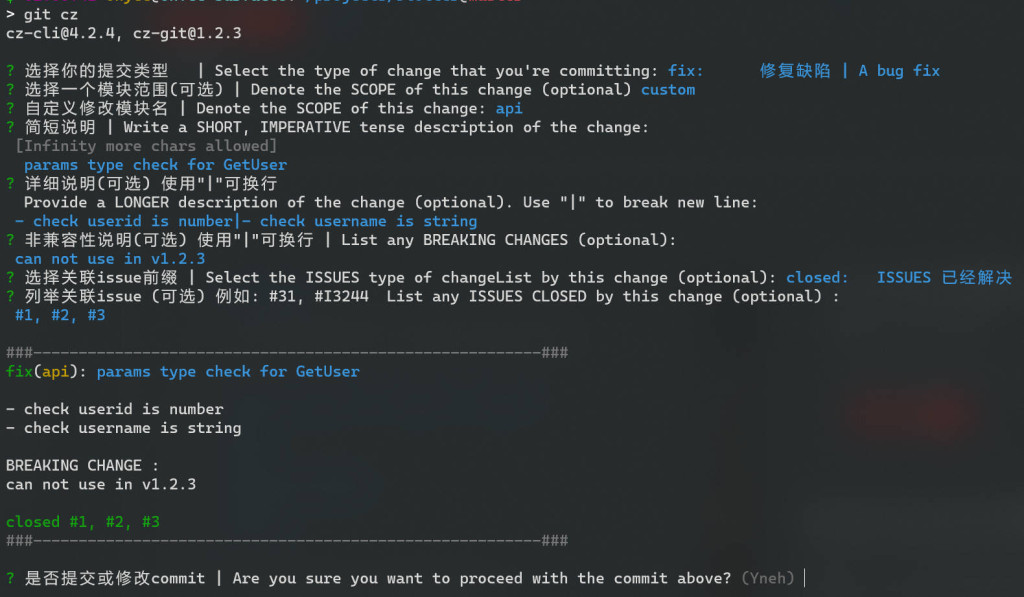
安装依赖于 npm

1
npm install -g cz-git commitizen

安装完成后还需要在用户目录添加配置文件 ~/.czrc

如果对于不同的项目,需要添加不同的配置,也可以在项目目录中进行配置(详见官方文档)

1
2
3
4
5
6
7
8
9
10
11
12
13
14
15
16
17
18
19
20
21
22
23
24
25
26
27
28
29
30
31
32
33
34
35
36
37
38
39
40
41
42
43
44
45
46
47
48
49
50
51
52
53
54
55
56
57
58
59
60
61
62
63
64
65
66
67
68
69
70
71
72
73
74
75
76
77
78
79
80
81
82
83
84
85
86
87
88
89
90
91
92
93
94
95
96
97
98
99
100
101
{
"path": "cz-git",
"messages": {
"type": "选择你的提交类型 | Select the type of change that you're committing:",
"scope": "选择一个模块范围(可选) | Denote the SCOPE of this change (optional)",
"customScope": "自定义修改模块名 | Denote the SCOPE of this change:",
"subject": "简短说明 | Write a SHORT, IMPERATIVE tense description of the change:\n",
"body": "详细说明(可选) 使用\"|\"可换行 \n Provide a LONGER description of the change (optional). Use \"|\" to break new line:\n",
"breaking": "非兼容性说明(可选) 使用\"|\"可换行 | List any BREAKING CHANGES (optional):\n",
"footerPrefixsSelect": "选择关联issue前缀 | Select the ISSUES type of changeList by this change (optional):",
"customFooterPrefixs": "输入自定义issue前缀 | Input ISSUES Prefix:",
"footer": "列举关联issue (可选) 例如: #31, #I3244 List any ISSUES CLOSED by this change (optional) :\n",
"confirmCommit": "是否提交或修改commit | Are you sure you want to proceed with the commit above?"
},
"types": [
{
"value": "feat",
"name": "feat: 新增功能 | A new feature"
},
{
"value": "fix",
"name": "fix: 修复缺陷 | A bug fix"
},
{
"value": "release",
"name": "release: 发布版本 | release a new version"
},
{
"value": "docs",
"name": "docs: 文档更新 | Documentation only changes"
},
{
"value": "style",
"name": "style: 代码格式 | Changes that do not affect the meaning of the code"
},
{
"value": "refactor",
"name": "refactor: 代码重构 | A code change that neither fixes a bug nor adds a feature"
},
{
"value": "perf",
"name": "perf: 性能提升 | A code change that improves performance"
},
{
"value": "test",
"name": "test: 测试相关 | Adding missing tests or correcting existing tests"
},
{
"value": "build",
"name": "build: 构建相关 | Changes that affect the build system or external dependencies"
},
{
"value": "ci",
"name": "ci: 持续集成 | Changes to our CI configuration files and scripts"
},
{
"value": "revert",
"name": "revert: 回退代码 | Revert to a commit"
},
{
"value": "chore",
"name": "chore: 其他修改 | Other changes that do not modify src or test files"
}
],
"useEmoji": false,
"scopes": [],
"allowCustomScopes": true,
"allowEmptyScopes": true,
"customScopesAlign": "bottom",
"customScopesAlias": "custom",
"emptyScopesAlias": "empty",
"upperCaseSubject": false,
"allowBreakingChanges": [
"feat",
"fix"
],
"breaklineNumber": 100,
"breaklineChar": "|",
"skipQuestions": [],
"issuePrefixs": [
{
"value": "link",
"name": "link: 将任务状态更改为进行中"
},
{
"value": "closed",
"name": "closed: ISSUES 已经解决"
}
],
"customIssuePrefixsAlign": "top",
"emptyIssuePrefixsAlias": "skip",
"customIssuePrefixsAlias": "custom",
"confirmColorize": true,
"maxHeaderLength": null,
"maxSubjectLength": null,
"minSubjectLength": 0,
"defaultBody": "",
"defaultIssues": "",
"defaultScope": "",
"defaultSubject": ""
}

而后,使用 git cz 替代 git commit 即可

转自:https://www.ohyee.cc/post/note_git_commit

参考:

https://xie.infoq.cn/article/dffa8c4efd68796bc526639ee

https://segmentfault.com/a/1190000040879546

https://segmentfault.com/a/1190000040995531

使用 VS Code 作为 Laravel 开发 IDE

想要 vscode 使用方便,就得安装插件 😄

重要

PHP Intelephense

如果你想在vscode中进行PHP开发,这是一个非常需要的扩展。为您提供适当的自动完成、错误提示、转到类型定义,提供基于文档注释的自动完成等。它还为您提供WordPress代码完成,但默认情况下未启用。

Laravel Extra Intellisense

另一个所需的扩展。它将为您提供更好的视图、验证规则、ENV、配置等自动完成功能。

Laravel goto view

PHPDoc Generator

我发现定期为类和函数编写文档很好。要使PHPDoc生成器生成PHPDoc块,请将光标放置在具有类、方法或特性的行上,然后按Control+Enter 键。

Laravel Blade formatted

保存后会自动格式化 blade 文件。

Laravel Blade Snippets

Laravel blade 文件的一些重要片段。例如,b:foreach 将设置 foreach 循环块,b:if-else 将设置 if-else 条件块。有关更多片段,您可以阅读扩展的详细信息。

ENV

.env 文件高亮显示

可选项

pest: 优雅的 PHP 测试框架

Better Pest

可帮助您从文件、测试范围和全局运行 pest 测试。

键盘快捷键设置示例:

1
2
3
4
5
6
7
8
9
10
11
12
13
14
15
16
{
"key": "alt+r",
"command": "better-pest.run"
},
{
"key": "cmd+k cmd+r",
"command": "-better-pest.run"
},
{
"key": "alt+f",
"command": "better-pest.run-file"
},
{
"key": "cmd+k cmd+f",
"command": "-better-pest.run-file"
}

Pest Snippets

provides some snippets for quickly writing pest related common block of codes.

:pte to access all test() snippets.

:pti to access all it() snippets.

:pex to access the available expect() methods.

参考:

https://script-jungle.com/setup-vscode-for-laravel-development

https://dhanar98.hashnode.dev/best-laravel-dev-tools-for-faster-development-2024

https://alemsbaja.hashnode.dev/recommended-visual-studio-code-extensions-for-laravel-developers

Four VS Code Extensions For Laravel/PHP Projects

SyntaxError: Unexpected token 'export'

运行 npm run dev 出现如下错误:

1
2
3
4
5
6
7
8
9
10
11
12
13
14
15
16
17
18
19
20
21
22
23
24
25
26
27
28
29
30
31
> dev
> vite


VITE v4.4.11 ready in 358 ms

➜ Local: http://localhost:5173/
➜ Network: use --host to expose
➜ press h to show help

LARAVEL v10.26.2 plugin v0.7.8

➜ APP_URL: http://localhost
(node:105128) Warning: To load an ES module, set "type": "module" in the package.json or use the .mjs extension.
(Use `node --trace-warnings ...` to show where the warning was created)
[Failed to load PostCSS config: Failed to load PostCSS config (searchPath: /root/project/php/e-campus-portal): [SyntaxError] Unexpected token 'export'
/root/project/php/e-campus-portal/postcss.config.js:1
export default {
^^^^^^

SyntaxError: Unexpected token 'export'
at internalCompileFunction (node:internal/vm:73:18)
at wrapSafe (node:internal/modules/cjs/loader:1178:20)
at Module._compile (node:internal/modules/cjs/loader:1220:27)
at Module._extensions..js (node:internal/modules/cjs/loader:1310:10)
at Module.load (node:internal/modules/cjs/loader:1119:32)
at Module._load (node:internal/modules/cjs/loader:960:12)
at ModuleWrap.<anonymous> (node:internal/modules/esm/translators:169:29)
at ModuleJob.run (node:internal/modules/esm/module_job:194:25)]

Node.js v18.17.1

在网上一直搜 SyntaxError: Unexpected token 'export' 的解决办法,最终发现 Warning: To load an ES module, set "type": "module" in the package.json or use the .mjs extension. 这句才是重点,在 package.json 中添加:

1
2
3
4
{
...
"type": "module"
}

在 Laravel 中使用 PHP Enums 存储附加信息

定义 Enum

1
2
3
4
5
6
7
8
9
10
<?php

namespace App\Enums;

enum SocialNetwork: string
{
case FACEBOOK = 'facebook';
case TWITTER = 'twitter';
case YOUTUBE = 'youtube';
}

在模型(Model)中转换属性(Casting)

1
2
3
4
5
6
7
8
9
10
11
12
13
14
15
16
<?php

namespace App\Models;

use App\Enums\SocialNetwork;
use Illuminate\Database\Eloquent\Factories\HasFactory;
use Illuminate\Database\Eloquent\Model;

class SocialProfile extends Model
{
use HasFactory;

protected $casts = [
'social_network' => SocialNetwork::class,
];
}

这意味着您可以与枚举实例交互,而不仅仅是与数据库中的字符串值交互,还可以访问enums方法。我们稍后再谈。

对这句话这意味着您可以与枚举实例交互,而不仅仅是与数据库中的字符串值交互的示例:

1
2
3
$profile = new SocialProfile()
$profile->social_network = SocialNetwork::FACEBOOK;
profile->save();

如果不这么做,那么代码则要这么写:

1
2
3
$profile = new SocialProfile()
$profile->social_network = SocialNetwork::FACEBOOK->value;
$pro

验证 Enum

1
2
3
4
5
6
use App\Enums\SocialNetwork;
use Illuminate\Validation\Rules\Enum;

$request->validate([
'social_network' => [new Enum(SocialNetwork::class)],
]);

根据 Enum 存储附加信息

除了定义选项外,枚举还允许使用其他方法。您甚至可以在方法中使用枚举。

我想要一种存储每个枚举选项的有效域名的方法,所以我创建了一个使用枚举值的匹配语句,并返回了一个有效域名数组。

1
2
3
4
5
6
7
8
9
10
11
12
13
14
15
16
17
18
19
20
21
22
23
24
25
26
27
28
29
<?php

namespace App\Enums;

enum SocialNetwork: string
{
case FACEBOOK = 'facebook';
case TWITTER = 'twitter';
case YOUTUBE = 'youtube';

public function domains(): array
{
return match ($this) {
SocialNetwork::FACEBOOK => [
'facebook.com',
'fb.me',
'fb.com',
],
SocialNetwork::TWITTER => [
'twitter.com',
't.co',
],
SocialNetwork::YOUTUBE => [
'youtube.com',
'youtu.be',
],
};
}
}

另一个有用的地方是,如果我将来需要添加一个新的社交网络,我只有一个地方可以添加定义和域。我可以很容易地在枚举中添加 Instagram 作为选项,无论我在哪里使用枚举,代码都应该更新。

在自定义验证规则中使用枚举(Enum)

1
2
3
4
5
6
7
8
9
10
11
12
13
14
15
16
17
18
19
20
21
22
23
24
25
26
27
28
29
30
31
32
33
<?php

namespace App\Rules;

use App\Enums\SocialNetwork;
use Closure;
use Illuminate\Contracts\Validation\ValidationRule;
use Illuminate\Support\Str;

class SocialNetworkRule implements ValidationRule
{
/**
* Get the allowed domains from the SocialNetwork enum
* and ensure at least one matches the value.
*
* @param \Closure(string): \Illuminate\Translation\PotentiallyTranslatedString $fail
*/
public function validate(string $attribute, mixed $value, Closure $fail): void
{
$allowedDomains = array_map(
fn (SocialNetwork $socialNetwork) => $socialNetwork->domains(),
SocialNetwork::cases()
);

$domains = collect($allowedDomains)
->flatten()
->all();

if (! Str::contains($value, $domains)) {
$fail('The :attribute field must be a valid social network.');
}
}
}

从 url 获取社交网络

1
2
3
4
5
6
7
8
9
10
11
12
use Illuminate\Support\Str;

public function getNetwork(string $link): string|null
{
foreach (SocialNetwork::cases() as $case) {
if (Str::contains($link, $case->domains())) {
return $case->value;
}
}

return null;
}

原文 Using PHP Enums in Laravel to store additional information

LaravelTips:在 Laravel 中加载限制数量的关联数据并避免 N+1问题

标题可能有点绕,比如微博首页的消息流,每条消息最多显示5条热门评论,Laravel 关联查询如何实现?

1
2
3
4
5
6
7
8
9
10
$limit = 5;

$users = User::query()
->addSelect([
'highest_rated_comment_ids' => Comment::query()
->selectRaw("SUBSTRING_INDEX(GROUP_CONCAT(comments.id order by rating desc, ','), ',', {$limit})")
->whereColumn('comments.user_id', 'users.id')
->limit($limit)
])
->get();
1
2
3
4
5
6
7
8
9
10
11
12
select
`users`.*,
(
select
SUBSTRING_INDEX(GROUP_CONCAT(comments.id order by rating desc, ','), ',', 5)
from
`comments`
where
`comments`.`user_id` = `users`.`id`
limit 5) as `highest_rated_comments`
from
`users`
1
2
3
4
5
6
7
8
9
10
11
$highestRatedCommentIds = $users->pluck('highest_rated_comment_ids')
->map(function (string $commentIds) {
return explode(',', $commentIds);
})
->flatten();

// $highestRatedCommentIds = [27, 4, 39, 21, 107, ...];

$highestRatedComments = $this->getQueryBuilder()
->whereIn('id', $highestRatedCommentIds)
->get();
1
2
3
4
5
6
7
8
9
10
11
12
13
14
foreach ($users as $user) {
// Turn the highest_rated_comment_ids property from the user into an array
$userHighestRatedCommentIds = explode(',', $user->highest_rated_comment_ids);

// Pull the comments that relate to this user out of the collection of all comments
// sortBy ensures they are added in the same order as highest_rated_comment_ids i.e. descending rating order
$userHighestRatedComments = $highestRatedComments
->whereIn('id', $userHighestRatedCommentIds)
->sortBy(fn (Comment $comment) => array_flip($userHighestRatedCommentIds)[$comment->id])
->values();

// Add the comments to the user
$user->setRelation('highest_rated_comments', $userHighestRatedComments);
}

LIMITing Loaded Relationship Records While Avoiding N+1 in Laravel

添加自定义Artisan命令(带可选参数)

1、创建命令(command)

1
php artisan make:command CreateUserCommand

2、完善逻辑

1
2
3
4
5
6
7
8
9
10
11
12
13
14
15
16
17
18
19
20
21
22
23
24
25
26
27
28
29
30
31

<?php

namespace App\Console\Commands;

use Illuminate\Console\Command;
use App\Models\User;

class CreateUserCommand extends Command
{
protected $signature = 'create:user {username?} {email?} {password?} {--admin : Create an admin user}';

protected $description = 'Create a new user';

public function handle()
{
$username = $this->argument('username') ?? $this->ask('Enter username:');
$email = $this->argument('email') ?? $this->ask('Enter email:');
$password = $this->argument('password') ?? $this->secret('Enter password:');
$isAdmin = $this->option('admin');

$user = new User();
$user->name = $username;
$user->email = $email;
$user->password = bcrypt($password);
$user->is_admin = $isAdmin;
$user->save();

$this->info('User created successfully!');
}
}

3、使用命令

按照 $signature 中的定义传入参数:

1
php artisan create:user admin admin@example.com password123 --admin

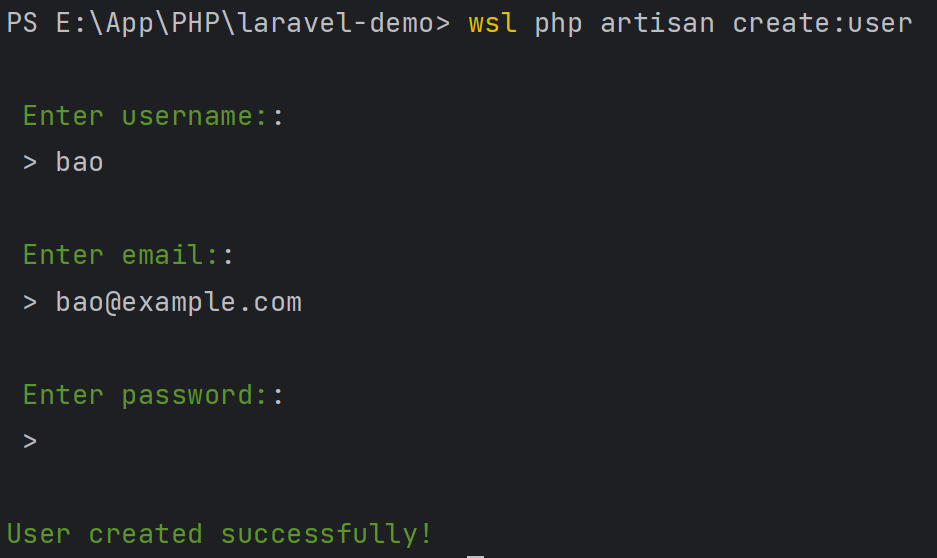
还可以不传参数,通过命令行提示完成:

1
php artisan create:user

参考:https://laracoding.com/adding-a-custom-artisan-command-with-optional-arguments/

LaravelTips:7个Laravel函数也接受数组参数

Eloquent: find($id) VS find($array)

Eloquent Model 的 find() 方法根据主键查询模型:

1
$products = Product::find(1);

返回某一个 Product:

但是我们也可以将一个ID数组传递给 find() 方法:

1
$products = Product::find([1, 2, 3]);

返回一组集合:

注意: 不能用于查询构造器(Query Builder) 仅用于 Eloquent Models 时有效。

Eloquent: where($key, $value) VS where($conditionsArray)

Eloquent Model 的 where() 方法,常用示例:

1
2
3
4
$products = Product::query()
->where('category_id', 1)
->where('manufacturer_id', 2)
->get();

也可以这么写:

1
2
3
4
5
6
$products = Product::query()
->where([
'category_id' => 1,
'manufacturer_id' => 2,
])
->get();

生成如下 sql :

1
select * from `products` where (`category_id` = 1 and `manufacturer_id` = 2)

如果使用 “<” 或者 “>” 操作符:

1
2
3
4
5
6
$products = Product::query()
->where([
'category_id' => 1,
['stock_left', '>', 100]
])
->get();

对应的 sql:

1
select * from `products` where (`category_id` = 1 and `stock_left` > 100)

注意 where 后的括号,如果不用数组写法,示例代码如下:

1
2
3
4
5
6
$products = Product::query()
->where(function($query){
$query->where('category_id', 1)
->where('stock_left', '>', 100);
})
->get();

Session: put($key, $value) VS put($valuesArray)

1
2
session()->put('cart', 'Cart information');
session()->put('cart_total', 'Cart total');

也可以这么写:

1
2
3
4
session()->put([
'cart' => 'Cart information',
'cart_total' => 'Cart total'
]);

类似的,查询特定的 key 是否存在:

1
session()->has('cart');

如果要同时查询多个 key 是否存在呢?可以这么做:

1
session()->has(['cart', 'cart_total']);

如果两个键都存在,它将返回true;如果其中任何一个键不存在,则返回false。

Cache: put($key, $value) VS put($valuesArray)

和上面的比较类似。

1
2
Cache::put('cart', 'Cart information', 60);
Cache::put('cart_total', 'Cart total', 60);

可以修改为:

1
2
3
4
Cache::put([
'cart' => 'Cart information',
'cart_total' => 'Cart total'
], 60);

Migrations: dropColumn($name) VS dropColumn($columnsArray)

1
2
3
4
5
Schema::table('products', function (Blueprint $table) {
$table->dropColumn('name');
$table->dropColumn('description');
$table->dropColumn('price');
});

可以修改为:

1
2
3
Schema::table('products', function (Blueprint $table) {
$table->dropColumn(['name', 'description', 'price']);
});

Gates: has($gate) VS has($gatesArray)

判断用户是否有单一授权:

1
Gate::has('edit-post')

如果要判断用户是否同时满足多个授权:

1
Gate::has(['edit-post', 'delete-post'])

App: environment($env) VS environment($envArray)

获取当前环境:

1
App::environment();

检查是否 local 环境:

1
App::environment('local');

检查是否是 local 或者 testing 环境:

1
App::environment(['local', 'testing']);

原文:https://laraveldaily.com/post/laravel-functions-that-also-accept-array-parameter