PHP 使用 JSON Schema 验证 JSON 数据

json_validate() 方法

PHP 8.3 提供了 json_validate() 方法, 可以用来验证是否有语法错误:

1
2
3
4
5
6
7
8
9
10
11
12
13
14
15
16
17
18
19
20
21
22
23
24
25
26
27
28
29
30
31
32
33
34
35
36
$fruitsArray = [
[
'name' => 'Avocado',
'fruit' => '🥑',
'wikipedia' => 'https://en.wikipedia.org/wiki/Avocado',
'color' => 'green',
'rating' => 8,
],
[
'name' => 'Apple',
'fruit' => '🍎',
'wikipedia' => 'https://en.wikipedia.org/wiki/Apple',
'color' => 'red',
'rating' => 7,
],
[
'name' => 'Banana',
'fruit' => '🍌',
'wikipedia' => 'https://en.wikipedia.org/wiki/Banana',
'color' => 'yellow',
'rating' => 8.5,
],
[
'name' => 'Cherry',
'fruit' => '🍒',
'wikipedia' => 'https://en.wikipedia.org/wiki/Cherry',
'color' => 'red',
'rating' => 9,
],
];

if (json_validate($jsonString)) {
echo "Valid JSON syntax.";
} else {
echo "Invalid JSON syntax.";
}

PHP 8.3 之前的版本,可以使用 symfony/polyfill-php83 包提供的 json_validate() 方法:

1
composer require symfony/polyfill-php83

但是 json_validate() 方法只能验证是否有 JSON 语法错误,要进一步验证 JSON 数据类型等,可以使用 JSON schema:

swaggest/json-schema

安装包

1
composer require swaggest/json-schema

定义 Scheme

1
2
3
4
5
6
7
8
9
10
11
12
13
14
15
16
17
18
19
20
21
22
23
24
25
26
$schemaJson = <<<'JSON'
{
"$schema": "http://json-schema.org/draft-07/schema#",
"type": "array",
"items" : {
"type": "object",
"properties": {
"name": {
"type": "string"
},
"fruit": {
"type": "string"
},
"wikipedia": {
"type": "string"
},
"color": {
"type": "string"
},
"rating": {
"type": "number"
}
}
}
}
JSON;

验证

1
2
3
4
5
6
7
8
9
10
11
12
13
14
15
16
17
require 'vendor/autoload.php';

use Swaggest\JsonSchema\Schema;

try {
$schemaObject = Schema::import(
json_decode($schemaJson),
)->in(
json_decode($jsonString),
);
echo "JSON is valid according to the schema.";

} catch (\Swaggest\JsonSchema\Exception\ValidationException $e) {
echo "JSON validation error: " . $e->getMessage();
} catch (\Swaggest\JsonSchema\Exception\TypeException $e1) {
echo "JSON validation Type error: " . $e1->getMessage();
}

参考:https://dev.to/robertobutti/validating-json-with-json-schema-and-php-2b4i

Laravel 查询作用域(Query Scopes)

什么是查询作用域(Query Scopes)?

查询作用域让你以复用的方式为模型查询(Eloquent queries)定义条件约束。通常在模型(Model)中一匿名方法的形式定义、或者定义一个继承自 Illuminate\Database\Eloquent\Scope 接口的类(class)。

查询作用域的分类:

  • 局部作用域:你需要在查询中手动调用此方法。
  • 全局作用域:自动应用到你的查询中。

如果使用过 Laravel 的软删除(soft delete)功能,默认会在模型查询中添加全局约束 whereNull('deleted_at') ,还提供了局部作用域 withTrashedonlyTrashed

局部作用域(Local Query Scopes)

假设我们构建一个博客应用,\App\Models\Article 模型中有一个可为 nullpublished_at 字段来存储发布时间,如果 published_at 的时间在当前时间以前,则认为已发布,如果为 null 或者则当前时间之后,则认为未发布。

获取已发布的文章;

1
2
3
4
5
use App\Models\Article;

$publishedPosts = Article::query()
->where('published_at', '<=', now())
->get();

获取未发布的文章:

1
2
3
4
5
6
7
8
9
use App\Models\Article;
use Illuminate\Contracts\Database\Eloquent\Builder;

$unpublishedPosts = Article::query()
->where(function (Builder $query): void {
$query->whereNull('published_at')
->orWhere('published_at', '>', now());
})
->get();

使用局部作用域来优化上面的逻辑,在 \App\Models\Article 中定义局部作用域:

1
2
3
4
5
6
7
8
9
10
11
12
13
14
15
16
17
18
19
20
21
22
23
24
25
declare(strict_types=1);

namespace App\Models;

use Illuminate\Contracts\Database\Eloquent\Builder;
use Illuminate\Database\Eloquent\Model;
use Illuminate\Database\Eloquent\Relations\BelongsTo;

final class Article extends Model
{
public function scopePublished(Builder $query): Builder
{
return $query->where('published_at', '<=', now());
}

public function scopeNotPublished(Builder $query): Builder
{
return $query->where(function (Builder $query): Builder {
return $query->whereNull('published_at')
->orWhere('published_at', '>', now());
});
}

// ...
}

那么获取已发布文章、未发布文章的逻辑可以改写为:

1
2
3
4
5
6
7
8
9
use App\Models\Article;

$publishedPosts = Article::query()
->published() // 这里手动调用
->get();

$unpublishedPosts = Article::query()
->notPublished() // 这里手动调用
->get();

**注意:在 Article 模型中定义的方法名为 scopePublishedscopeNotPublished,然后使用的时候是 published()>notPublished()。 **

全局作用域(Global Query Scopes)

假设我们构建的是一个多租户(multi-tenant)的博客系统,用户只能看到他们所属组的文章,可能的查询:

1
2
3
4
5
use App\Models\Article;

$articles = Article::query()
->where('team_id', Auth::user()->team_id)
->get();

对于这样的系统,需每次添加 where('team_id', Auth::user()->team_id) 约束,简化的方法就是添加全局作用域。有两种方式,一种是通过 php artisan make:scope 命令创建单独的类;二是使用匿名方法;

通过 php artisan make:scope 创建全局作用域

1
php artisan make:scope TeamScope

将会创建 app/Models/Scopes/TeamScope.php 文件:

1
2
3
4
5
6
7
8
9
10
11
12
13
14
15
16
17
18
19
declare(strict_types=1);

namespace App\Models\Scopes;

use Illuminate\Database\Eloquent\Builder;
use Illuminate\Database\Eloquent\Model;
use Illuminate\Database\Eloquent\Scope;
use Illuminate\Support\Facades\Auth;

final readonly class TeamScope implements Scope
{
/**
* Apply the scope to a given Eloquent query builder.
*/
public function apply(Builder $builder, Model $model): void
{
$builder->where('team_id', Auth::user()->team_id);
}
}

注册该全局作用域,有两种方式:

  1. 使用 Illuminate\Database\Eloquent\Attributes\ScopedBy 属性:
1
2
3
4
5
6
7
8
9
10
11
12
13
declare(strict_types=1);

namespace App\Models;

use App\Models\Scopes\TeamScope;
use Illuminate\Database\Eloquent\Attributes\ScopedBy;
use Illuminate\Database\Eloquent\Model;

#[ScopedBy(TeamScope::class)]
final class Article extends Model
{
// ...
}
  1. 在模型的 booted 方法中使用 addGlobalScope 方法
1
2
3
4
5
6
7
8
9
10
11
12
13
14
15
16
17
18
19
declare(strict_types=1);

namespace App\Models;

use App\Models\Scopes\TeamScope;
use Illuminate\Database\Eloquent\Factories\HasFactory;
use Illuminate\Database\Eloquent\Model;

final class Article extends Model
{
use HasFactory;

protected static function booted(): void
{
static::addGlobalScope(new TeamScope());
}

// ...
}

查询文章的逻辑可以简化为:

1
2
3
use App\Models\Article;

$articles = Article::query()->get();

假设 team_id 为 1 ,那么生成的 sql 如下:

1
select * from `articles` where `team_id` = 1

可以看到,会自动为模型查询添加全局作用域。

使用匿名方法的方式创建全局作用域

直接在模型的 booted 方法中通过匿名方法:

1
2
3
4
5
6
7
8
9
10
11
12
13
14
15
16
17
18
19
declare(strict_types=1);

namespace App\Models;

use Illuminate\Contracts\Database\Eloquent\Builder;
use Illuminate\Database\Eloquent\Model;
use Illuminate\Support\Facades\Auth;

final class Article extends Model
{
protected static function booted(): void
{
static::addGlobalScope('team_scope', static function (Builder $builder): void {
$builder->where('team_id', Auth::user()->team_id);
});
}

// ...
}

忽略全局作用域

由于全局作用域在模型查询是默认添加的,但是在某些场景下,不需要全局作用域定义的逻辑,可以使用 withoutGlobalScopes 方法忽略全局作用域:

1
2
3
use App\Models\Article;

$articles = Article::query()->withoutGlobalScopes()->get();

默认忽略该模型定义的所有全局作用域, 可以指定忽略特定的作用域:

1
2
3
4
5
6
7
8
use App\Models\Article;
use App\Models\Scopes\TeamScope;

$articles = Article::query()
->withoutGlobalScopes([
TeamScope::class,
'another_scope',
])->get();

上述代码同时演示了两种方法创建的全局作用域如何指定。

**注意:全局作用域仅在模型查询时添加,如果是用数据库查询,例如 $articles = DB::table('articles')->get(); ,并不会添加全局作用域提供的逻辑。 **

测试用例写法参考原文。

参考:https://laravel-news.com/query-scopes

Laravel Tips: 5 个调度方法

1. skip() & when()

If you want your scheduled task to execute only when some condition is true, use when() to set such conditions inline:

1
2
3
$schedule->command('your:command')->when(function () {
return some_condition();
});

skip() is the exact opposite of the when() method. If the skip method returns true, the scheduled task will not be executed:

1
2
3
$schedule->command('emails:send')->daily()->skip(function(){
return Calendar::isHolidauy();
});

2. withoutOverlapping()

You may be running a critical job that should only have one instance running at a time. That’s where withoutOverlapping() ensures that a scheduled task won’t overlap, preventing potential conflicts.

1
$schedule->command('your:command')->withoutOverlapping();

3. thenPing()

After executing a task, you might want to ping a URL to notify another service or trigger another action. thenPing() lets you do just that seamlessly.

1
$schedule->command('your:command')->thenPing('http://example.com/webhook');

4. runInBackground()

If you want your scheduled task to run in the background without holding up other processes. runInBackground() will help you do this:

1
$schedule->command('your:command')->runInBackground();

5. evenInMaintenanceMode()

You can guess what it does by its name. You can execute scheduled tasks even when your application is in maintenance mode.

1
$schedule->command('your:command')->evenInMaintenanceMode();

https://backpackforlaravel.com/articles/tips-and-tricks/laravel-advanced-top-5-scheduler-functions-you-might-not-know-about

Laravel 11 使用 JWT 认证 API

创建项目、配置请参考文档。

Laravel 11 默认没有创建 routes/api.php 文件,

初始化 API 配置

1
php artisan install:api

创建了 routes/api.php 文件,并在 bootstrap/app.php 文件中自动配置:

1
2
3
4
5
6
7
8
9
10
11
12
13
14
15
16
17
18
19
20
21
22
23
24
<?php

use Illuminate\Auth\AuthenticationException;
use Illuminate\Foundation\Application;
use Illuminate\Foundation\Configuration\Exceptions;
use Illuminate\Foundation\Configuration\Middleware;
use Illuminate\Http\Request;
use Symfony\Component\HttpFoundation\Response;
use Symfony\Component\HttpKernel\Exception\NotFoundHttpException;

return Application::configure(basePath: dirname(__DIR__))
->withRouting(
web: __DIR__ . '/../routes/web.php',
api: __DIR__ . '/../routes/api.php', // 自动注册
commands: __DIR__ . '/../routes/console.php',
health: '/up',
)
->withMiddleware(function (Middleware $middleware) {
//
})
->withExceptions(function (Exceptions $exceptions) {
//
})->create();

进一步配置,在遇到未登录的情况返回错误提示而不是跳转到登录页面:

1
2
3
4
5
6
7
8
9
10
11
12
13
14
15
16
17
18
19
20
return Application::configure(basePath: dirname(__DIR__))
->withRouting(
web: __DIR__ . '/../routes/web.php',
api: __DIR__ . '/../routes/api.php',
commands: __DIR__ . '/../routes/console.php',
health: '/up',
)
->withMiddleware(function (Middleware $middleware) {
//
})
->withExceptions(function (Exceptions $exceptions) {
// 401 返回错误提示
$exceptions->render(function (AuthenticationException $e, Request $request) {
if ($request->is('api/*')) {
return response()->json([
'message' => $e->getMessage(),
], Response::HTTP_UNAUTHORIZED);
}
});
})->create();

安装设置 JWT 包

1
composer require php-open-source-saver/jwt-auth

发布配置文件

1
php artisan vendor:publish --provider="PHPOpenSourceSaver\JWTAuth\Providers\LaravelServiceProvider"

生成 secret key,保存在 .env 文件中:

1
php artisan jwt:secret

config/auth.php 文件中修改 auth guard 配置:

1
2
3
4
5
6
7
8
9
10
11
12
13
14
15
16
'defaults' => [
'guard' => 'api',
'passwords' => 'users',
],

'guards' => [
'web' => [
'driver' => 'session',
'provider' => 'users',
],

'api' => [
'driver' => 'jwt',
'provider' => 'users',
],
],

完善用户(User)模型

实现 JWTSubject 接口:

1
2
3
4
5
6
7
8
9
10
11
12
13
14
15
16
17
18
19
20
21
22
23
24
25
26
27
28
29
30
31
32
33
34
35
36
37
38
39
40
41
42
43
44
45
46
47
48
49
50
51
52
53
54
55
56
57
58
59
60
61
62
63
64
65
66
67
68
<?php

namespace App\Models;

// use Illuminate\Contracts\Auth\MustVerifyEmail;
use Illuminate\Database\Eloquent\Factories\HasFactory;
use Illuminate\Foundation\Auth\User as Authenticatable;
use Illuminate\Notifications\Notifiable;
use PHPOpenSourceSaver\JWTAuth\Contracts\JWTSubject;

class User extends Authenticatable implements JWTSubject
{
use HasFactory, Notifiable;

/**
* The attributes that are mass assignable.
*
* @var array<int, string>
*/
protected $fillable = [
'name',
'email',
'password',
];

/**
* The attributes that should be hidden for serialization.
*
* @var array<int, string>
*/
protected $hidden = [
'password',
'remember_token',
];

/**
* Get the attributes that should be cast.
*
* @return array<string, string>
*/
protected function casts(): array
{
return [
'email_verified_at' => 'datetime',
'password' => 'hashed',
];
}

/**
* Get the identifier that will be stored in the subject claim of the JWT.
*
* @return mixed
*/
public function getJWTIdentifier()
{
return $this->getKey();
}

/**
* Return a key value array, containing any custom claims to be added to the JWT.
*
* @return array
*/
public function getJWTCustomClaims()
{
return [];
}
}

创建用户相关的 API

1
php artisan make:controller AuthController

完善 app/Http/Controllers/AuthController.php

1
2
3
4
5
6
7
8
9
10
11
12
13
14
15
16
17
18
19
20
21
22
23
24
25
26
27
28
29
30
31
32
33
34
35
36
37
38
39
40
41
42
43
44
45
46
47
48
49
50
51
52
53
54
55
56
57
58
59
60
61
62
63
64
65
66
67
68
69
70
71
72
73
74
75
76
77
78
79
80
81
82
83
84
85
86
87
88
89
90
91
92
93
94
95
96
97
98
99
100
101
102
<?php

namespace App\Http\Controllers;

use App\Http\Controllers\Controller;
use App\Models\User;
use Validator;


class AuthController extends Controller
{

/**
* Register a User.
*
* @return \Illuminate\Http\JsonResponse
*/
public function register() {
$validator = Validator::make(request()->all(), [
'name' => 'required',
'email' => 'required|email|unique:users',
'password' => 'required|confirmed|min:8',
]);

if($validator->fails()){
return response()->json($validator->errors()->toJson(), 400);
}

$user = new User;
$user->name = request()->name;
$user->email = request()->email;
$user->password = bcrypt(request()->password);
$user->save();

return response()->json($user, 201);
}


/**
* Get a JWT via given credentials.
*
* @return \Illuminate\Http\JsonResponse
*/
public function login()
{
$credentials = request(['email', 'password']);

if (! $token = auth()->attempt($credentials)) {
return response()->json(['error' => 'Unauthorized'], 401);
}

return $this->respondWithToken($token);
}

/**
* Get the authenticated User.
*
* @return \Illuminate\Http\JsonResponse
*/
public function me()
{
return response()->json(auth()->user());
}

/**
* Log the user out (Invalidate the token).
*
* @return \Illuminate\Http\JsonResponse
*/
public function logout()
{
auth()->logout();

return response()->json(['message' => 'Successfully logged out']);
}

/**
* Refresh a token.
*
* @return \Illuminate\Http\JsonResponse
*/
public function refresh()
{
return $this->respondWithToken(auth()->refresh());
}

/**
* Get the token array structure.
*
* @param string $token
*
* @return \Illuminate\Http\JsonResponse
*/
protected function respondWithToken($token)
{
return response()->json([
'access_token' => $token,
'token_type' => 'bearer',
'expires_in' => auth()->factory()->getTTL() * 60
]);
}
}

注册路由

routes/api.php 文件中添加:

1
2
3
4
5
6
7
8
9
10
11
12
13
14
15
<?php

use Illuminate\Support\Facades\Route;
use App\Http\Controllers\AuthController;

Route::group([
'middleware' => 'api',
'prefix' => 'auth'
], function ($router) {
Route::post('/register', [AuthController::class, 'register'])->name('register');
Route::post('/login', [AuthController::class, 'login'])->name('login');
Route::post('/logout', [AuthController::class, 'logout'])->middleware('auth:api')->name('logout');
Route::post('/refresh', [AuthController::class, 'refresh'])->middleware('auth:api')->name('refresh');
Route::post('/me', [AuthController::class, 'me'])->middleware('auth:api')->name('me');
});

参考:https://www.binaryboxtuts.com/php-tutorials/laravel-11-json-web-tokenjwt-authentication/

Filament 表单复用

创建表单组件

Step 1:定义表单组件

例如,你需要创建用户管理的表单,那么应该在 app/Filament/Components 目录下创建 UserForm.php 文件:

1
2
3
4
5
6
7
8
9
10
11
12
13
14
15
16
17
18
19
20
21
22
23
24
25
26
27
28
29
<?php

namespace App\Filament\Components;

use Filament\Forms\Components\{Select, TextInput};

class UserForm
{
public static function schema(): array
{
return [
TextInput::make('name')
->required()
->label('Name'),
TextInput::make('email')
->email()
->required()
->label('Email Address'),
Select::make('role')
->options([
'admin' => 'Administrator',
'user' => 'User',
])
->required()
->label('Role'),
// Add more fields as needed...
];
}
}

Step 2:使用组件

1
2
3
4
5
6
7
8
9
10
11
12
13
14
15
16
17
18
19
20
21
22
23
24
25
26
27
28
29
30
31
32
33
<?php

namespace App\Filament\Resources;

use App\Models\User;
use Filament\Forms\Form;
use Filament\Resources\Resource;
use App\Filament\Components\UserForm;
use App\Filament\Resources\UserResource\Pages;

class UserResource extends Resource
{
protected static ?string $model = User::class;

protected static ?string $navigationIcon = 'heroicon-o-user';

public static function form(Form $form): Form
{
return $form->schema(
UserForm::schema(),
);
}

public static function getPages(): array
{
return [
'index' => Pages\ListUser::route('/'),
'create' => Pages\CreateUser::route('/create'),
'view' => Pages\ViewUser::route('/{record}'),
'edit' => Pages\EditUser::route('/{record}/edit'),
];
}
}

通过调用 UserForm::schema(),你可以在项目的任何地方使用该表单。

适配不同的场景表单组件

更新表单组件

1
2
3
4
5
6
7
8
9
10
11
12
13
14
15
16
17
18
19
20
21
22
23
24
25
26
27
28
29
30
<?php

namespace App\Filament\Components;

use Filament\Forms\Components\{Select, TextInput};

class UserForm
{
public static function schema(array $options = []): array
{
return [
TextInput::make('name')
->required()
->hidden($options['nameHidden'] ?? false)
->label('Name'),
TextInput::make('email')
->email()
->required()
->label('Email Address'),
Select::make('role')
->options([
'admin' => 'Administrator',
'user' => 'User',
])
->required()
->label('Role'),
// Add more fields as needed...
];
}
}

Step 2:使用组件是传递参数

1
2
3
4
5
6
7
8
9
10
11
<?php

public static function form(Form $form): Form
{
return $form->schema(
UserForm::schema(options: [
'nameHidden' => true,
]),
);
}

参考:https://www.luckymedia.dev/blog/reusing-filament-forms

Laravel 配置额外的环境文件

在Laravel中,你可以配置加载其他环境文件而不是.env文件。此功能有助于测试,您可以在测试中加载 .env.testing 环境文件,而不是默认文件。您通常不需要使用此功能,但通过设置 APP_ENV 环境变量,Laravel可以检测自定义配置。

CLI Example

此功能最直接了当的例子是运行 Artisan 命令或 phpunit 命令时使用不同的环境变量文件。

使用 Artisan 命令,你可以使用 --env 参数指定不同的 .env 文件或者定义 APP_ENV。例如,下面的例子使用 .env.demo:

1
2
3
4
5
6
7
8
9
10
# Set up `.env.demo`
cp .env .env.demo
echo "\nEXAMPLE_SETTING=demo" >> .env.demo

# Use the `demo` env

php artisan tinker --env=demo

# Or set APP_ENV
APP_ENV=demo php artisan tinker

如果查询到, Laravel 会加载 .env.demo 文件而不是 .env 文件。
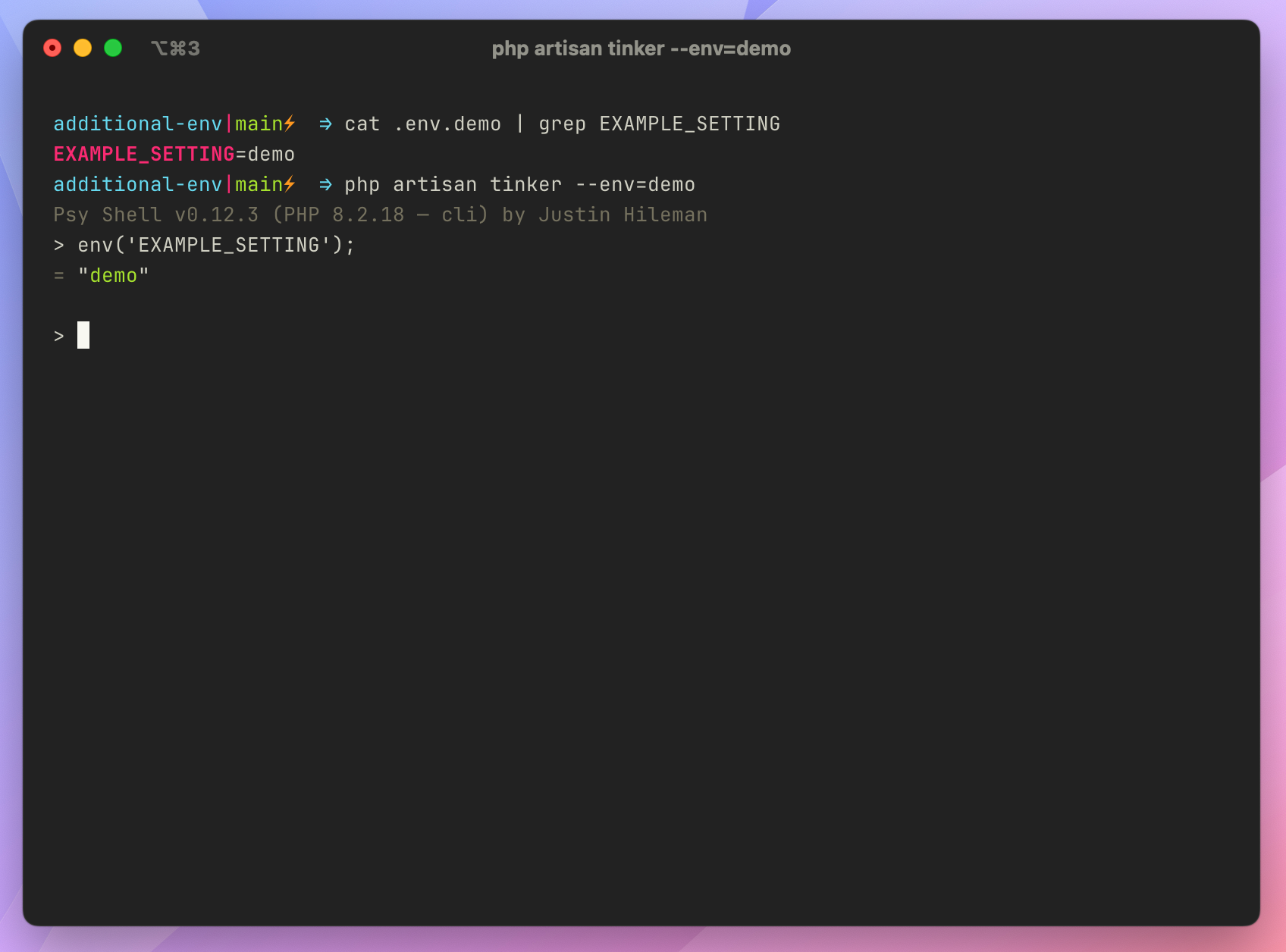
Example using .env.demo instead of .env

在 PHPUnit 测试中使用 .env.testing

Building on what we know about the Laravel framework loading a specific ENV file if it exists, running Laravel feature tests in PHPUnit will use the .env file by default. Using .env for tests and local development could quickly cause issues such as configuring a separate database for testing. You could define database connection details in phpunit.xml, but let’s also look at setting them in .env.testing.

PHPUnit defines an APP_ENV environment variable in phpunit.xml, which means that Laravel looks for a .env.testing file when bootstrapping Feature tests because the phpunit.xml file defines APP_ENV before the Laravel framework gets bootstrapped in Feature tests:

1
<env name="APP_ENV" value="testing"/>

That means we can copy the stock .env file to .env.testing and avoid mixing the two files during testing:

1
2
3
cp .env .env.testing

echo "\nEXAMPLE_SETTING=testing" >> .env.testing

You can configure environment variables in phpunit.xml. However, I like using the .env.testing file to ensure a clean environment specifically for testing. It’s also up to you whether you version control .env.testing or ignore it in .gitignore.

After copying the .env file, you can verify that .env.testing is loaded by adding the following to a test in your tests/Feature folder. Tests in the tests/Unit folder won’t bootstrap the Laravel framework:

1
2
3
4
5
6
7
8
9
10
11
12
13
/**
* A basic test example.
*/
public function test_the_application_returns_a_successful_response(): void
{
logger('Which environment file is Laravel using?', [
'file' => $this->app->environmentFile()
]);

$response = $this->get('/');

$response->assertStatus(200);
}

When I run phpunit, I get the following log confirming that I’m using the .env.testing file:

1
[2024-05-24 00:22:42] testing.DEBUG: Which environment file is Laravel using? {"file":".env.testing"}

If you ignore this file in your VCS, you could add an example file .env.testing.example with your team’s conventions or let them decide how to configure tests locally. I recommend setting system-level environment variables in CI to configure things like test databases.

Check out the Laravel Documentation for more details on environment configuration. If you’re curious how this works at the framework level, check out the setEnvironmentFilePath method and checkForSpecificEnvironmentFile in the Laravel framework source code.

Laravel 读取 json 文件

假设 json 文件存放在 storage/app/ 目录下:

方法一:

1
2
3
4
use Illuminate\Support\Facades\File;

$contents = File::get(Storage::path('product.json'));
$arr = json_decode($contents, true);

方法二:

1
2
3
4
use Illuminate\Support\Facades\File;
use Illuminate\Support\Facades\Storage;

$arr = File::json(Storage::path('product.json'), true);

方法三:

1
2
3
4

use Illuminate\Support\Facades\Storage;

$arr = Storage::json('product.json');

参考:

https://www.laravelia.com/post/how-to-read-json-file-in-laravel-10

Jetpack Compose : 使用 LinkAnnotation 替代 ClickableText

文本点击事件:

1
2
3
4
5
6
ClickableText(
text = AnnotatedString("Open Link"),
onClick = { offset ->
// handle click
}
)

使用 buildAnnotatedString 实现:

1
2
3
4
5
6
Text(buildAnnotatedString {
append("View my ")
withLink(LinkAnnotation.Url(url = "https://joebirch.co")) {
append("website")
}
})

默认情况下,可点击文本以下划线修饰。

可通过 SpanStyle 修改:

1
2
3
4
5
6
7
8
9
10
11
Text(buildAnnotatedString {
append("View my ")
withLink(
LinkAnnotation.Url(
url = "https://joebirch.co",
style = SpanStyle(color = MaterialTheme.colorScheme.primary)
)
) {
append("website")
}
})

参考:

https://joebirch.co/android/migrating-from-the-clickabletext-composable-to-linkannotation/

Jetpack Compose 入门:搭建 Android 开发环境、配置、新建项目

先决条件:熟悉 Kotlin 的语法。

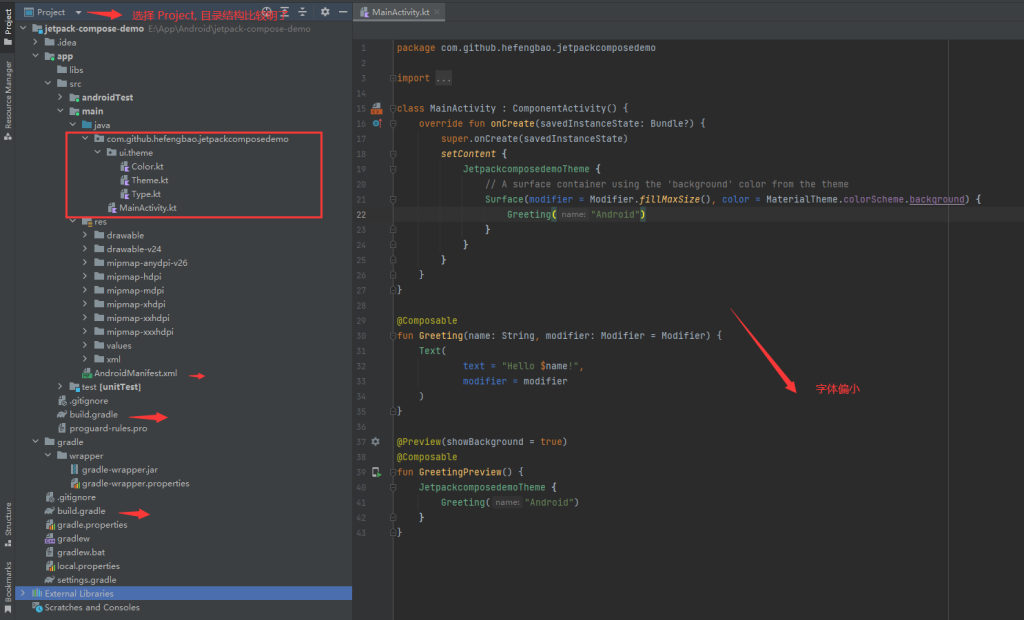
下载 Android Studio , https://developer.android.google.cn/?hl=zh-cn, 下载完成后,安装基本点击 「Next」即可:

新建项目:

设置:
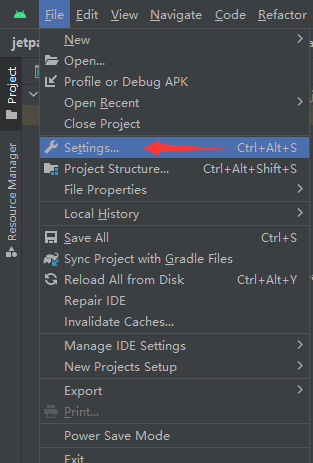
设置编辑区字体大小:

SDK:
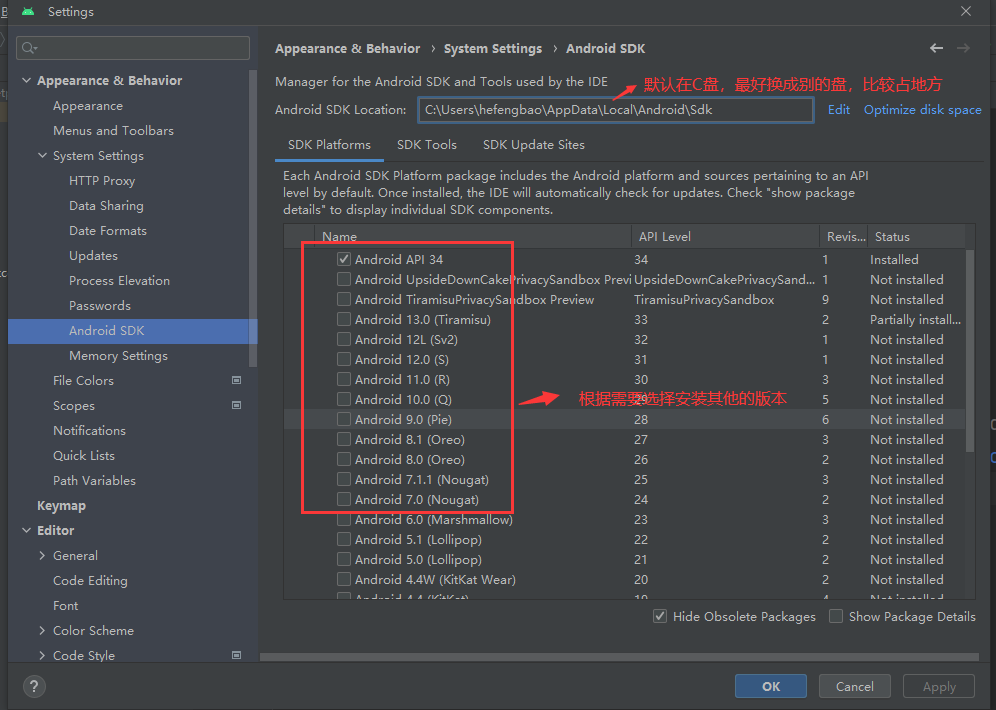
Gradle:

如果重新设置了 gradle 保存目录,则需要在项目中同步 gradle 文件:
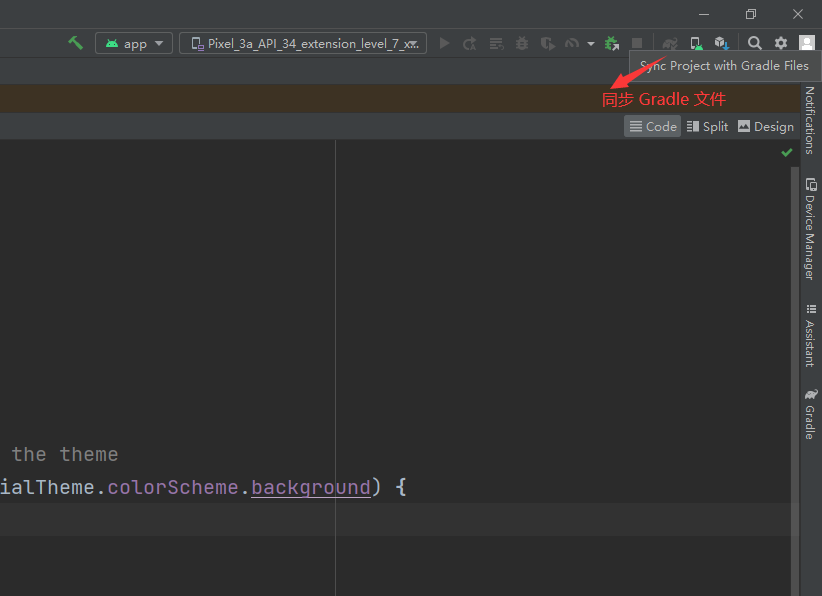
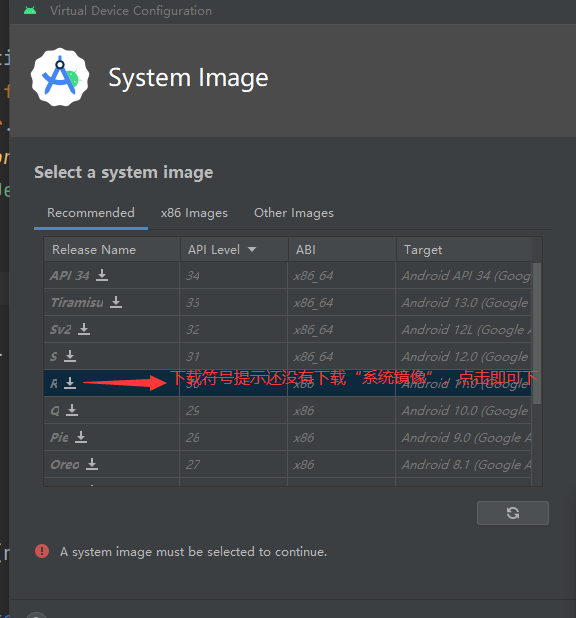
模拟器:
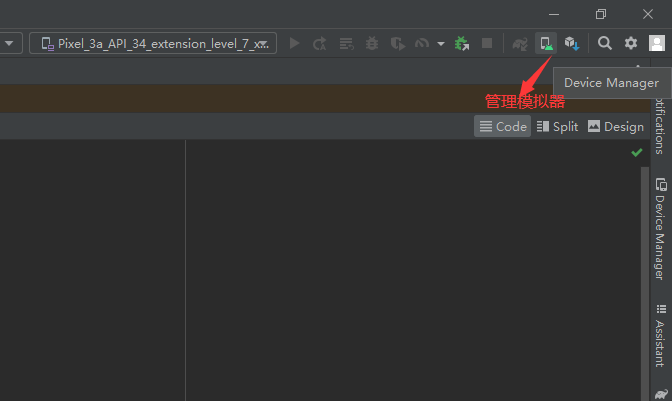
运行项目:
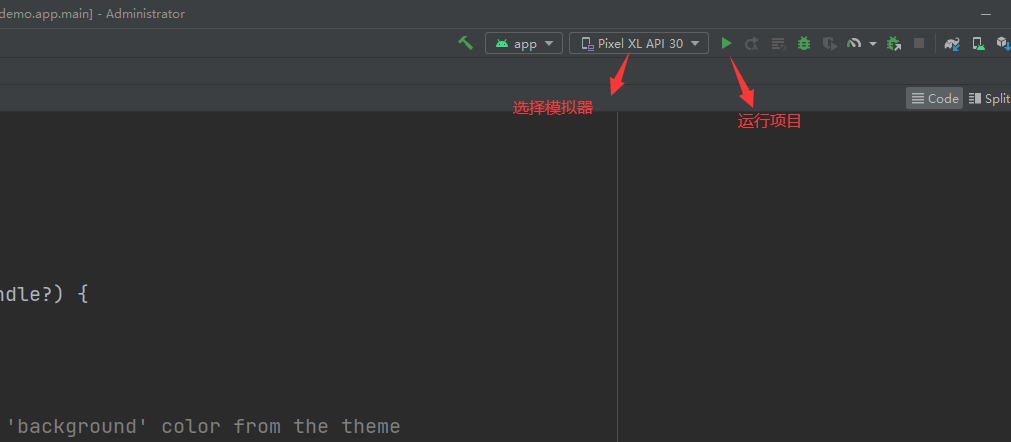
资料:

Compose 经验分享:开发要点&常见错误&面试题

Jetpack Compose 入门:Modifier、Box、Colum、Row

JetpackCompose 文档:

https://developer.android.google.cn/jetpack/compose/documentation?hl=zh-cn

官方教程:https://developer.android.google.cn/courses/pathways/compose?hl=zh-cn

compose 版本:https://developer.android.google.cn/jetpack/androidx/releases/compose?hl=zh-cn 更新比英文官网慢 /(ㄒoㄒ)/~~

implementation platform(‘androidx.compose:compose-bom:2023.05.00’)

官方示例:

https://github.com/android/nowinandroid

https://github.com/android/compose-samples

学习完基本知识点后,可以仔细研究一下官方的例子。

Modifier 修饰符

按文档的描述:

更改可组合项的大小、布局、行为和外观:Modifier.size()Modifier.fillMaxWidth()Modifier.fillMaxSize()Modifier.padding()` 等,这是最常用的。

添加信息,如无障碍标签:

1
2
3
4
5
6
Modifier.clickable(
enabled: Boolean,
onClickLabel: String?,
role: Role?,
onClick: () -> Unit
)

处理用户输入:

1
Modifier.onFocusChanged(onFocusChanged: (FocusState) -> Unit)

添加高级互动,如使元素可点击、可滚动、可拖动或可缩放:clickable {}

初始化 Modifer:

1
2
3
4
5
6
7
8
9
10
val modifer = Modifier

// 或者

@Composable
fun BasicScreen(
modifier: Modifier = Modifier
) {

}

相关文档:

修饰符:https://developer.android.google.cn/jetpack/compose/modifiers?hl=zh-cn

修饰符列表:https://developer.android.google.cn/jetpack/compose/modifiers-list?hl=zh-cn

可组合函数

Jetpack Compose 是围绕可组合函数构建的。这些函数可让您以程序化方式定义应用的界面,只需描述应用界面的外观并提供数据依赖项,而不必关注界面的构建过程(初始化元素、将其附加到父项等)。如需创建可组合函数,只需将 @Composable 注解添加到函数名称中即可。

快捷输入 comp ,待出现提示,然后按回车键:

教程:https://developer.android.google.cn/jetpack/compose/tutorial?hl=zh-cn

Box 布局

相对布局,元素依次堆叠,默认在左上方(TopStart):

1
2
3
4
5
6
7
8
9
10
11
12
13
14
15
16
17
18
19
20
21
22
23
24
25
26
27
28
29
30
31
32
33
34
35
36
37
38
39
40
41
@Composable
fun BoxSample(
modifier: Modifier
) {
Box(
modifier = modifier.size(250.dp).background(Color.White)
){
Box(
modifier = modifier
.width(200.dp)
.height(200.dp)
.background(Color.Green)
)
Box(
modifier = modifier
.width(150.dp)
.height(150.dp)
.background(Color.Cyan)
)
Box(
modifier = modifier
.padding(10.dp)
.width(100.dp)
.height(100.dp)
.background(Color.Red)
)
Box(
modifier = modifier
.width(50.dp)
.height(50.dp)
.background(Color.Red)
.align(Alignment.BottomEnd)
)
}
}

@Preview
@Composable
private fun BoxSamplePreview() {
BoxSample(modifier = Modifier)
}

知识点:

1、modifier 链式调用,以及设置顺序

2、设置元素大小:size() 设定长度、高相同, width()height() 分别设定长度和高度,还有 fillMaxWidth()fillMaxHeight() 以及 fillMaxSize() ,则是自适应宽度和高度。

3、设置背景色 background()

4、Box 元素的位置设置用 align(),可用的参数有 Alignment.BottomEndAlignment.TopStart 等十多种,可把鼠标指到 align(Alignment.BottomEnd) 括号内, Ctr + b 快捷键查看。

5、使用 @Preview 注解预览

Colum 布局

默认元素从上到下依次排列。

1
2
3
4
5
6
7
8
9
10
11
12
13
14
15
16
17
18
19
20
21
22
23
24
25
26
27
28
29
@Composable
fun ColumSample(
modifier: Modifier
) {
Column(
modifier = modifier.fillMaxWidth().background(Color.White),
verticalArrangement = Arrangement.spacedBy(8.dp)
) {
Box(modifier = modifier
.height(20.dp)
.fillMaxWidth()
.background(Color.Green))
Box(modifier = modifier
.height(20.dp)
.fillMaxWidth()
.background(Color.Red))
Box(modifier = modifier
.padding(horizontal = 16.dp)
.height(20.dp)
.fillMaxWidth()
.background(Color.Blue))
}
}

@Preview
@Composable
private fun ColumSamplePreview() {
ColumSample(modifier = Modifier)
}

知识点:

1、可通过 verticalArrangement = Arrangement.spacedBy(8.dp) 设置每行之间的间隔

2、padding(8.dp) 设置上下左右相同的边距,padding(start = 8.dp, end = 4.dp, top = 10.dp, bottom = 6.dp) 上下左右需要设置那个就用那个,如果左右边距或上下边距相同则可以用 padding(horizontal = 16.dp, vertical = 0.dp)

Row 布局

默认元素从左到右依次排列。

1
2
3
4
5
6
7
8
9
10
11
12
13
14
15
16
17
18
19
20
21
22
23
24
25
26
27
28
@Composable
fun RowSample(
modifier: Modifier
) {
Row(
modifier = modifier
.fillMaxWidth()
.background(Color.Black),
horizontalArrangement = Arrangement.spacedBy(8.dp)
) {
Box(modifier = modifier
.width(20.dp)
.height(40.dp)
.background(Color.Green))
Box(modifier = modifier
.width(30.dp)
.height(30.dp)
.background(Color.Red))
Box(modifier = modifier.height(50.dp).weight(2f).background(Color.Blue))
Box(modifier = modifier.height(50.dp).weight(1f).background(Color.Cyan))
}
}

@Preview
@Composable
private fun RowSamplePreview() {
RowSample(modifier = Modifier)
}

知识点:

1、 horizontalArrangement = Arrangement.spacedBy(8.dp) 设置没列的间隔

2、 weight() 设置元素如何使用横向的剩余空间,比只有一个元素设置了 weight 属性,则它会占用横向的所有空间,又比如上面的代码中,蓝色快占 2/3, 青色块占 1/3。

示例代码:https://github.com/hefengbao/jetpack-compose-demo