Jetpack compose 嵌套滚动

  • Modifier.nestedScroll(connection, dispatcher?):将组件附加到嵌套滚动链上。
  • NestedScrollConnection: 重写 onPreScroll/onPostScroll 方法,以在子级处理滚动前后消耗或响应滚动偏移量。
  • NestedScrollDispatcher: 在构建自定义可滚动组件时,向父级(上游)派发滚动/抛掷事件。
1
2
3
4
5
6
7
8
9
10
11
12
13
14
15
16
17
18
19
val nestedConnection = remember {
object : NestedScrollConnection {
override fun onPreScroll(
available: Offset,
source: NestedScrollSource
): Offset {
// intercept before child scrolls
return Offset.Zero
}
override fun onPostScroll(
consumed: Offset,
available: Offset,
source: NestedScrollSource
): Offset {
// react after child scrolls
return Offset.Zero
}
}
}

This connection lets you consume or react to scroll deltas before and after the child handles them.

After that link your connection to a parent container using Modifier.nestedScroll, so it joins the nested‑scroll chain.

1
2
3
4
5
6
7
Box(
Modifier
.fillMaxSize()
.nestedScroll(nestedConnection)
) {
// Place child scrollable(s) here
}

Inside onPreScroll, adjust a header’s height state and return how much you consumed. For example:

1
2
3
4
5
6
7
8
9
10
11
12
13
14
15
16
val toolbarHeight = remember { mutableStateOf(maxHeightDp) }
val connection = remember {
object : NestedScrollConnection {
override fun onPreScroll(
available: Offset,
source: NestedScrollSource
): Offset {
val deltaY = available.y
val newHeight = (toolbarHeight.value + deltaY)
.coerceIn(minHeightDp, maxHeightDp)
val consumed = newHeight - toolbarHeight.value
toolbarHeight.value = newHeight
return Offset(0f, consumed)
}
}
}

This ensures the header collapses as you scroll up and expands on scroll down.

Wrap a LazyColumn and your header in a Box with Modifier.nestedScroll(connection). Tie the header’s height and offset modifiers to the state updated in onPreScroll:

1
2
3
4
5
6
7
8
9
10
11
12
13
14
15
16
17
18
19
20
21
22
23
24
25
26
27
28
29
30
31
32
33
34
35
36
37
38
39
40
41
@Composable
fun CollapsingToolbarScreen() {
val minHeight = 56.dp
val maxHeight = 200.dp
val maxHeightPx = with(LocalDensity.current) { maxHeight.toPx() }
val offsetY = remember { mutableStateOf(0f) }

val connection = remember {
object : NestedScrollConnection {
override fun onPreScroll(
available: Offset,
source: NestedScrollSource
): Offset {
val delta = available.y
val newOffset = (offsetY.value + delta)
.coerceIn(-maxHeightPx, 0f)
val consumed = newOffset - offsetY.value
offsetY.value = newOffset
return Offset(0f, consumed)
}
}
}

Box(
Modifier
.fillMaxSize()
.nestedScroll(connection)
) {
LazyColumn(contentPadding = PaddingValues(top = maxHeight)) {
items(100) {
Text("Item #$it", Modifier.padding(16.dp))
}
}
TopAppBar(
title = { Text("Title") },
modifier = Modifier
.height(maxHeight + offsetY.value.toDp())
.offset { IntOffset(0, offsetY.value.roundToInt()) }
)
}
}

Nested Scrolling in Jetpack Compose by Victor Brandalise

Char & String

定义字符、字符串

1
2
3
4
5
// 定义字符串,用双引号""
val hello = "你好 8ug.icu"

// 定义字符,可以用单引号''
val char = 'C'

字符串长度:length & count()

1
2
3
4
5
6
val length = hello.length
// 或者
val length2 = hello.count()

println("length = $length, length2 = $length2")
//输出结果: length = 10, length2 = 10

字符串拼接 & 模板

1
2
3
4
5
6
7
8
9
10
11
12
13
14
15
16
17
18
19
20
21
println("hello ".plus("www.8ug.icu")) //hello www.8ug.icu
println("hello " + "www.8ug.icu") //hello www.8ug.icu

val bug = "www.8ug.icu"

println("hello $bug") //hello www.8ug.icu


val strTemple = """
众鸟高飞尽,
孤云独去闲。
相看两不厌,
只有敬亭山。
""".trimIndent()

println(strTemple)
// 输出结果:
// 众鸟高飞尽,
// 孤云独去闲。
// 相看两不厌,
// 只有敬亭山。

字符查找:first()firstOrNull()first{}last()lastOrNull()find{}indexOf()

1
2
3
4
5
6
7
8
9
10
11
12
13
14
15
16
17
18
19
20
21
22
23
24
25
// 获取第一个元素
val firstChar = hello.first()
println(firstChar) // 结果:你

//println("".first()) //NoSuchElementException 这个会报错
println("".firstOrNull()) // 结果: null

val firstChar2 = hello.first {
it == '你'
// it == 'a' // 报 NoSuchElementException 错误
}
println(firstChar2) // 结果: 你

val lastChar = hello.last()
println(lastChar) //结果: u

hello.lastOrNull()
hello.lastOrNull { it == 'u' }

hello.find { it == '你' }

val index: Int = hello.indexOf('你')

println("字符第一次出现的下标 = $index")
//结果:字符第一次出现的下标 = 0

字符串截取 substring()subSequence()

1
2
3
4
5
6
7
8
9
10
11
12
13
14
15
16
17
18
19
20
21
22
23
24
25
26
27
28
29
30
31
/**
* 字符串截取:
* substring(startIndex: Int, endIndex: Int)
* substring(startIndex: Int)
* substring(rang: IntRang)
* startIndex参数:截取字符串的开始下标
* endIndex参数:截取字符串的结束下标
* rang参数,是指一个IntRang类型
*/

val substr = hello.substring(0,2)
println("截取的字符 = $substr")
//结果:截取的字符 = 你好

val substr2 = hello.substring(IntRange(0,2))
println("截取的字符2 = $substr2")
//结果:截取的字符2 = 你好

//println(hello.substring(0,hello.length + 1))
//StringIndexOutOfBoundsException 越界错误

/**
* 字符串截取:
* subSequence(startIndex: Int, endIndex: Int)
* startIndex参数:截取字符串的开始下标
* endIndex参数:截取字符串的结束下标
*/

val substr3 = hello.subSequence(0,2)
println("截取的字符3 = $substr3")
//结果:截取的字符3 = 你好

字符串替换:replace()replaceFirst()replaceAfter()replaceAfterLast()replaceBefore()replaceBeforeLast()

1
2
3
4
5
6
7
8
9
10
11
12
13
14
15
16
17
18
19
20
21
22
23
24
25
26
27
28
29
30
31
32
33
34
35
36
37
38
39
40
41
42
43
44
45
46
47
48
49
50
51
52
53
54
55
56
57
58
59
60
61
62
63
64
/**
* replace(oldChar: Char, newChar: Char, ignoreCase: Boolean = false)
* oldChar: 要被替换的字符
* newChar: 用来替换的字符
* ignoreCase: 是否忽略大小写,默认否
*/

val replaceStr = hello.replace('u','U')
println("替换字符 = $replaceStr")
//结果:替换字符 = 你好 8Ug.icU

val replaceStr2 = hello.replace('U','哈', true)
println("替换字符 = $replaceStr2")
//结果:替换字符 = 你好 8哈g.ic哈

println(hello.replace("你好", "Hello"))
//结果:Hello 8ug.icu

/**
* 把满足条件的第一个字符或字符串替换成新的字符或字符串
* String.replaceFirst(oldChar: Char, newChar: Char, ignoreCase: Boolean = false)
* String.replaceFirst(oldValue: String, newValue: String, ignoreCase: Boolean = false)
*/

println("ii".replaceFirst('i','I'))
//结果:Ii

/**
* 把字符串中第一个匹配分隔符的之后的部分替换为替代字符串
* String.replaceAfter(delimiter: Char, replacement: String, missingDelimiterValue: String = this)
* String.replaceAfter(delimiter: String, replacement: String, missingDelimiterValue: String = this)
* delimiter:分隔符
* replacement:替换的字符串
* missingDelimiterValue:没有查找到分隔符时返回的值,默认是原字符串
*/
println("uiuiui".replaceAfter('u',"X"))
//结果:uX
println("uiuiui".replaceAfter('a',"X"))
//结果:uiuiui
println("uiuiui".replaceAfter("a","X", "AA"))
//结果:AA

/**
* 把字符串中最后一个匹配分隔符的之后的部分替换为替代字符串
*/
println("uui".replaceAfterLast('u',"X"))
//结果:uuX

/**
* 把字符串中第一个匹配分隔符的之前的部分替换为替代字符串
* String.replaceBefore(delimiter: Char, replacement: String, missingDelimiterValue: String = this)
* String.replaceBefore(delimiter: String, replacement: String, missingDelimiterValue: String = this)
*/

println("hello 888ug.icu".replaceBefore('8',"B"))
//结果:B888ug.icu

/**
* 把字符串中最后一个匹配分隔符的之前的部分替换为替代字符串
* String.replaceBeforeLast(delimiter: Char, replacement: String, missingDelimiterValue: String = this)
* String.replaceBeforeLast(delimiter: String, replacement: String, missingDelimiterValue: String = this)
*/
println("hello 888ug.icu".replaceBeforeLast('8',"B"))
//结果:B8ug.icu

字符串分割 split()

1
2
3
4
5
6
7
8
9
10
/**
* 字符串分割,返回为 List<String>
* CharSequence.split(vararg delimiters: String, ignoreCase: Boolean = false, limit: Int = 0)
* CharSequence.split(vararg delimiters: Char, ignoreCase: Boolean = false, limit: Int = 0)
* CharSequence.split(regex: Pattern, limit: Int = 0)
*/

println("hello 8ug.icu".split(" "))
//结果 [hello, 8ug.icu]
println("hello 8ug.icu".split(Pattern.compile("")))

字符串验证

1
2
3
4
5
6
7
8
9
10
11
12
13
14
15
16
17
18
19
20
21
/**
* isBlank(): 判断字符串长度(length)是否为 0,不可用于可为 null 的字符串
* isBlank(): 判断字符串长度(length)是否大于 0,不可用于可为 null 的字符串
* isEmpty(): 判断字符串长度(length)是否为 0,不可用于可为 null 的字符串
* isBlank(): 判断字符串长度(length)是否大于 0,不可用于可为 null 的字符串
* isNullOrEmpty():判断字符串是否为 null 或者长度为 0
* isNullOrBlank():判断字符串是否为 null 或者长度为 0
*/

println("".isBlank()) //结果:true
println("".isNotBlank()) //结果:false
println("".isEmpty()) //结果:true
println("".isNotEmpty()) //结果:false

val nullStr: String? = null
//nullStr.isEmpty() 错误
//nullStr.isBlank() 错误
println(nullStr?.isBlank()) //结果:null

println(nullStr.isNullOrEmpty()) //结果:true
println(nullStr.isNullOrBlank()) //结果:true

Demo: https://github.com/hefengbao/kotlin-demo.git

Laravel Snowflake

用来生成类似于 Twitter 雪花算法的 64 位识别码。

安装

1
2
3
composer require "kra8/laravel-snowflake"

php artisan vendor:publish --provider="Kra8\Snowflake\Providers\LaravelServiceProvider"

用例

获取实例

1
$snowflake = $this->app->make('Kra8\Snowflake\Snowflake');

或者

1
$snowflake = app('Kra8\Snowflake\Snowflake');

生成雪花算法标识码

1
$id = $snowflake->next();

在 Eloquent 中使用

将 Kra8\Snowflake\HasSnowflakePrimary trait 添加到 Eloquent 模型。该 trait 实现了将数据库主键设置为雪花算法生成的ID类型,并自动将 $incrementing 属性设置为 false

1
2
3
4
5
6
7
8
9
10
11
<?php
namespace App;

use Kra8\Snowflake\HasSnowflakePrimary;
use Illuminate\Notifications\Notifiable;
use Illuminate\Foundation\Auth\User as Authenticatable;

class User extends Authenticatable
{
use HasSnowflakePrimary, Notifiable;
}

Column type id is supported.

1
2
3
4
5
6
7
8
9
10
11
public function up(): void
{
Schema::create('users', function (Blueprint $table) {
$table->id();
$table->string('name');
$table->string('email')->unique();
$table->string('password');
$table->rememberToken();
$table->timestamps();
});
}

JavaScript 支持

由于JavaScript无法处理64位整数,因此还提供了 HasShortPrimary trait,它会生成一个可由JavaScript 处理的 53 位整数 ID。

使用方法:只需将 HasSnowflakePrimary 替换为 HasShortPrimary 即可。

1
2
3
4
5
6
7
8
9
10
11
<?php
namespace App;

use Kra8\Snowflake\HasShortflakePrimary;
use Illuminate\Notifications\Notifiable;
use Illuminate\Foundation\Auth\User as Authenticatable;

class User extends Authenticatable
{
use HasShortflakePrimary, Notifiable;
}

技术说明:

JavaScript 的 Number 类型仅支持53位整数精度(IEEE 754双精度限制),而雪花算法生成的ID通常是64位。HasShortPrimary 通过压缩时间戳/工作节点等位域,生成兼容JavaScript的53位ID变体。

参考:

kra8/laravel-snowflake: This Laravel package to generate 64 bit identifier like the snowflake within Twitter.

Livedata map switchmap

LiveData可以通过Transformations的map和switchMap操作,将一个LiveData转成另一种类型的LiveData,效果与RxJava的map/switchMap操作符类似。

可以看看两个函数的声明

1
2
3
4
5
6
7
8
public static <X, Y> LiveData<Y> map(
@NonNull LiveData<X> source,
@NonNull final Function<X, Y> mapFunction)


public static <X, Y> LiveData<Y> switchMap(
@NonNull LiveData<X> source,
@NonNull final Function<X, LiveData<Y>> switchMapFunction)

根据以上代码,我们可以知道,对应的变换函数返回的类型是不一样的:map是基于泛型类型的变换,而switchMap则返回一个新的LiveData。

来源:

https://mp.weixin.qq.com/s/qzyfKv6iOHlVobVYi-Q4Mw

windows10 搭建 php 环境

Windows 10 操作系统

下载

https://windows.php.net/download#php-7.3

下载 Non Thread Safe 版本

安装:

比如解压到 D:/php, 在环境变量 Path 中添加 D:/php

进入安装目录,复制 php.ini-development文件, 修改为 php.ini

php.ini 中修改:

新打开 cmdWindows PowerShell 等, 输入 php -v 测试是否成功

开启 Oracel Oci

下载 instant-client:

https://www.oracle.com/cn/database/technologies/instant-client/downloads.html

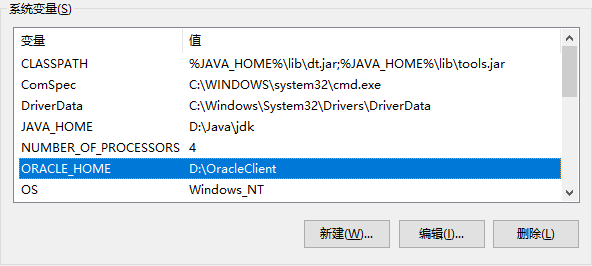
解压到 D:/OracleClient, 在环境变量 Path 中添加 D:/OracleClient, 在环境变量中添加:

php.ini 中去掉 extension=oci8_12c 前面的分号,

新打开 cmdWindows PowerShell 等, 输入 php -m 测试是否成功

【转】Using Scoped Functions in Kotlin - let, run, with, also, apply

Scoped Functions in Kotlin

By definition, Scoped functions are functions that execute a block of code within the context of an object.

Well, what does this mean? These functions provide a way to give temporary scope to the object under consideration where specific operations can be applied to the object within the block of code, thereby, resulting in a clean and concise code. Not clear still right? Yeah. In Software Development, things are only better understood by implementing rather than reading. So, let’s go ahead and understand these scoped functions with some examples.

The context of the object can be referred to as “it” or “this” which we will be understanding through examples in this article.

Differentiating scoped functions with examples

There are five scoped functions in Kotlin: let, run, with, also and *apply.* Let’s go through them one by one.

But before going through these examples, let’s consider a Model class “Person”

1
2
3
4
5
6
7
8
9
class Person() {
var name: String = "Abcd"
var contactNumber: String = "1234567890"
var address: String = "xyz"
fun displayInfo() = print("\n Name: $name\n " +
"Contact Number: $contactNumber\n " +
"Address: $address")

}

let

Let’s consider the following function:

1
2
3
4
5
6
7
8
private fun performLetOperation() {
val person = Person().let {
return@let "The name of the Person is: ${it.name}"
}
print(person)
}
output:
The name of the Person is: Abcd

From the above code snippet, we can see that although “let” operation is performed on a Person object, the output of the code is a string value and not the Person object. This implies that the “let” operator provides an option to perform an operation on the current object and return any value based on the use case.

Note: It is not necessary to write “return@let”. This is only done to enhance code readability. In Kotlin, if the last statement in a “let” block is a non-assignment statement, it is by default a return statement. For example:

1
2
3
4
5
6
7
8
private fun performLetOperation() {
val person = Person().let {
"The name of the Person is: ${it.name}"
}
print(person)
}
output:
The name of the Person is: Abcd

The above code also behaves the same way since the last statement is a non-assignment statement. So what happens if we don’t return anything in the “let” block? It is similar to calling a function that has no return value. So let’s say if we modify the function as:

1
2
3
4
5
6
7
8
private fun performLetOperation() {
val person = Person().let {
it.name = "NewName"
}
print(person)
}
output:
kotlin.Unit

We can see that since there was no return value in the let block and hence printing the same would indicate that the “print” functionality is called upon a unit function.

There are other advantages of using let:

  • It refers to the context of the object by using the “it” keyword and hence, this “it” can be renamed to a readable lambda parameter.
1
2
3
4
5
6
private fun performLetOperation() {
val person = Person().let { personDetails ->
personDetails.name = "NewName"
}
print(person)
}

This can be very helpful if we have nested let blocks, and since all let blocks refer to the context of their respective objects as “it”, it might be difficult for the compiler which objects we are referring to:

  • The second advantage is it easily helps in providing null checks. Let’s say we make the “name” parameter of the “Person” class nullable and we want to print the name of the person only if it is a not null value, then we can write a clean, simple and concise code as follows:
1
2
3
4
5
6
7
var name: String? = "Abcd"
private fun performLetOperation() {
val name = Person().name?.let {
"The name of the Person is: $it"
}
print(name)
}

We Know how lengthy the code would be to perform a null check in Java. Well, that’s the beauty of kotlin!

let” can also be used when we want to perform an operation on the result of a call chain. Let’s take the following example:

1
2
3
4
5
fun main() { 
val numbers = mutableListOf("One","Two","Three","Four","Five")
val resultsList = numbers.map { it.length }.filter { it > 3 }
print(resultsList)
}

So our aim is to fetch the values in the ArrayList whose length is greater than 3. Since we had to print the result we stored the result in a separate variable and then printed it. But using “let” operator, we can modify the code as:

1
2
3
4
5
6
fun main() {
val numbers = mutableListOf("One","Two","Three","Four","Five")
numbers.map { it.length }.filter { it > 3 }.let {
print(it)
}
}

This way we can perform an operation on the result of the call chain.

run

The “run” operator is similar to the “let” operator in terms of accepting a return value that is different from the object on which the scope function is being applied to. Hence, a “run” operator can be used to initialize an object and return the result of it.

1
2
3
4
5
6
7
8
9
10
11
private fun performRunOperation() {
Person().run {
name = "Asdf"
contactNumber = "0987654321"
return@run "The details of the Person is: ${displayInfo()}"
}
}
output:
Name: Asdf
Contact Number: 0987654321
Address: xyz

run vs let

So if run is similar to let in terms of accepting any return value, what’s the difference? The difference is run refers to the context of the object as “this” and not “it”. That is the reason we did not use “${this.name}” as it would be redundant here since the block of code understands that “name” is used here concerning the Person object.

One point here is that since the context is referred to as “this”, it cannot be renamed to a readable lambda parameter. So depending on the use case and requirement we have to choose between the let and the run operator. The “run” operator also helps in easy null checks similar to the “let” operator

1
2
3
4
5
6
7
8
9
var name: String? = "Abcd"
private fun performRunOperation() {
val name = Person().name?.run {
"The name of the Person is: $this"
}
print(name)
}
Output:
The name of the Person is: Abcd

with

The “with” operator is completely similar to the run operator that we just discussed. It also refers to the context of the object as “this”, similar to how the “run” operator uses it.

1
2
3
4
5
6
7
8
private fun performWithOperation() {
val person = with(Person()) {
return@with "The name of the Person is: ${this.name}"
}
print(person)
}
Output:
The name of the Person is: Abcd

with vs run

So, if “with” is the same as “run”, what’s the difference? How should we choose between these two? Now, this is an interesting case. Let’s consider a case where a Person object can be nullable.

we can see that the context of the object referred to as “this” is a nullable type of Person. And hence, to correct this, we need to change the code as:

1
2
3
4
5
6
7
8
9
private fun performWithOperation() {
val person: Person? = null
with(person) {
this?.name = "asdf"
this?.contactNumber = "1234"
this?.address = "wasd"
this?.displayInfo()
}
}

So performing a null check using a “with” operator is difficult and this is where we can replace it with “run” as follows:

1
2
3
4
5
6
7
8
9
private fun performRunOperation() {
val person: Person? = null
person?.run {
name = "asdf"
contactNumber = "1234"
address = "wasd"
displayInfo()
}
}

This looks a lot cleaner.

apply

The apply function is similar to the run functionality only in terms of referring to the context of the object as “this” and not “it” and also in providing null safety checks:

1
2
3
4
5
6
7
8
9
private fun performApplyOperation() {
val person: Person? = null
person?.apply {
name = "asdf"
contactNumber = "1234"
address = "wasd"
displayInfo()
}
}

“apply” use-case in Android Development

Specifically for Android Development, “apply“ can be useful in many cases. We have many scenarios where we should return an instance of Intent or an Alert Dialog etc., by adding specific attributes to them. Let’s take the example of an intent here:

1
2
3
4
5
6
7
8
9
10
11
12
13
14
// Normal approach
fun createIntent(intentData: String, intentAction: String): Intent {
val intent = Intent()
intent.action = intentAction
intent.data = Uri.parse(intentData)
return intent
}

// Improved approach, by using apply
fun createIntent(intentData: String, intentAction: String) =
Intent().apply {
action = intentAction
data = Uri.parse(intentData)
}

The improved approach from the above code snippet helps in avoiding variable name redundancy thereby enhancing the code readability and the principle of clean code.

apply vs run

So let’s see the difference between apply and run functions.

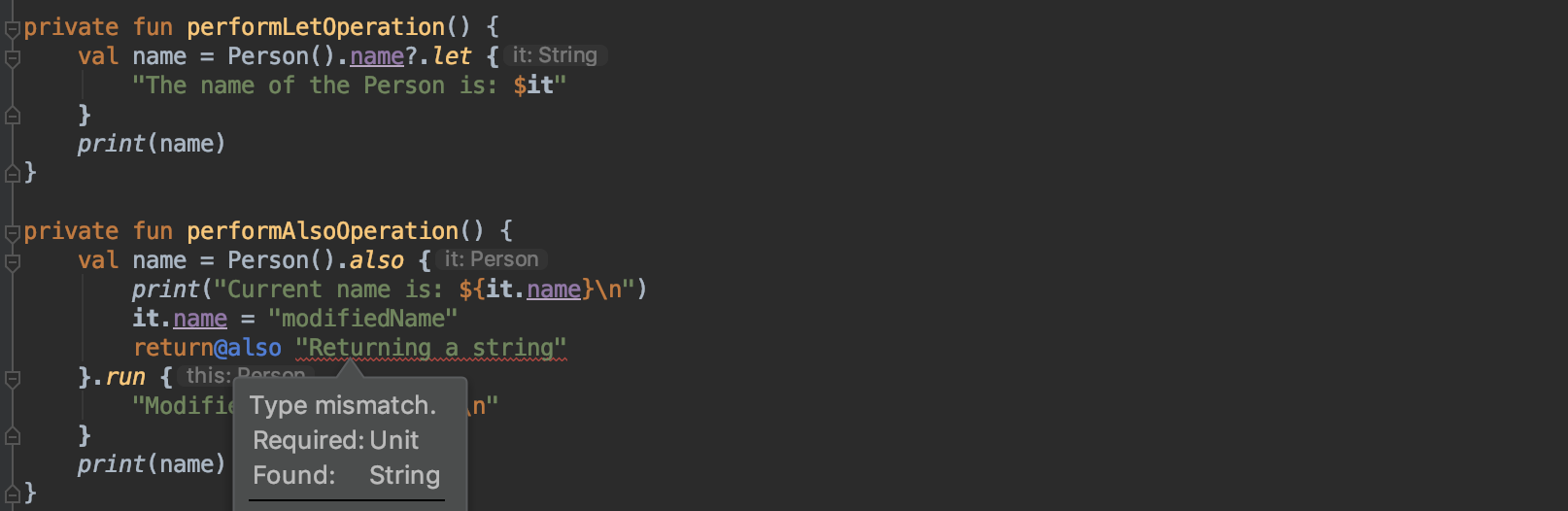
We can see that run accepts a return statement whereas **“**apply” does not accept a return statement(we can see the error thrown by the IDE in the image) and always returns the same object which it is referring to.

also

The “*also”* function is similar to the *let* functionality only in terms of referring to the context of the object as “it” and not “this” and also in providing null safety checks:

1
2
3
4
5
6
7
8
9
10
11
12
private fun performAlsoOperation() {
val name = Person().also { currentPerson ->
print("Current name is: ${currentPerson.name}\n")
currentPerson.name = "modifiedName"
}.run {
"Modified name is: $name\n"
}
print(name)
}
output:
Current name is: Abcd
Modified name is: modifiedName

Here we can see the usage of the readable lambda parameters, similar to what we have seen in the “let” operator case. The advantage of using “also” operator is that while doing a chain of operations, this operator helps in evaluating the current operating value if required. Let’s suppose we did not use the “also” operator in the above case, we should have written the code as:

1
2
3
4
5
6
7
var name = Person().name
print("Current name is: $name\n")
name = "modifiedName"
name = name.run {
"Modified name is: $name\n"
}
print(name)

Although this gives the same output, the chain in which the operations are being held is broken and that would not make a good readable code and hence “also” operator is very useful in this case. Hence, by using the also operator, the code can be modified as:

1
2
3
4
5
6
7
8
9
private fun performAlsoOperation() {
val name = Person().also {
print("Current name is: ${it.name}\n")
it.name = "ModifiedName"
}.run {
"Modified name is: $name\n"
}
print(name)
}

This way we can execute the intermediate result within the execution chain without breaking the chain, thereby leading to a better readable code.

“also” vs “let”

So let’s see the difference between also and let functions.

We can see that let accepts a return statement whereas “also” does not accept a return statement(we can see the error thrown by the IDE in the image) and always returns the same object which it is referring to.

Summary

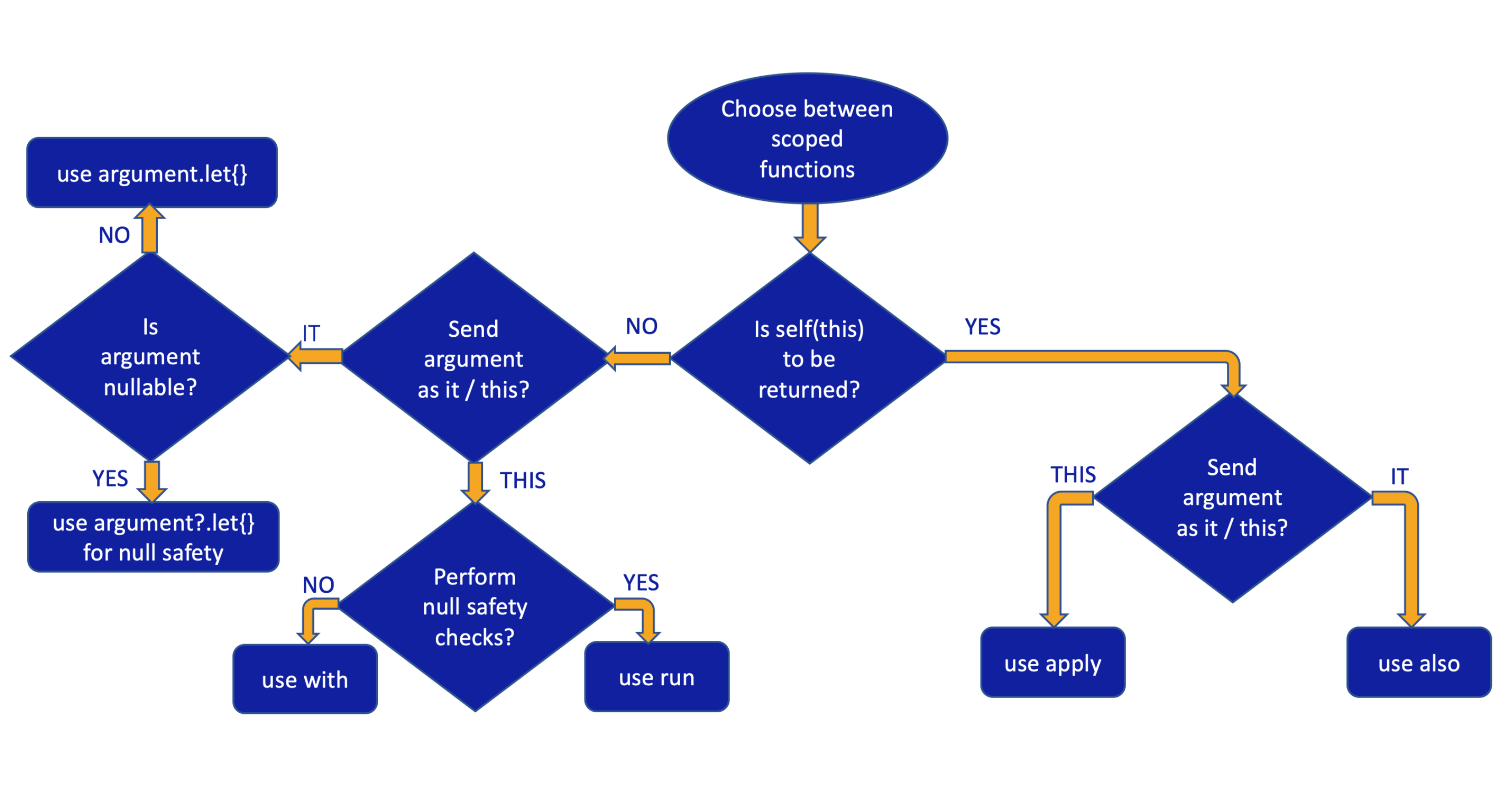
We can also represent the summary of choosing between the scoped functions as a flowchart.

That’s all about the Scoped functions in Kotlin. Although we might be using this in our code, we hope that our article has given you a clearer way of understanding and implementing the right scoped function in the right place.


来源:

https://blog.mindorks.com/using-scoped-functions-in-kotlin-let-run-with-also-apply