Practical ProGuard rules examples

In my previous article I explained why everyone should use ProGuard for their Android apps, how to enable it and what kind of errors you might encounter when doing so. There was a lot of theory involved, as I think it’s important to understand the underlying principles in order to be prepared to deal with any potential problems.

I also talked in a separate article about the very specific problem of configuring ProGuard for an Instant App build.

In this part, I’d like to talk about the practical examples of ProGuard rules on a medium sized sample app: Plaid by Nick Butcher.

Lessons learned from Plaid

Plaid actually turned out to be a great subject for researching ProGuard problems, as it contains a mix of 3rd party libraries that use things like annotation processing and code generation, reflection, java resource loading and native code (JNI). I extracted and jotted down some practical advice that should apply to other apps in general:

Data classes

1
2
3
4
5
public class User {
String name;
int age;
...
}

Probably every app has some kind of data class (also known as DMOs, models, etc. depending on context and where they sit in your app’s architecture). The thing about data objects is that usually at some point they will be loaded or saved (serialized) into some other medium, such as network (an HTTP request), a database (through an ORM), a JSON file on disk or in a Firebase data store.

Many of the tools that simplify serializing and deserializing these fields rely on reflection. GSON, Retrofit, Firebase — they all inspect field names in data classes and turn them into another representation (for example: {“name”: “Sue”, “age”: 28}), either for transport or storage. The same thing happens when they read data into a Java object — they see a key-value pair “name”:”John” and try to apply it to a Java object by looking up a String name field.

Conclusion: We cannot let ProGuard rename or remove any fields on these data classes, as they have to match the serialized format. It’s a safe bet to add a @Keep annotation on the whole class or a wildcard rule on all your models:

1
-keep class io.plaidapp.data.api.dribbble.model.** { *; }

Warning*: It’s possible to make a mistake when testing if your app is susceptible to this issue. For example, if you serialize an object to JSON and save it to disk in version N of your app without the proper keep rules, the saved data might look like this:* *{“a”: “Sue”, “b”: 28}*. Because ProGuard renamed your fields to *a* and *b*, everything will seem to work, data will be saved and loaded correctly.

However, when you build your app again and release version N+1 of your app, ProGuard might decide to rename your fields to something different, such as *c* and *d*. As a result, data saved previously will fail to load.

You *must* ensure you have the proper keep rules in the first place.

Java code called from native side (JNI)

Android’s default ProGuard files (you should always include them, they have some really useful rules) already contain a rule for methods that are implemented on the native side (-keepclasseswithmembernames class * { native ; }). Unfortunately there is no catch-all way to keep code invoked in the opposite direction: from JNI into Java.

With JNI it’s entirely possible to construct a JVM object or find and call a method on a JVM handle from C/C++ code and in fact, one of the libraries used in Plaid does that.

Conclusion: Because ProGuard can only inspect Java classes, it will not know about any usages that happen in native code. We must explicitly retain such usages of classes and members via a @Keep annotation or -keep rule.

1
2
3
4
-keep, includedescriptorclasses 
class in.uncod.android.bypass.Document { *; }
-keep, includedescriptorclasses
class in.uncod.android.bypass.Element { *; }

Opening resources from JAR/APK

Android has its own resources and assets system that normally shouldn’t be a problem for ProGuard. However, in plain Java there is another mechanism for loading resources straight from a JAR file and some third-party libraries might be using it even when compiled in Android apps (in that case they will try to load from the APK).

The problem is that usually these classes will look for resources under their own package name (which translates to a file path in the JAR or APK). ProGuard can rename package names when obfuscating, so after compilation it might happen that the class and its resource file are no longer in the same package in the final APK.

To identify loading resources in this way, you can look for calls to Class.getResourceAsStream / getResource and ClassLoader.getResourceAsStream / getResource in your code and in any third party libraries you depend on.

Conclusion: We should keep the name of any class that loads resources from the APK using this mechanism.

In Plaid, there are actually two — one in the OkHttp library and one in Jsoup:

1
2
-keepnames class okhttp3.internal.publicsuffix.PublicSuffixDatabase
-keepnames class org.jsoup.nodes.Entities

How to come up with rules for third party libraries

In an ideal world, every dependency you use would supply their required ProGuard rules in the AAR. Sometimes they forget to do this or only publish JARs, which don’t have a standardized way to supply ProGuard rules.

In that case, before you start debugging your app and coming up with rules, remember to check the documentation. Some library authors supply recommended ProGuard rules (such as Retrofit used in Plaid) which can save you a lot of time and frustration. Unfortunately, many libraries don’t (such as is the case with Jsoup and Bypass mentioned in this article). Also be aware that in some cases the config supplied with the library will only work with optimizations disabled, so if you are turning them on you might be in uncharted territory.

So how to come up with rules when the library doesn’t supply them?
I can only give you some pointers:

  1. Read the build output and logcat!
  2. Build warnings will tell you which -dontwarn rules to add
  3. ClassNotFoundException, MethodNotFoundException and FieldNotFoundException will tell you which -keep rules to add

You should be glad when your app crashes with ProGuard enabled — you’ll have somewhere to start your investigation :)

The worst class of problems to debug are when you app works, but for example doesn’t show a screen or doesn’t load data from the network.

That’s where you need to consider some of the scenarios I described in this article and get your hands dirty, even diving into the third party code and understanding why it might fail, such as when it uses reflection, introspection or JNI.

Debugging and stack traces

ProGuard will by default remove many code attributes and hidden metadata that are not required for program execution . Some of those are actually useful to the developer — for example, you might want to retain source file names and line numbers for stack traces to make debugging easier:

1
-keepattributes SourceFile, LineNumberTable

You should also remember to save the ProGuard mappings files produced when you build a release version and upload them to Play to get de-obfuscated stack traces from any crashes experienced by your users.

If you are going to attach a debugger to step through method code in a ProGuarded build of your app, you should also keep the following attributes to retain some debug information about local variables (you only need this line in your debug build type):

1
-keepattributes LocalVariableTable, LocalVariableTypeTable

Minified debug build type

The default build types are configured such that debug doesn’t run ProGuard. That makes sense, because we want to iterate and compile fast when developing, but still want the release build to use ProGuard to be as small and optimized as possible.

But in order to fully test and debug any ProGuard problems, it’s good to set up a separate, minified debug build like this:

1
2
3
4
5
6
7
8
9
10
buildTypes {
debugMini {
initWith debug
minifyEnabled true
shrinkResources true
proguardFiles getDefaultProguardFile('proguard-android.txt'),
'proguard-rules.pro'
matchingFallbacks = ['debug']
}
}

With this build type, you’ll be able to connect the debugger, run UI tests (also on a CI server) or monkey test your app for possible problems on a build that’s as close to your release build as possible.

Conclusion: When you use ProGuard you should always QA your release builds thoroughly, either by having end-to-end tests or manually going through all screens in your app to see if anything is missing or crashing.

Runtime annotations, type introspection

ProGuard will by default remove all annotations and even some surplus type information from your code. For some libraries that’s not a problem — those that process annotations and generate code at compile time (such as Dagger 2 or Glide and many more) might not need these annotations later on when the program runs.

There is another class of tools that actually inspect annotations or look at type information of parameters and exceptions at runtime. Retrofit for example does this by intercepting your method calls by using a Proxy object, then looking at annotations and type information to decide what to put or read from the HTTP request.

Conclusion: Sometimes it’s required to retain type information and annotations that are read at runtime, as opposed to compile time. You can check out the attributes list in the ProGuard manual.

1
-keepattributes *Annotation*, Signature, Exception

If you’re using the default Android ProGuard configuration file (*getDefaultProguardFile('proguard-android.txt')*), the first two options — Annotations and Signature — are specified for you. If you’re not using the default you have to make sure to add them yourself (it also doesn’t hurt to just duplicate them if you know they’re a requirement for your app).

Moving everything to the default package

The -repackageclasses option is not added by default in the ProGuard config. If you are already obfuscating your code and have fixed any problems with proper keep rules, you can add this option to further reduce DEX size. It works by moving all classes to the default (root) package, essentially freeing up the space taken up by strings like “com.example.myapp.somepackage”.

1
-repackageclasses

ProGuard optimizations

As I mentioned before, ProGuard can do 3 things for you:

  1. it gets rid of unused code,
  2. renames identifiers to make the code smaller,
  3. performs whole program optimizations.

The way I see it, everyone should try and configure their build to get 1. and 2. working.

To unlock 3. (additional optimizations), you have to use a different default ProGuard configuration file. Change the proguard-android.txt parameter to proguard-android-optimize.txt in your build.gradle:

1
2
3
4
5
6
release {
minifyEnabled true
proguardFiles
getDefaultProguardFile('proguard-android-optimize.txt'),
'proguard-rules.pro'
}

This will make your release build slower, but will potentially make your app run faster and reduce code size even further, thanks to optimizations such as method inlining, class merging and more aggressive code removal. Be prepared however, that it might introduce new and difficult to diagnose bugs, so use it with caution and if anything isn’t working, be sure to disable certain optimizations or disable the use of the optimizing config altogether.

In the case of Plaid, ProGuard optimizations interfered with how Retrofit uses Proxy objects without concrete implementations, and stripped away some method parameters that were actually required. I had to add this line to my config:

1
-optimizations !method/removal/parameter

You can find a list of possible optimizations and how to disable them in the ProGuard manual.

When to use @Keep and -keep

@Keep support is actually implemented as a bunch of -keep rules in the default Android ProGuard rules file, so they’re essentially equivalent. Specifying -keep rules is more flexible as it offers wildcards, you can also use different variants which do slightly different things (-keepnames, -keepclasseswithmembers and more).

Whenever a simple “keep this class” or “keep this method” rule is needed though, I actually prefer the simplicity of adding a@Keep annotation on the class or member, as it stays close to the code, almost like documentation.

If some other developer coming after me wants to refactor the code, they will know immediately that a class/member marked with @Keep requires special handling, without having to remember to consult the ProGuard configuration and risking breaking something. Also most code refactorings in the IDE should retain the @Keep annotation with the class automatically.

来源:

https://medium.com/androiddevelopers/practical-proguard-rules-examples-5640a3907dc9

Android 透明色

设置alpha有一种局限性,会使得内容也变得透明,但是使用透明色只会使背景透明,内容不透明

不透明

100%FF

95%F2

90%E6

85%D9

80%CC

75%BF

70%B3

65%A6

60%99

55%8C

半透明50%80

45%73

40%66

35%59

30%4D

25%40

20%33

15%26

10%1A

5%0D

全透明

0%00

举例:

全透明:#00000000

半透明:#80000000

不透明:#FF000000

白色半透明:#80FFFFFF

红色30%透明:#4Dca0d0d

来源:

https://www.jianshu.com/p/abc95c2a0fa9

【转】HTML 文档之 Head 最佳实践

每一个标准的 HTML 文档都包含一个 <head> 头部分,除了声明文档类型,编码方式和文档标题,引入外部资源这些基本功能外,<head> 头还能做很多非常有用的事情,这篇文章整理了作者认可的一些最佳实践,写在这里与各位分享。

语言

html 标签中通过 lang 属性进行明确的语言声明,将会有助于翻译,英文、简体中文和繁体中文网页所属性值如下:

1
2
3
<html lang="en">
<html lang="zh-Hans">
<html lang="zh-Hant">

编码

请在 <head> 中第一行统一使用 utf-8 编码声明。

1
<meta charset="utf-8">

Base 元素

尽量不使用 <base> 元素,绝对地址和 URL 对于开发者和用户来说都更好。

1
2
3
4
5
6

<base href="/blog/">
<link href="hello-world" rel="canonical">


<link href="/blog/hello-world" rel="canonical">

Viewport

设置 viewport 的宽度为设备宽度,默认缩放比为 1(允许用户缩放),设置 viewport-fit=cover 以兼容 iPhone X 全面屏“刘海”的显示。

1
<meta name="viewport" content="width=device-width,initial-scale=1,viewport-fit=cover">

DNS 预读取

DNS 预读取是一项使浏览器主动去执行域名解析的功能,其范围包括当前文档内的所有链接,这能够减少用户点击链接时的延迟。

1
2
3
<meta http-equiv="x-dns-prefetch-control" content="on">
<link rel="dns-prefetch" href="//www.google-analytics.com">
<link rel="dns-prefetch" href="//fonts.googleapis.com">

预加载

指示浏览器预先请求当前页面所需要的关键性资源。

1
2
<link rel="preload" href="/css/main.css" as="style">
<link rel="preload" href="/js/main.js" as="script">

预请求

指示浏览器预先请求用户即将浏览页面所需要的关键性资源。

1
2
<link rel="prefetch" href="/img/css-sprite.png">
<link rel="prefetch" href="/fonts/icons.woff2">

渲染偏好

对于国内各种双核浏览器,通过设置 renderer 头要求它们使用 webkit 内核;对于 IE 浏览器,通过设置 IE=edge 要求它使用最新的版本;对于百度搜索强制转码的流氓做法,通过 no-transform 禁止其自动转码;指示浏览器对类似电话、邮箱或地址的内容不要自作聪明的瞎识别(移动端)。

1
2
3
4
5
<meta name="renderer" content="webkit"> 
<meta name="force-rendering" content="webkit">
<meta http-equiv="X-UA-Compatible" content="IE=edge">
<meta http-equiv="Cache-Control" content="no-transform">
<meta name="format-detection" content="telephone=no,email=no,adress=no">

文档信息

HTML 文档的一些元数据,包括:作者、描述、关键词和生成工具;设置 robotsindex,follow 指示搜索引擎爬虫该页面需要进入索引,并且页面内的所有链接都要继续跟踪;设置 referrerorigin-when-cross-origin 指示浏览器在进行跨域跳转时,其 referrer 值将统一为域名,而非具体的 URL 地址。

1
2
3
4
5
6
<meta name="author" content="米老朱">
<meta name="description" content="米老朱的个人博客">
<meta name="keywords" content="米老朱,极客,博客,WEB,开发,产品设计">
<meta name="generator" content="Hugo 0.32">
<meta name="robots" content="index,follow">
<meta name="referrer" content="origin-when-cross-origin">

Icons

虽说所有浏览器都还支持过时的 favicon.ico 格式,但在 HTML5 时代,我们应该使用更好的 PNG icon with sizes 方案。同时为了兼容老旧浏览器,我们可以将生成好的 favicon.ico 文件放在网站的根目录下面,通常浏览器会自动请求并加载它,并不需要额外通过 link 标签引入。

1
2
3
4
5
6
7
8
9
10
11
12
13
14
15
16
17
18
19
20
<meta name="theme-color" content="#db5945"> 
<meta name="application-name" content="米老朱的博客">
<meta name="apple-mobile-web-app-capable" content="yes">
<meta name="apple-mobile-web-app-status-bar-style" content="black">
<meta name="apple-mobile-web-app-title" content="米老朱的博客">
<meta name="msapplication-tooltip" content="米老朱的博客">
<meta name="msapplication-TileColor" content="#db5945">
<meta name="msapplication-TileImage" content="/img/logo-144.png">
<meta name="msapplication-config" content="/browserconfig.xml">
<link rel="icon" type="image/png" href="/img/logo-16.png" sizes="16x16">
<link rel="icon" type="image/png" href="/img/logo-32.png" sizes="32x32">
<link rel="icon" type="image/png" href="/img/logo-96.png" sizes="96x96">
<link rel="icon" type="image/png" href="/img/logo-128.png" sizes="128x128">
<link rel="icon" type="image/png" href="/img/logo-196.png" sizes="196x196">
<link rel="icon" type="image/png" href="/img/logo-228.png" sizes="228x228">
<link rel="apple-touch-icon" href="/img/logo-120.png">
<link rel="apple-touch-icon" href="/img/logo-152.png" sizes="152x152">
<link rel="apple-touch-icon" href="/img/logo-180.png" sizes="180x180">
<link rel="apple-touch-icon" href="/img/logo-167.png" sizes="167x167">
<link rel="mask-icon" href="/img/logo.svg" color="green">

微软为了让 Metro UI 更好看,引入了 browserconfig.xml 文件,主要用于定制网站固定磁铁的图标和背景颜色,其格式如下所示:

1
2
3
4
5
6
7
8
9
10
11
12
13
<?xml version="1.0" encoding="utf-8"?>
<browserconfig>
<msapplication>
<tile>
<square70x70logo src="/img/logo-70.png"/>
<square150x150logo src="/img/logo-150.png"/>
<wide310x150logo src="/img/logo-310x150.png"/>
<square310x310logo src="/img/logo-310.png"/>
<TileImage src="/img/logo-144.png"/>
<TileColor>#db5945</TileColor>
</tile>
</msapplication>
</browserconfig>

favicon.ico 实际上是一个图片容器,里面至少应该包含 16x16,32x32,48x48 三个尺寸的 png 图片,我们可以使用 ImageMagick 工具在本地直接生成(生成之前需要对 png 图片进行压缩以减小尺寸)。

1
$ convert favicon-16.png favicon-32.png favicon-48.png favicon.ico

注意:apple-mobile-web-app-status-bar-style 值默认状态栏为白色,可设置为 black(黑色) 或者 black-translucent(灰色半透明);mask-icon 引入的 svg 文件必须只有一个图层,并且 viewBox 属性应该为 “0 0 16 16”。

Twitter Cards

Twitter 卡片用于将网站内容以更加优雅漂亮的方式分享到 twitter.com 网站,从形式上说,分为:summary, summary_large_image, app, player 四种形式,通常我们的站点只需要 summary 这种形式。

1
2
3
4
5
<meta name="twitter:card" content="summary">
<meta name="twitter:site" content="@melaozhu">
<meta name="twitter:title" content="此处为分享标题">
<meta name="twitter:description" content="此处为分享描述">
<meta name="twitter:image" content="此处为分享配图">

配置上线后,你可以通过这个 Card validator 工具检查是否正确显示。

Facebook Open Graph

Open Graph 是一套开放的网页标注协议,通过 meta 标签标注网页的类型,主要由 Facebook 推动,已经成为社交分享领域的事实标准。如果你希望明确告诉社交网络或搜索引擎你的网页类型,你应该添加这些 meta 标签。

1
2
3
4
5
<meta property="og:type" content="article">
<meta property="og:title" content="此处为分享标题">
<meta property="og:description" content="此处为分享描述">
<meta property="og:image" content="此处为分享配图">
<meta property="og:url" content="此处为分享的链接地址">

固定链接

对于一份文档存在多个 URL 的情况,通过 rel="canonical" 指定唯一的固定链接。

1
<link rel="canonical" href="https://laozhu.me/">

RSS 链接

对于支持 RSS 订阅的页面,可针对 RSS 阅读器提供可订阅的源文件。

1
<link rel="alternative" href="/index.xml" title="米老朱的博客" type="application/atom+xml">

Polyfill

可以专门为老旧的 IE 浏览器引入 Polyfill 方案,举个例子,为了让 IE6-IE8 浏览器能够使用 HTML5 标签和 Media Query 特性,我们需要引入 html5shivresponse.js 这两个库。

1

其他的 Polyfill 方案写法类似。

打印样式表

对于可打印的页面(如文章页面),可提供针对打印机的样式表,使得网站用户可以将文章打印下来阅读。

1
<link rel="stylesheet" href="/css/print.css" media="print">

交替样式表

定义交替样式表的时候,指定其 title 属性,以方便用户在浏览器中根据名称选择替代样式,交替样式表多用于多主题切换的站点。

1
2
<link href="default.css" rel="stylesheet">
<link href="high-contrast.css" rel="alternate stylesheet" title="High contrast">

参考资料

  1. HTML Best Practices
  2. Favicon Cheatsheet
  3. DNS 预读取
  4. Prefetching, preloading, prebrowsing
  5. Favicons, Touch Icons, Tile Icons, etc. Which Do You Need?
  6. Here’s Everything You Need to Know About Favicons in 2017
  7. Configuring Web Applications
  8. Creating Pinned Tab Icons
  9. “The Notch” and CSS
  10. Alternative style sheets

来源:

https://github.com/laozhu/my-blog/blob/master/content/post/html-head-best-practices.md

【转】浅析 Laravel 文档推荐的 Nginx 配置

1
2
3
4
5
6
7
8
9
10
11
12
13
14
15
16
17
18
19
20
21
22
23
24
25
26
27
28
29
30
31
32
33
34
35
36
37
38
39
40
41
42
43
44
45
46
47
48
49
50
51
52
server {
# 监听 HTTP 协议默认的 [80] 端口。
listen 80;
# 绑定主机名 [example.com]。
server_name example.com;
# 服务器站点根目录 [/example.com/public]。
root /example.com/public;

# 添加几条有关安全的响应头;与 Google+ 的配置类似,详情参见文末。
add_header X-Frame-Options "SAMEORIGIN";
add_header X-XSS-Protection "1; mode=block";
add_header X-Content-Type-Options "nosniff";

# 站点默认页面;可指定多个,将顺序查找。
# 例如,访问 http://example.com/ Nginx 将首先尝试「站点根目录/index.html」是否存在,不存在则继续尝试「站点根目录/index.htm」,以此类推...
index index.html index.htm index.php;

# 指定字符集为 UTF-8
charset utf-8;

# Laravel 默认重写规则;删除将导致 Laravel 路由失效且 Nginx 响应 404。
location / {
try_files $uri $uri/ /index.php?$query_string;
}

# 关闭 [/favicon.ico] 和 [/robots.txt] 的访问日志。
# 并且即使它们不存在,也不写入错误日志。
location = /favicon.ico { access_log off; log_not_found off; }
location = /robots.txt { access_log off; log_not_found off; }

# 将 [404] 错误交给 [/index.php] 处理,表示由 Laravel 渲染美观的错误页面。
error_page 404 /index.php;

# URI 符合正则表达式 [\.php$] 的请求将进入此段配置
location ~ \.php$ {
# 配置 FastCGI 服务地址,可以为 IP:端口,也可以为 Unix socket。
fastcgi_pass unix:/var/run/php/php7.2-fpm.sock;
# 配置 FastCGI 的主页为 index.php。
fastcgi_index index.php;
# 配置 FastCGI 参数 SCRIPT_FILENAME 为 $realpath_root$fastcgi_script_name。
fastcgi_param SCRIPT_FILENAME $realpath_root$fastcgi_script_name;
# 引用更多默认的 FastCGI 参数。
include fastcgi_params;
}
# 通俗地说,以上配置将所有 URI 以 .php 结尾的请求,全部交给 PHP-FPM 处理。

# 除符合正则表达式 [/\.(?!well-known).*] 之外的 URI,全部拒绝访问
# 也就是说,拒绝公开以 [.] 开头的目录,[.well-known] 除外
location ~ /\.(?!well-known).* {
deny all;
}
}

关于 X-Frame-Options、X-XSS-Protection 和 X-Content-Type-Options 可参考 https://imququ.com/post/web-security-and-response-header.html

关于 .well-known 目录的详细解释,可参考 https://serverfault.com/questions/795467/for-what-is-the-well-known-folder

来源:https://wi1dcard.dev/posts/laravel-recommended-nginx-conf-analysis/

Vue Router

Query parameters

https://something.com/user/456?locale=en

1
2
3
4
5
<router-link 
:to="{ name: 'pathName',
params: { id: $route.params.id },
query: { locale: 'en' } }">
</router-link>

Adding hash fragment

1
2
3
<router-link :to="{ name: pathName, hash: '#text' }">
Jump to content
</router-link>

Scroll behavior

1
2
3
4
5
6
7
8
9
10
11
12
13
import { routes } from './routes.js'
const router = new VueRouter({
routes,
scrollBehavior(to, from, savedPosition) {
if (savedPosition) {
return savedPosition;
}
if (to.hash) {
return { selector: to.hash };
}
return { x: 0, y: 0 };
}
});

Here, routes are all our routes kept in a separate file. The scrollBehavior()function is what manages the scrolling of our routes. It has 3 parameters:

  1. to — This represents the new route we will be visiting
  2. from — This is the previous route we came from. So if we click on a <router-link> on Home page to visit the About page, then to would be our About page and from is the Home page.
  3. savedPosition — This is the important parameter. It represents the previous position before scrolling. It will become clear after I explain what the above function does.

参考:

https://medium.com/@NAPOLEON039/the-lesser-known-amazing-things-vuerouter-can-do-3fbb2c191c00

【转】How To Store Use Sensitive Information In Android Development

Step 1 : Consolidate sensitive information in file(s) and ignore from the repo

The first naive thought is just to write all the sensitive information in a file and don’t commit it. List the file in .gitignore so that nobody accidentally commits it.

For example, we can store all API keys/secrets in app/keys.properties:

1
2
3
4
TMDB_API_KEY=XXXXYYYYZZZZ
AZURE_API_KEY=AAAABBBBCCCC
AWS_API_KEY=LLLLMMMMNNNNN
...

.gitignore would look like this.

1
2
3
...
# Files with sensitive info
app/keys.properties

Now, how can we use the TMDB_API_KEY from the main Java/Kotlin code? We can let gradle to generate some code for you.

In your app/build.gradle, you can write something like this.

1
2
3
4
5
6
7
8
9
10
11
12
13
14
15
16
17
18
19
android {
...
buildTypes {
release {
...
buildConfigField("String", "TMDB_API_KEY", "\"" + getTmdbApiKey() + "\"")
}
debug {
buildConfigField("String", "TMDB_API_KEY", "\"" + getTmdbApiKey() + "\"")
}
}
}
def getTmdbApiKey() {
def keysFile = file("keys.properties")
def keysProperties = new Properties()
keysProperties.load(new FileInputStream(keysFile))
def tmdbApiKey = keysProperties['TMDB_API_KEY']
return tmdbApiKey
}

Basically, you read the sensitive file and get the key value pairs, feed the corresponding API key value you want into the magic function **buildConfigField**. This function is going to create a static field with provided parameters after gradle sync. The auto generated**BuildConfig.java** will look like this.

1
2
3
4
public final class BuildConfig {
...
public static final String TMDB_API_KEY = "XXXXYYYYZZZZ";
}

Now you can access this global variable from anywhere in the app. If you are using Retrofit to generate API client code, you can do something like this.

1
2
3
4
5
6
interface TMDBService {
@GET("3/movie/now_playing")
fun nowplaying(@Query("page") page: Int,
@Query("api_key") apiKey: String = BuildConfig.TMDB_API_KEY
): Flowable<MoviesPage>
}

Now, this is awesome. Your sensitive information is consolidated in a single place (keys.properties in this example) and is not going to be easily pushed to any repository by accident. You can pass the file to a new team mate as he/she joins. Your team can probably manage the file in 1Password or a dedicated private repository.

NOTE: Obviously, it is cumbersome and has drawbacks to pass keys.properties to the new team members outside of repository. I will explain the solution in the Step 3.

Step 2: Make CI/CD work with environment variable

With the previous step, we successfully skipped sensitive information to be included in the repository. However, that will cause a problem to the CI/CD system. Remember the build.gradle we wrote above.

1
2
3
4
5
6
7
8
9
10
11
12
13
14
15
16
17
18
19
android {
...
buildTypes {
release {
...
buildConfigField("String", "TMDB_API_KEY", "\"" + getTmdbApiKey() + "\"")
}
debug {
buildConfigField("String", "TMDB_API_KEY", "\"" + getTmdbApiKey() + "\"")
}
}
}
def getTmdbApiKey() {
def keysFile = file("keys.properties")
def keysProperties = new Properties()
keysProperties.load(new FileInputStream(keysFile))
def tmdbApiKey = keysProperties['TMDB_API_KEY']
return tmdbApiKey
}

The gradle sync on CI/CD server would fail because it cannot find keys.properties, because it was omitted from the repository.

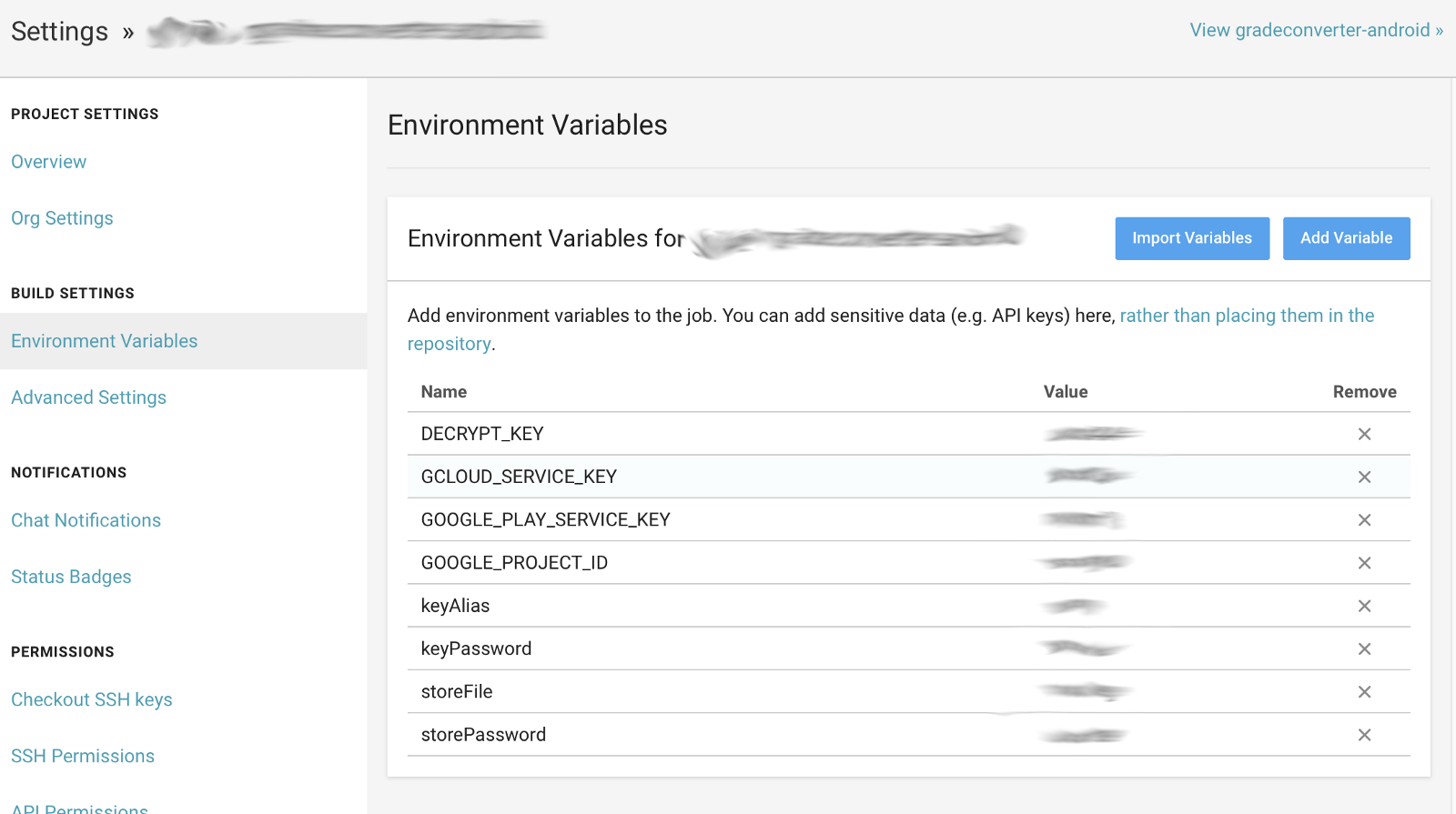
You might have guessed : here comes good old environment variables. Every CI/CD system has an entry for environment variables. This screen is from Circle CI for example.

Environment Variables Screen for Circle CI

You can just “Add Variable” forTMDB_API_KEY in this case.

And of course, we have to modify our gradle script to look at environment variables in addition to the file(s).

1
2
3
4
5
6
7
8
9
10
11
12
def getTmdbApiKey() {
def tmdbApiKey = System.getenv("TMDB_API_KEY")
if (tmdbApiKey == null || tmdbApiKey.length() == 0) {
def keysFile = file("keys.properties")
def keysProperties = new Properties() keysProperties.load(new FileInputStream(keysFile))
tmdbApiKey = keysProperties['TMDB_API_KEY']
if (tmdbApiKey == null) {
logger.error("You need to either place appropriate keys.properties or set proper environment variables for API key")
}
}
return tmdbApiKey
}

Now, in the modified function above, we first look at the environment variable TMDB_API_KEY. If the environment variable is not defined, we will read from the file as before. As long as CI/CD has that environment variable properly set, it can successfully generate a build.

Step 3 : Encrypt the sensitive keys and push to the repository

By consolidating sensitive key information in file(s) and configuring gradle scripts properly, you can set up your Android project to hide sensitive information from the repository.

With this approach, however, we have to have another storage to just store the sensitive information. If we use some password manager (e.g., 1Password), then you cannot manage versions of the sensitive file. You can work this around by setting up a dedicated private repository, but it’s a bit cumbersome that you have to pull/copy the file from a separate repository.

Here comes git-secret. It uses GPG under the hood and allows easy interface for the repository manager to encrypt secret files so that only certain developers are allowed to decrypt those.

Initial Setup

The repository manager needs to put the repository under control of git-secret and specify file(s) to encrypt. This only needs to happen once. Following commands should be executed from the top level directory of the repository.

1
2
% git secret init                    // You only need to do this once
% git secret add app/keys.properties // You only need to do this once per file

Developer passes the public key to the repository manager

The repository manager needs to obtain GPG public key from individual developers. Individual developer can follow this link to create and export GPG public key. One important thing for the developer is that he/she SHOULD NEVER FORGET THE PASSPHRASE HE/SHE SET HERE. It’s quite cumbersome to recover from that situation, and I bet you want to avoid facing unhappy devops or a tech lead.

Repository manager encrypts secret file(s) using the public keys.

On receiving the public key, the repository manager runs the following command.

1
% gpg --import IMPORTED_PUBLIC_KEY.txt

Now, repository managers machine can encrypt any file using developers’ GPG public keys. The repo manager can then type following command to grant access for the developer to the respository.

1
% git secret tell xxx@yyy.com

The Email is the one associated to the imported public key. You can probably check the email via **pgp --list-keys** after doing the import.

Now, you can issue the magic command:

1
% git secret hide

This will create an encrypted file app/keys.properties.secret out of app/keys.properties, using the public keys registered to the machine. The repository manager can then push the encrypted file to the repository.

Any developer can decrypt secret file(s) with a simple command.

1
% git secret reveal

The above command lets you regenerate app/keys.properties out of app/keys.properties.secret as long as the steps above have been successfully completed. 💥💥💥

The initial setup is a little bit involved process, but it becomes very simple after that. Every time a new developer comes in, he/she needs to send the public key to the repository manager, where he/she add the user and re-encrypt the file(s). The new member can then just pull the repository and enter **git secret reveal**. It is much better than searching the file in some other storage, possibly without knowing whether that is the latest version or not.

Summary

I have introduced the 3 steps to share sensitive information without pushing it to the repository. The 3rd step is probably optional at this point. It requires some effort of setting up, and also has some shortcomings like follows:

  • You always need to run the **git secret hide** command in a machine that has everybody’s public keys.
  • When the secret file(s) is updated and pushed to the repo, developers should not forget to run **git secret reveal**. Otherwise, you will keep running the app based on old info.

However, the above points are limitations of current toolset and hopefully will get better soon. Overall, the trend is heading to the direction to commit encrypted version of secret files in the same repository. Another tool that fills the same purpose is git-crypt.

First 2 steps, at this moment, is probably something we should follow in every Android project. Once CI systems offer reliable support for git-secret or git-crypt, we may just implement the decryption process on the CI and skip Step2 (getting info through environment variable)

来源:

https://medium.com/@yfujiki/how-to-store-use-sensitive-information-in-android-development-bc352892ece7

【转】使用 Moshi 解析 json

After using Gson for parsing JSON API responses in android I started using the Moshi JSON library created by Square as it targets the android platform, supports using Kotlin language features, is lightweight (with codegen) and has a simpler API.

As a consumer of a restful API with JSON responses it is preferable to handle any issues at the boundary of the data layer in your model rather than have them propagate into the app and have to track them down. Kotlin’s native language features are supported with Moshi to ensure the type safety of a Kotlin class used with adapters to parse JSON responses.

This article demonstrates how this is achieved from setting up Moshi, using it to parse JSON into a simple model object and implementing your own adapter.

Set-up using codegen

Prior to version 1.6 Moshi was implemented using reflection with the kotlin-reflect artifact which at 2.5MB is quite heavyweight for an android app. Since version 1.6 you can also use codegen with the moshi-kotlin-codegen artifact. This is preferred for runtime performance and use of Kotlin language features in the generated adapters. (The only limitation compared with the reflection artifact is that it doesn’t support private and protected fields). In this article I’ll use codegen which requires this gradle configuration:

1
2
3
4
5
6
apply plugin: 'kotlin-kapt'
...
dependencies {
implementation 'com.squareup.moshi:moshi:1.8.0'
kapt 'com.squareup.moshi:moshi-kotlin-codegen:1.8.0'
}

Parsing JSON into a simple model object

Consider this JSON and Kotlin data class for a movie:

1
2
3
4
5
6
7
8
9
10
11
12
13
14
15
{
"vote_count": 2026,
"id": 19404,
"title": "Example Movie",
"image_path": "/example-movie-image.jpg",
"overview": "Overview of example movie"
}
@JsonClass(generateAdapter = true)
data class Movie (
@Json(name = "vote_count") val voteCount: Int = -1,
val id: Int,
val title: String,
@Json(name = "image_path") val imagePath: String,
val overview: String
)

There are a couple of things to highlight here. We’ve annotated the class with@JsonClass(generateAdapter = true) which will generate a JsonAdapter to handle serializing/deserializing to and from JSON of the specified type.

The@Json(name = “value”) annotation defines the JSON key name for serialisation and the property to set the value on with deserialization.

This annotation works similarly to *@SerializedName(“some_json_key”)* in Gson and *@JsonProperty("some_json_key")* in Jackson.

To hook it all up and parse the json to the data class you need to create a Moshi object, create the adapter instance and then pass the JSON to the adapter:

1
2
3
val moshi: Moshi = Moshi.Builder().build()
val adapter: JsonAdapter<Movie> = moshi.adapter(Movie::class.java)
val movie = adapter.fromJson(moviesJson))

Moshi handling of null and absent JSON fields

If the JSON response changes and sets a null field in the JSON then the adapter will fail respecting the non null reference of a val property in the data class and throw a clear exception.

1
2
3
4
5
6
7
8
{
"vote_count": 2026,
"id": 19404,
"title": "Example Movie",
"image_path": "/example-movie-image.jpg",
"overview": null
}
com.squareup.moshi.JsonDataException: Non-null value 'overview' was null at $[0].overview

If the JSON response has an absent field then again the reason for the thrown exception is clear:

1
2
3
4
5
6
7
{
"vote_count": 2026,
"id": 19404,
"title": "Example Movie",
"image_path": "/example-movie-image.jpg"
}
com.squareup.moshi.JsonDataException: Required property ‘overview’ missing at $[1]

Default properties work just as expected setting the voteCount to -1 if it is absent in the consumed JSON. If the property is nullable, however, and null is set in the the JSON then the null value takes precedence. So @Json(name = "vote_count") val voteCount: Int? = -1 will set voteCount to null if “vote_count": null is in the JSON.

Creating your own JSON adapter

There will be times when you don’t want a JSON key to map directly to a Kotlin property and you can create your own custom adapter to change the parsing.

Take a look at the updated JSON and corresponding model where genres the movie belongs to have been introduced referenced by genre id:

1
2
3
4
5
6
7
8
9
10
11
12
13
14
15
16
17
18
19
20
{
"vote_count": 2026,
"id": 19404,
"title": "Example Movie",
"genre_ids": [
35,
18,
10749
],
"overview": "Overview of example movie"
}
@JsonClass(generateAdapter = true)
data class Movie (
@Json(name = "vote_count") val voteCount: Int = -1,
val id: Int,
val title: String,
@Json(name = "genre_ids") val genres: List<Genre>,
val overview: String
)
data class Genre(val id: Int, val name: String)

As you haven’t specified how to map the ids to create a genre the parsing fails with com.squareup.moshi.JsonDataException: Expected BEGIN_OBJECT but was NUMBER at path $[0].genre_ids[0] From the model you can see a list of Genre is expected in the JSON but a list of NUMBER is found

To do this mapping you need to create your own adapter and register it when you create the moshi instance:

1
2
3
4
5
6
7
8
9
10
11
12
13
14
15
16
17
18
19
20
21
22
23
24
25
26
27
28
29
30
31
32
33
34
35
36
37
38
//Movie genres from the The movie database https://www.themoviedb.org/
class GenreAdapter {

@ToJson
fun toJson(genres: List<Genre>): List<Int> {
return genres.map { genre -> genre.id}
}

@FromJson
fun fromJson(genreId: Int): Genre {

when (genreId) {
28 -> return Genre(28, "Action")
12 -> return Genre(12, "Adventure")
16 -> return Genre(16, "Animation")
35 -> return Genre(35, "Comedy")
80 -> return Genre(80, "Crime")
99 -> return Genre(99, "Documentary")
18 -> return Genre(18, "Drama")
10751 -> return Genre(10751, "Family")
14 -> return Genre(14, "Fantasy")
36 -> return Genre(36, "History")
27 -> return Genre(27, "Horror")
10402 -> return Genre(10402, "Music")
10749 -> return Genre(10749, "Romance")
9648 -> return Genre(9648, "Mystery")
878 -> return Genre(878, "Science Fiction")
10770 -> return Genre(10770, "TV Movie")
53 -> return Genre(53, "Mystery")
10752 -> return Genre(10752, "War")
37 -> return Genre(37, "Western")
else -> throw JsonDataException("unknown genre id: $genreId")
}
}
}
val moshi: Moshi = Moshi.Builder().add(GenreAdapter()).build()
val adapter: JsonAdapter<Movie> = moshi.adapter(Movie::class.java)
val movie = adapter.fromJson(moviesJson))

The mapping is now handled and you can create Genres from the ids in the JSON. You could do this mapping after consuming the JSON by specifying @Json(name = “genre_ids”) val genres: List<Int>, but it’s better to use Moshi to do this when you ingest the content as you will discover any issues sooner.

Further Reading on Moshi Codegen

Zac Sweers Exploring Moshi’s Kotlin Codegen

Christophe Beyls Advanced JSON parsing techniques using Moshi and Kotlin

Wrapping Up

Gists for implementing the examples above in codegen and reflection are available here:

Moshi Kotlin Reflection Example with Custom Adapter

Moshi Kotlin Codegen Example with Custom Adapter

Sample projects showing full code of the examples with data from The Movie Database using both moshi codegen and moshi reflection with architecture components are available in the repo below.

alexforrester/android-moshi
*dog: Uses Android Architecture Components to illustrate moshi parsing of json into kotlin with different…*github.com

I hope this article helps you get up-to-speed with Moshi if you are considering using it for your android project. Comments are welcome. Happy parsing!

来源:

https://proandroiddev.com/getting-started-using-moshi-for-json-parsing-with-kotlin-5a460bf3935a

【转】Learning Kotlin:let、with、run、apply、also函数的使用

Kotlin Receivers

Before continuing with the rest, let’s first explain what a receiver is in the Kotlin language, because the functions let, also, apply, and run are extension functions that operate on their receiver.

Nowadays, in modern Object Oriented Programming terminology, our code calls a method on an instance of a class. This executes a function (method) in the context of an object (instance of a class), usually referenced by the optional keyword this.

In older Object Oriented Programming parlance (Smalltalk), the function is often referred to as the message, while the instance is referred to as the receiver. The call sends the message to the receiver.

The receiver is the object on which a function is executed and, in Kotlin, this function can be a plain old instance method or it can be an extension function.

1
2
3
val arguments = ...
val result = arguments.apply { ... } // 'arguments' is the receiver
result.also { ... } // 'result' is the receiver

Now let’s dive into how we can choose the correct one.

Note: The code-snippets are hosted on https://play.kotlinlang.org, which show up as embedded and runnable code in blog posts. You may need to click Show Embed and then accept the data-collection policy by clicking **Y**.

Use ‘apply’ for building or configuring objects

1
inline fun <T> T.apply(lambda: T.() -> Unit): T
1
2
3
4
5
6
7
8
9
10
11
12
13
14
15
16
17
18
19
20
21
22
23
24
25
26
27
28
29
30
31
32
33
34
35
36
37
38
39
40
41
42
43
44
45
46
47
typealias Bundle = HashMap<String, Any>

fun Bundle.putString(key: String, value: String) {
this[key] = value
}

fun Bundle.putInt(key: String, value: Int) {
this[key] = value
}

abstract class Style

data class Notification(
val style: Style,
val extras: Bundle
) {
class InboxStyle : Style()

class Builder(context: Any, channelID: String) {
lateinit var style : Style
lateinit var extras : Bundle

fun build() : Notification = Notification(style, extras)
}
}

private const val EXTRA_ID = "extra_id"
private const val EXTRA_MAX_ITEMS = "extra_max_items"
private val context = Any()
private val channel = "channel"

fun main() {
val id = "ID"
val maxSize = 20

val extraBundle = Bundle().apply {
putString(EXTRA_ID, id)
putInt(EXTRA_MAX_ITEMS, maxSize)
}

val notification = Notification.Builder(context, channel).apply {
style = Notification.InboxStyle()
extras = extraBundle
}.build()

println(notification)
}
1
Notification(style=Notification$InboxStyle@2ff4acd0, extras={extra_max_items=20, extra_id=ID})

Uses ‘apply’ for building a Bundle and configuring a Notification Builder

The apply function takes a lambda-with-receiver and…

  1. Provides its receiver to the lambda’s receiver
    Inside the lambda, the receiver can be used through the optional keyword **this**.
  2. Calls the lambda
    The code in the lambda configures or ‘builds’ the receiver.
  3. Returns its receiver
    The returned value is the configured/built receiver.

Use ‘also’ for executing side-effects on objects

1
inline fun <T> T.also(lambda: (T) -> Unit): T
1
2
3
4
5
6
7
8
9
10
11
12
13
14
15
16
17
18
19
20
21
22
23
24
25
26
27
28
29
30
31
32
33
34
35
36
37
38
39
40
41
42
43
44
45
46
47
48
49
50
51
52
53
typealias Bundle = HashMap<String, Any>

fun Bundle.putString(key: String, value: String) {
this[key] = value
}

fun Bundle.putInt(key: String, value: Int) {
this[key] = value
}

abstract class Style

data class Notification(
val style: Style,
val extras: Bundle
) {
class InboxStyle : Style()

class Builder(context: Any, channelID: String) {
lateinit var style : Style
lateinit var extras : Bundle

fun build() : Notification = Notification(style, extras)
}
}

private const val EXTRA_ID = "extra_id"
private const val EXTRA_MAX_ITEMS = "extra_max_items"

fun main() { example() }

fun example(): Notification {
val context = Any()
val channel = "channel"

val id = "ID"
val maxSize = 20


val extraBundle = Bundle().apply {
putString(EXTRA_ID, id)
putInt(EXTRA_MAX_ITEMS, maxSize)
}

val notification = Notification.Builder(context, channel).apply {
style = Notification.InboxStyle()
extras = extraBundle
}.build()

return notification.also {
println(it)
}
}
1
Notification(style=Notification$InboxStyle@2ff4acd0, extras={extra_max_items=20, extra_id=ID})

Uses ‘also’ to print the ‘notification’ object

The also function takes a lambda with one parameter and…

  1. Provides its receiver to the lambda’s parameter
    Inside the lambda, the receiver can be used through the keyword **it**.
  2. Calls the lambda
    The code in the lambda executes side-effects on the receiver. Side-effects can be logging, rendering on a screen, sending its data to storage or to the network, etc.
  3. Returns its receiver
    The returned value is the receiver, but now with side-effects applied to it.

Use ‘run’ for transforming objects

1
inline fun <T, R> T.run(lambda: T.() -> R): R
1
2
3
4
5
6
7
8
9
10
11
fun main() {
val map = mapOf("key1" to 4, "key2" to 20)

val logItem = map.run {
val count = size
val keys = keys
val values = values
"Map has $count keys $keys and values $values"
}
println(logItem)
}
1
Map has 2 keys [key1, key2] and values [4, 20]

Uses ‘run’ to transform the Map into a printable String of our liking

The run function takes a lambda-with-receiver and…

  1. Provides its receiver to the lambda’s receiver
    Inside the lambda, the receiver can be used through the optional keyword **this**.
  2. Calls the lambda and gets the its result of the lambda
    The code in the lambda calculates a result based on the receiver.
  3. Returns the result of the lambda
    This allows the function to transform the receiver of type T into a value of type R that was returned by the lambda.

Use ‘let’ for transforming nullable properties

1
inline fun <T, R> T.let(lambda: (T) -> R): R
1
2
3
4
5
6
7
8
9
10
11
12
13
14
15
16
class Mapper {
val mapProperty : Map<String, Int>? = mapOf("key1" to 4, "key2" to 20)

fun toLogString() : String {
return mapProperty?.let {
val count = it.size
val keys = it.keys
val values = it.values
"Map has $count keys $keys and values $values"
} ?: "Map is empty"
}
}

fun main() {
println(Mapper().toLogString())
}
1
Map has 2 keys [key1, key2] and values [4, 20]

Uses ‘let’ to transform the nullable property of Mapper into a printable String of our liking

The let function takes a lambda with one parameter and…

  1. Provides its receiver to the lambda’s parameter
    Inside the lambda, the receiver can be used through the keyword **it**.
  2. Calls the lambda and gets its result
    The code in the lambda calculates a result based on the receiver.
  3. Returns the result of the lambda
    This allows the function to transform the receiver of type T into a value of type R that was returned by the lambda.

As we can see, there is no big difference between the usage of run or let.

We should prefer to use let when

  • The receiver is a nullable property of a class.
    In multi-threaded environments, a nullable property could be set to null just after a null-check but just before actually using it. This means that Kotlin cannot guarantee null-safety even after if (myNullableProperty == null) { ... } is true. In this case, use myNullableProperty**?.let** { ... }, because the it inside the lambda will never be null.
  • The receiver this inside the lambda of run may get confused with another this from an outer-scope or outer-class. In other words, if our code in the lambda would become unclear or too muddled, we may want to use let.

Use ‘with’ to avoid writing the same receiver over and over again

1
inline fun <T, R> with(receiver: T, block: T.() -> R): R
1
2
3
4
5
6
7
8
9
10
11
12
13
14
15
class RemoteReceiver {
fun remoteControl(id: String) : RemoteControl = TODO()

fun turnOnAction(remoteControlId: String) : Unit {
val remoteControl = remoteControl(remoteControlId)
with(remoteControl) {
turnOnAV()
selectInput(HDMI_IN_2)
selectOutput(HDMI_OUT_1)
selectDSP(PASSTHROUGH)
setVolume(-20.0)
}
}

}
1

Use ‘with’ to avoid writing ‘remoteControl.’ over and over again

The with function is like the run function but it doesn’t have a receiver. Instead, it takes a ‘receiver’ as its first parameter and the lambda-with-receiver as its second parameter. The function…

  1. Provides its first parameter to the lambda’s receiver
    Inside the lambda, the receiver can be used through the optional keyword **this**.
  2. Calls the lambda and get its result
    We no longer need to write the same receiver over and over againbecause the receiver is represented by the optional keyword this.
  3. Returns the result of the lambda
    Although the receiver of type T is transformed into a value of type R , the return value of a with function is usually ignored.

Use ‘run’ or ‘with’ for calling a function with multiple receivers

Earlier we discussed the concept of a receiver in Kotlin. An object not only can have one receiver, an object can have two receivers. For a function with two receivers, one receiver is the object for which this instance function is implemented, the other receiver is extended by the function.

Here’s an example where adjustVolume is a function with multiple (two) receivers:

1
2
3
4
5
6
7
8
9
10
11
12
13
14
15
16
17
18
19
20
21
22
23
24
25
26
27
interface AudioSource {
val volume : Double
}

class AVReceiver(private val baseVolume: Double) {
fun AudioSource.adjustVolume() : Double =
this@AVReceiver.baseVolume + this@adjustVolume.volume
}

fun main() {
val audioSource = object: AudioSource { // Is extended by 'adjustVolume'
override val volume = 20.0
}

val avReceiver = AVReceiver(-4.0) // The context in which 'adjustVolume' will be called

val outputVolume1 : Double
val outputVolume2 : Double

outputVolume1 = avReceiver.run { audioSource.adjustVolume() }

with(avReceiver) {
outputVolume2 = audioSource.adjustVolume()
}

println("$outputVolume1 and $outputVolume2")
}
1
16.0 and 16.0

In the above example of adjustVolume, this@AVReceiver is the instance-receiver and this@adjustVolume is the extended-receiver for theAudioSource.

The instance-receiver is often called the context. In our example, the extension-function adjustVolume for an AudioSource can be called in the context of an AVReceiver.

We know how to call a function on a single receiver. Just write **receiver**.myFunction(param1, param2) or something similar. But how can we provide not one but two receivers? This is where run and with can help.

Using run or with, we can call a receiver’s extension-function in the contextof another receiver. The context is determined by the receiver of run, or the first parameter of with.

1
2
3
4
5
6
7
8
9
10
11
12
13
14
15
16
17
18
19
20
21
22
23
24
25
26
interface AudioSource {
val volume : Double
}

class AVReceiver(private val baseVolume: Double) {
fun AudioSource.adjustVolume() : Double =
this@AVReceiver.baseVolume + this@adjustVolume.volume
}

fun main() {
val audioSource = object: AudioSource { // Is extended by 'adjustVolume'
override val volume = 20.0
}

val avReceiver = AVReceiver(-4.0) // The context in which 'adjustVolume' will be called

val outputVolume1 : Double
val outputVolume2 : Double

outputVolume1 = avReceiver.run { audioSource.adjustVolume() }

with(avReceiver) {
outputVolume2 = audioSource.adjustVolume()
}

println("$outputVolume1 and $outputVolume2")
1
16.0 and 16.0

The ‘adjustVolume’ is called on an AudioSource in the context of an AVReceiver

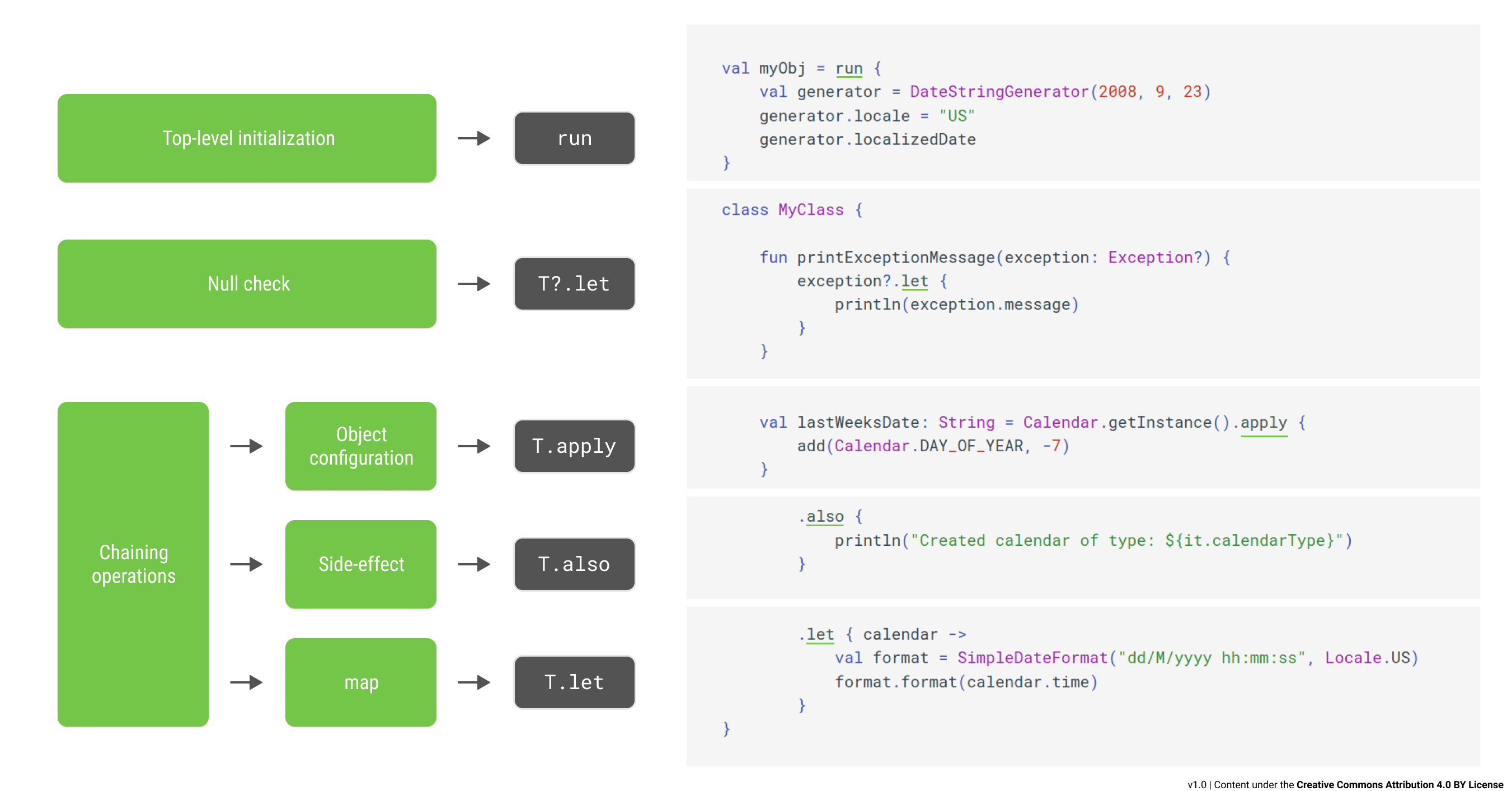
Quick Recap

The return values and how the receivers are referenced in the lambda

The function apply configures or builds objects

The function also executes side-effects on objects

The function run transforms its receiver into a value of another type

The function let transforms a nullable property of a class into a value of another type

The function with helps you avoid writing the same receiver over and over again

- Bonus Points -

There are few more Standard Library Kotlin functions defined besides the five we talked about just now. Here is a short list of the other ones:

inline fun **TODO**(reason: String = " ... ") : Nothing
Todo throws an exception with the provided, but optional, reason. If we forget to implement a piece of code and don’t remove this todo, our app may crash.

inline fun **repeat**(times: Int, action: (Int) -> Unit): Unit
Repeat calls the provided action a given number of times. We can write less code using repeat instead of a for loop.

inline fun <T> T.**takeIf**(predicate: (T) -> Boolean) : T?
TakeIf returns the receiver if the predicate returns true, otherwise it returns null. It is an alternative to an if (...)expression.

inline fun <T> T.**takeUnless**(predicate: (T) -> Boolean) : T?
TakeUnless returns the receiver if the predicate returns false, otherwise it returns null. It is an alternative to an if(**!**...) expression.

If we need to code something like if (long...expression.predicate()), we may need to repeat the long expression again in the then or else clause. Use TakeIf or TakeUnless to avoid this repetition.

参考:

https://blog.csdn.net/u013064109/article/details/78786646

https://medium.com/the-kotlin-chronicle/lets-also-apply-a-run-with-kotlin-on-our-minds-56f12eaef5e3

作用域函数:let、apply、with、run、also

https://juejin.im/post/6856954554718617614

Parameter type must not include a type variable or wildcard: java.util.Map<java.lang.String, ? extends okhttp3.RequestBody>

Android (kotlin 开发) 应用访问接口,出现如下错误:

1
2
java.lang.IllegalArgumentException: Parameter type must not include a type variable or wildcard: java.util.Map<java.lang.String, ? extends okhttp3.RequestBody> (parameter #1)
for method StoryService.addStory

接口:

1
2
3
@Multipart
@POST("story")
fun addStory(@PartMap params: Map<String, RequestBody>): Call<Story>

解决办法,在 RequestBody 前添加注解 @JvmSuppressWildcards

1
2
3
@Multipart
@POST("story")
fun addStory(@PartMap params: Map<String, @JvmSuppressWildcards RequestBody>): Call<Story>

参考:

https://stackoverflow.com/questions/45785874/multipart-request-with-retrofit-partmap-error-in-kotlin-android