How to enable logging in OkHttp ?

Ever had some bad issues, while doing an API call in your android application? Or may be got some error which was making your API call unsuccessful.

What did you try?

First resort would have been to try API calls through some client that what was the error. Or may be something else you would have tried.

What if I told you that you could have chosen something else as well and that would have not required you to test APIs via some client.

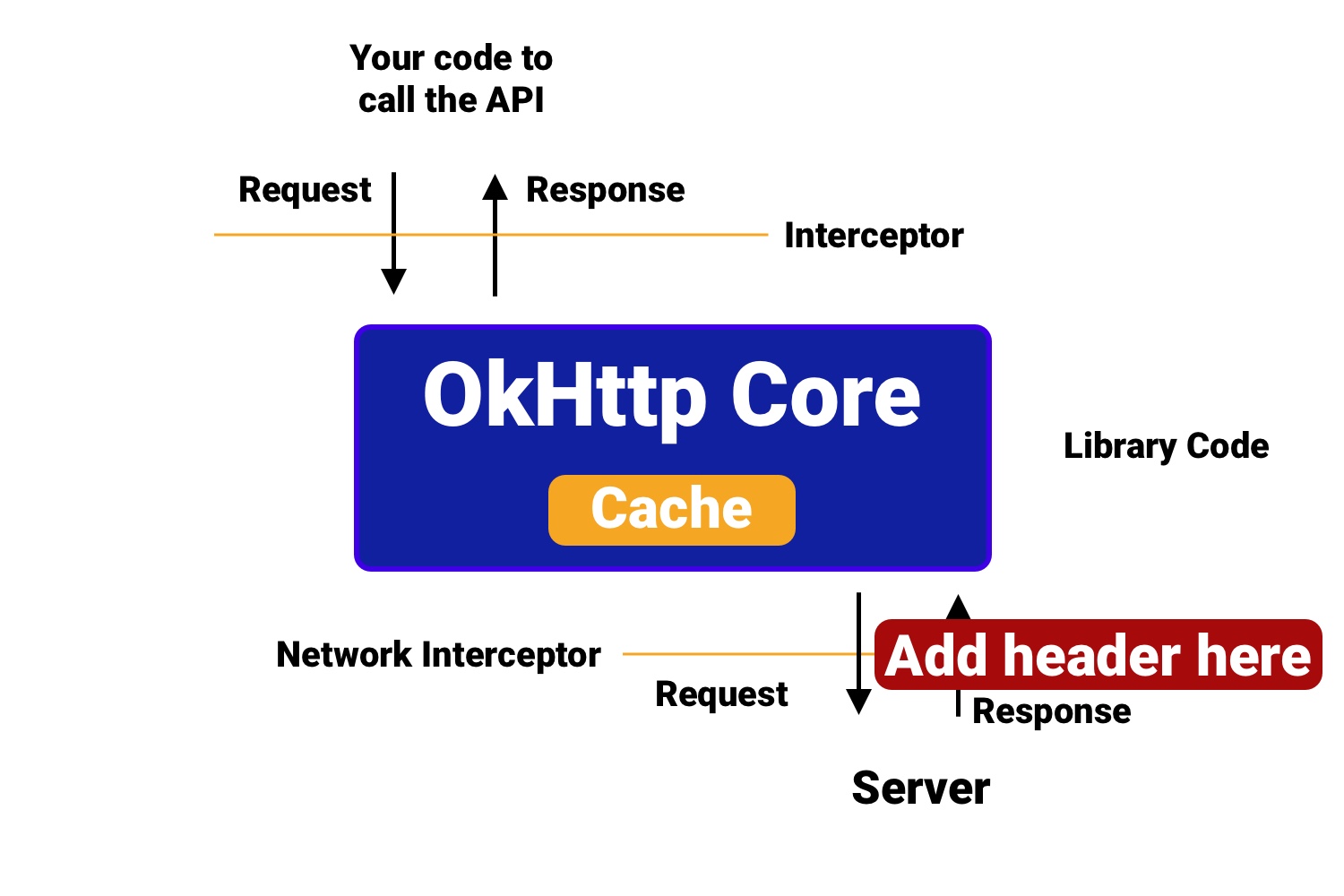
You can use Interceptors in your android code to gets the logs their itself while getting an error. This sounds a better solution right?

Let’s understand more about logging in Android. So, in this, we will discuss about okhttp logging interceptor and how we can leverage it log our API calls.

What is OkHttp?

OkHttp is an interceptor which helps you to log your API calls. So, here an interceptor is more like a manager for an API call which helps you to monitor or perform certain action on your API calls.

Let us start by including it in our project, we will add the following in the build.gradle file:

1
implementation "com.squareup.okhttp3:logging-interceptor:4.0.1"

and to start logging your API calls, we need to first make an API call,

1
2
3
4
val client = OkHttpClient.Builder()
var request = Request.Builder()
.url(/** YOUR API URL **/)
.build()

Here, we create object for request and declared a variable client of OkHttpClient. Now, to perform API call, we will use the following to do it,

1
2
3
4
5
6
7
8
9
10
client.newCall(request).enqueue(object :Callback{
override fun onFailure(request: Request?, e: IOException?) {
//API Call fails
}

override fun onResponse(response: Response?) {
//Do something with response
}

})

Now, we have performed the first API call. But here we would not see any logs coming up because we have not added any specific interceptor to log the calls. So, how can we log the response the call.

To, start logging we need to add interceptors in the above OkHttpClient.

And as we mentioned , interceptors are used to monitor the API call and it will print the logs which would get generated, in the Logcat of the console.

To add a Interceptor,

1
2
val logging = HttpLoggingInterceptor()
logging.level = (HttpLoggingInterceptor.Level.BASIC)

we create and variable called logging of HttpLoggingInterceptor and set the level of logging to *Basic.* Basic is the initial level in which you can just log reqest and the response of the API. We can also have NONE, HEADERS and BODY.

*NONE : Logs Nothing.*

*HEADERS : Logs Request and Response along with Header.*

*BODY : Logs Request and Response along with header and if body present in the API call.*

And, to add this interceptor to the client we use,

1
2
val client = OkHttpClient.Builder()
client.addInterceptor(logging)

and, now when we call the API again we would start seeing the logs getting logged in the Logcat like the following,

1
2
3
--> POST /greeting http/1.1 (3-byte body)

<-- 200 OK (22ms, 6-byte body)

NOTE :

\1. To add a custom TAG for your or logs to get generated, just add the following,

1
2
3
4
5
val logging = HttpLoggingInterceptor(object : Logger() {
fun log(message: String) {
Log.d("YOUR TAG", message)
}
})

and you will see the logs getting generated with the TAG you added.

\2. You can also create a custom Interceptor by extending the Interceptor class.

1
2
3
4
5
6
7
8
class CustomInterceptor : Interceptor {
override fun intercept(chain: Interceptor.Chain): Response {
var request = chain.request()
request = request.newBuilder()
.build()
return chain.proceed(request)
}
}

and add it to the client using,

1
2
val client = OkHttpClient.Builder()
client.addInterceptor(CustomInterceptor())

\3. To hide sensative information from the Logcat of Android we can use,

1
2
logging.redactHeader("Authorization")
logging.redactHeader("Cookie")

Here, in above snippet redactHeader hides the sensitive information of Authorization and Cookie key.

These gets generated only in HEADERS and BODY level.

This is how we can log API calls being made in your Android application.

Oracle 查看某个账户下的表、视图

select * from all_tab_comments – 查询所有用户的表,视图等。

select * from user_tab_comments – 查询本用户的表,视图等。

select * from all_col_comments –查询所有用户的表的列名和注释。

select * from user_col_comments – 查询本用户的表的列名和注释。

select * from all_tab_columns –查询所有用户的表的列名等信息。

select * from user_tab_columns –查询本用户的表的列名等信息。

扩展资料

ORACLE下有三个视图

DBA_TABLES 拥有DBA角色的用户可以查看系统中的所有表

USER_TABLES 登录数据库的当前用户拥有的所有表

ALL_TABLES 登录数据库的当前用户有权限查看的所有表

参考资料:百度百科-Oracle

来源:

https://zhidao.baidu.com/question/2011096311632088908.html

ErrorException : symlink(): Input/output error

在 Windows 10 环境下, 项目中 php artisan storage:link 命令生成软连接,但是访问时总是提示 404 错误,于是远程到 homestead 环境创建软连接:

1
2
3
4
5
6
7
vagrant up

vagrant ssh

cd 项目

php artisan storage:link`

出现如下错误:

1
2
3
4
5
6
7
8
9
10
11
12
13
14
15
16
17
18
19
ErrorException  : symlink(): Input/output error

at /home/vagrant/code/lsapp/vendor/laravel/framework/src/Illuminate/Filesystem/Filesystem.php:228
224| */
225| public function link($target, $link)
226| {
227| if (! windows_os()) {
> 228| return symlink($target, $link);
229| }
230|
231| $mode = $this->isDirectory($target) ? 'J' : 'H';
232|

Exception trace:

1 symlink("/home/vagrant/code/lsapp/storage/app/public", "/home/vagrant/code/lsapp/public/storage")
/home/vagrant/code/lsapp/vendor/laravel/framework/src/Illuminate/Filesystem/Filesystem.php:228

2 Illuminate\Filesystem\Filesystem::link("/home/vagrant/code/lsapp/storage/app/public", "/home/vagrant/code/lsapp/public/storage")

https://laracasts.com/discuss/channels/laravel/symlink-inputouput-error 这里有讨论;用 ln 命令创建还是会报错,

最终,解决方案参照

https://www.cnblogs.com/youji-relog/p/11551532.html

亲测可行。

composer update: Discard changes [y,n,v,d,s,?]?

composer update 出现如下错误:

1
2
3
4
Package operations: 3 installs, 26 updates, 0 removals
- Updating nesbot/carbon (2.27.0 => 2.28.0): The package has modified files:
M bin/carbon
Discard changes [y,n,v,d,s,?]?

y - discard changes and apply the update

n - abort the update and let you manually clean things up

v - view modified files d - view local modifications (diff)

s - stash changes and try to reapply them after the update

查看源码:

https://github.com/composer/composer/blob/master/src/Composer/Downloader/GitDownloader.php#L269-L310

可选择 y, 然后运行 composer require nesbot/carbon --prefer-dist 重新安装。

参考:

https://www.e-learn.cn/content/wangluowenzhang/604410

proc_open(): fork failed - Cannot allocate memory

执行 composer update 出现如下错误:

1
2
3
4
5
6
7
8
Updates: symfony/service-contracts:v2.0.1, symfony/mime:v5.0.2, symfony/css-selector:v5.0.2, symfony/translation-contracts:v2.0.1
- Updating symfony/service-contracts (v1.1.8 => v2.0.1): The following exception is caused by a lack of memory or swap, or not having swap configured
Check https://getcomposer.org/doc/articles/troubleshooting.md#proc-open-fork-failed-errors for details

In Process.php line 344:

[ErrorException]
proc_open(): fork failed - Cannot allocate memory

这一般是出现在低内存的虚拟主机上,解决如下,配置交换内存:

1
2
3
/bin/dd if=/dev/zero of=/var/swap.1 bs=1M count=1024
/sbin/mkswap /var/swap.1
/sbin/swapon /var/swap.1

https://getcomposer.org/doc/articles/troubleshooting.md#proc-open-fork-failed-errors

https://segmentfault.com/a/1190000012533758

can not read a block mapping entry; a multiline key may not be an implicit key

1
2
3
4
5
6
7
8
9
10
11
12
13
14
15
16
17
18
19
20
21
22
23
24
25
YAMLException: can not read a block mapping entry; a multiline key may not be an implicit key at line 2, column 5:
date: 2019-08-21 17:19:49
^
at generateError (F:\Document\Blog\helloword\node_modules\js-yaml\lib\js-yaml\loader.js:167:10)
at throwError (F:\Document\Blog\helloword\node_modules\js-yaml\lib\js-yaml\loader.js:173:9)
at readBlockMapping (F:\Document\Blog\helloword\node_modules\js-yaml\lib\js-yaml\loader.js:1073:9)
at composeNode (F:\Document\Blog\helloword\node_modules\js-yaml\lib\js-yaml\loader.js:1359:12)
at readDocument (F:\Document\Blog\helloword\node_modules\js-yaml\lib\js-yaml\loader.js:1519:3)
at loadDocuments (F:\Document\Blog\helloword\node_modules\js-yaml\lib\js-yaml\loader.js:1575:5)
at Object.load (F:\Document\Blog\helloword\node_modules\js-yaml\lib\js-yaml\loader.js:1596:19)
at parseYAML (F:\Document\Blog\helloword\node_modules\hexo-front-matter\lib\front_matter.js:80:21)
at parse (F:\Document\Blog\helloword\node_modules\hexo-front-matter\lib\front_matter.js:56:12)
at Promise.all.spread (F:\Document\Blog\helloword\node_modules\hexo\lib\plugins\processor\post.js:48:20)
at tryCatcher (F:\Document\Blog\helloword\node_modules\bluebird\js\release\util.js:16:23)
at Promise._settlePromiseFromHandler (F:\Document\Blog\helloword\node_modules\bluebird\js\release\promise.js:509:35)
at Promise._settlePromise (F:\Document\Blog\helloword\node_modules\bluebird\js\release\promise.js:569:18)
at Promise._settlePromise0 (F:\Document\Blog\helloword\node_modules\bluebird\js\release\promise.js:614:10)
at Promise._settlePromises (F:\Document\Blog\helloword\node_modules\bluebird\js\release\promise.js:694:18)
at Promise._fulfill (F:\Document\Blog\helloword\node_modules\bluebird\js\release\promise.js:638:18)
at PromiseArray._resolve (F:\Document\Blog\helloword\node_modules\bluebird\js\release\promise_array.js:126:19)
at PromiseArray._promiseFulfilled (F:\Document\Blog\helloword\node_modules\bluebird\js\release\promise_array.js:144:14)
at PromiseArray._iterate (F:\Document\Blog\helloword\node_modules\bluebird\js\release\promise_array.js:114:31)
at PromiseArray.init [as _init] (F:\Document\Blog\helloword\node_modules\bluebird\js\release\promise_array.js:78:10)
at Promise._settlePromise (F:\Document\Blog\helloword\node_modules\bluebird\js\release\promise.js:566:21)
at Promise._settlePromise0 (F:\Document\Blog\helloword\node_modules\bluebird\js\release\promise.js:614:10)

原因: 标题中有方括号,本来想加 [转载] 几个字,居然编译不成功

创建 Vue 项目

1
vue create <Project Name> //文件名 不支持驼峰(含大写字母)

如果使用 Git Bash ,则使用如下命令:

1
winpty vue.cmd create <Project Name>
1
2
3
4
5
6
7
8
9
10
11
? Check the features needed for your project: (Press <space> to select, <a> to toggle all, <i> to invert selection)
>( ) Babel //转码器,可以将ES6代码转为ES5代码,从而在现有环境执行。
( ) TypeScript // TypeScript是一个JavaScript(后缀.js)的超集(后缀.ts)包含并扩展了 JavaScript 的语法,需要被编译输出为 JavaScript在浏览器运行,
目前较少人再用
( ) Progressive Web App (PWA) Support// 渐进式Web应用程序
( ) Router // vue-router(vue路由)
( ) Vuex // vuex(vue的状态管理模式)
( ) CSS Pre-processors // CSS 预处理器(如:less、sass)
( ) Linter / Formatter // 代码风格检查和格式化(如:ESlint)
( ) Unit Testing // 单元测试(unit tests)
( ) E2E Testing // e2e(end to end) 测试

①是否使用history router:

Vue-Router 利用了浏览器自身的hash 模式和 history 模式的特性来实现前端路由(通过调用浏览器提供的接口)

hash: 浏览器url址栏 中的 # 符号(如这个 URL:http://www.abc.com/#/hello,hash 的值为” #/hello”),hash 不被包括在 HTTP 请求中(对后端完全没有影响),因此改变 hash 不会重新加载页面

history:利用了 HTML5 History Interface 中新增的 pushState( ) 和 replaceState( ) 方法(需要特定浏览器支持)。单页客户端应用,history mode 需要后台配置支持(详细参见:https://router.vuejs.org/zh/guide/essentials/history-mode.html)

② css预处理器主要为css解决浏览器兼容、简化CSS代码 等问题(*Sass诞生于2007年,最早也是最成熟的一款CSS预处理器语言。)

1
2
3
4
5
6
7
8
9
10
11
? Please pick a preset: Manually select features

? Check the features neededforyour project: Router, Vuex, CSS Pre-processors, Linter, Unit

? Pick a CSS pre-processor (PostCSS, Autoprefixer and CSS Modules are supported bydefault):

> SCSS/SASS //Sass安装需要Ruby环境,是在服务端处理的,SCSS 是 Sass3新语法(完全兼容 CSS3且继承Sass功能)
LESS //Less最终会通过编译处理输出css到浏览器,Less 既可以在客户端上运行,
//也可在服务端运行 (借助 Node.js)
Stylus //Stylus主要用来给Node项目进行CSS预处理支持,Stylus功能上更为强壮,
//和js联系更加紧密,可创建健壮的、动态的的CSS。

③ ESLint:提供一个插件化的javascript代码检测工具

1
2
3
4
5
? Pick a linter / formatter config: (Use arrow keys)
> ESLintwitherror prevention only
ESLint + Airbnb config
ESLint + Standard config
ESLint + Prettier //使用较多

④ 何时检测:

1
2
3
? Pick additional lint features: (Press <space> to select, <a> to toggle all, <i> to invert selection)
>( ) Lint on save // 保存就检测
( ) Lint and fix on commit // fix和commit时候检查

⑤ 单元测试 :

1
2
? Pick a unit testing solution: (Use arrow keys)
> Mocha + Chai //mocha灵活,只提供简单的测试结构,如果需要其他功能需要添加其他库/插件完成。必须在全局环境中安装 Jest //安装配置简单,容易上手。内置Istanbul,可以查看到测试覆盖率,相较于Mocha:配置简洁、测试代码简 洁、易于和babel集成、内置丰富的expect

⑥ 如何存放配置 :

1
2
3
? Wheredoyou prefer placing configforBabel, PostCSS, ESLint, etc.? (Use arrow keys)
> In dedicated config files // 独立文件放置
In package.json // 放package.json里

⑦ 是否保存本次配置(之后可以直接使用):

1
? Savethisasa presetforfuture projects? (Y/n)  // y:记录本次配置,然后需要你起个名; n:不记录本次配置

Vue 配置

1、在 package.json 中配置

2、在根目录,新建 vue.config.js

1
2
3
4
5
modeule.exports = {
devServer: {
port: 8888
}
}

示例:

1
2
3
4
5
6
7
8
9
10
11
12
13
14
15
16
17
18
19
20
21
22
23
24
25
26
27
28
29
30
31
32
33
34
35
36
37
38
39
40
41
42
43
44
module.exports = {
baseUrl: '/', // 部署应用时的根路径(默认'/'),也可用相对路径(存在使用限制)
outputDir: 'dist', // 运行时生成的生产环境构建文件的目录(默认''dist'',构建之前会被清除)
assetsDir: '', //放置生成的静态资源(s、css、img、fonts)的(相对于 outputDir 的)目录(默认'')
indexPath: 'index.html',//指定生成的 index.html 的输出路径(相对于 outputDir)也可以是一个绝对路径。
pages: { //pages 里配置的路径和文件名在你的文档目录必须存在 否则启动服务会报错
index: { //除了 entry 之外都是可选的
entry: 'src/index/main.js', // page 的入口,每个“page”应该有一个对应的 JavaScript 入口文件
template: 'public/index.html', // 模板来源
filename: 'index.html', // 在 dist/index.html 的输出
title: 'Index Page', // 当使用 title 选项时,在 template 中使用:<title><%= //htmlWebpackPlugin.options.title %></title>
chunks: ['chunk-vendors', 'chunk-common', 'index'] // 在这个页面中包含的块,默认情况下会包含,提取出来的通用 chunk 和 vendor chunk
},
subpage: 'src/subpage/main.js'//官方解释:当使用只有入口的字符串格式时,模板会被推导为'public/subpage.html',若找不到就回退到'public/index.html',输出文件名会被推导为'subpage.html'
},
lintOnSave: true,// 是否在保存的时候检查
productionSourceMap: true,// 生产环境是否生成 sourceMap 文件
css: {
extract: true,// 是否使用css分离插件 ExtractTextPlugin
sourceMap: false,// 开启 CSS source maps
loaderOptions: {},// css预设器配置项
modules: false// 启用 CSS modules for all css / pre-processor files.
},
devServer: {// 环境配置
host: 'localhost',
port: 8080,
https: false,
hotOnly: false,
open: true, //配置自动启动浏览器
proxy: {// 配置多个代理(配置一个 proxy: 'http://localhost:4000' )
'/api': {
target: '<url>',
ws: true,
changeOrigin: true
},
'/foo': {
target: '<other_url>'
}
}
},
pluginOptions: {// 第三方插件配置
// ...
}
};

3、 babel.config.js

Mysql 8 安装

Mysql 8 安装

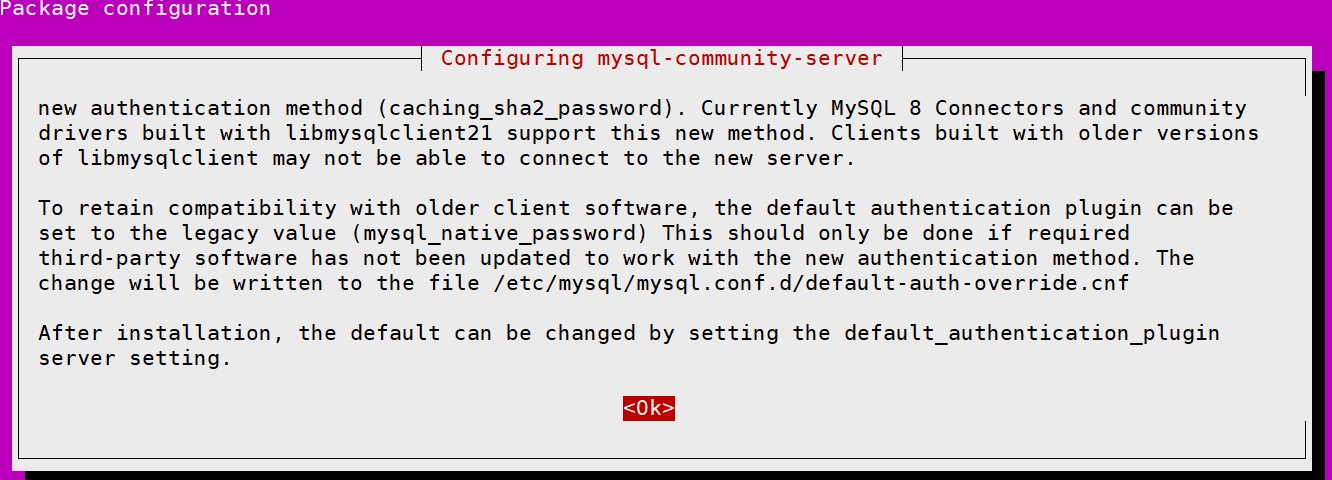
Ubuntu 20.04 可运行 sudo apt isntall mysql-server 命令直接安装。

1
2
CREATE USER 'pma'@'localhost' IDENTIFIED WITH caching_sha2_password BY 'pmapass';
GRANT SELECT, INSERT, UPDATE, DELETE ON <pma_db>.* TO 'pma'@'localhost';

下载:

https://dev.mysql.com/downloads/

https://dev.mysql.com/downloads/mysql/

文档:

https://dev.mysql.com/doc/refman/8.0/en/

https://dev.mysql.com/doc/refman/8.0/en/binary-installation.html

https://dev.mysql.com/doc/mysql-apt-repo-quick-guide/en/

安装(https://dev.mysql.com/doc/refman/8.0/en/binary-installation.html#binary-installation-layout):

推荐安装在 /usr/local 目录

1
2
3
4
5
6
7
8
9
10
11
12
13
14
15
16
17
18
19
20
21
22
23
24
25
26
27
28
29
tar -xvf  mysql_8.tar.xz //解压 tar.xz 文件

mv mysql_8 mysql //重命名

cd mysql

mkdir data //数据目录

groupadd mysql
useradd mysql -g mysql

chown mysql:mysql data


bin/mysqld --initialize --user=mysql --datadir /usr/local/mysql/data // 生成 root 用户的初始密码

cp support-files/mysql.server /etc/init.d/

vi .bash_profile //编辑环境变量
:/usr/local/mysql/bin //在 PATH 后添加

source .bash_profile


mysql -u root -p

//修改初始密码
//5.7 set password=password('密码');
alter user user() identified by '密码';

https://www.cnblogs.com/keme/p/10288168.html

APT 安装:

https://blog.csdn.net/wm609972715/article/details/83759266

如何在Ubuntu 18.04中安装MySQL 8.0数据库服务器_数据库技术_Linux公社-Linux系统门户网站 (linuxidc.com)

Ubuntu中更改MySQL数据库文件目录:

1
2
3
4
5
6
7
8
9
service mysql stop

cd /media/data
cp -a /var/lib/mysql /mysql

# 修改配置文件
vi /etc/mysql/mysql.conf.d/mysqld.cnf
# 修改 datadir
datadir = /media/data/mysql
1
2
3
4
5
6
vim /etc/apparmor.d/usr.sbin.mysqld

# /var/lib/mysql r, 修改为
/media/data/mysql r,
# /var/lib/mysql/** rwk, 修改为
/data/media/mysql/** rwk,
1
2
service apparmor restart
service mysql restart

https://www.jb51.net/article/150089.htm

7 Pro-tips for Room

1. Pre-populate the database

Do you need to add default data to your database, right after it was created or when the database is opened? Use RoomDatabase#Callback! Call the addCallback method when building your RoomDatabase and override either onCreate or onOpen.

onCreate will be called when the database is created for the first time, after the tables have been created. onOpen is called when the database was opened. Since the DAOs can only be accessed once these methods return, we‘re creating a new thread where we’re getting a reference to the database, get the DAO, and then insert the data.

1
2
3
4
5
6
7
8
9
10
11
12
13
14
Room.databaseBuilder(context.applicationContext,
DataDatabase::class.java, "Sample.db")
// prepopulate the database after onCreate was called
.addCallback(object : Callback() {
override fun onCreate(db: SupportSQLiteDatabase) {
super.onCreate(db)
// moving to a new thread
ioThread {
getInstance(context).dataDao()
.insert(PREPOPULATE_DATA)
}
}
})
.build()

See a full example here.

Note: When using the ioThread approach, if your app crashes at the first launch, in between database creation and insert, the data will never be inserted.

2. Use DAO’s inheritance capability

Do you have multiple tables in your database and find yourself copying the same Insert, Update and Delete methods? DAOs support inheritance, so create aBaseDaoclass, and define your generic @Insert, @Update and @Delete methods there. Have each DAO extend the BaseDao and add methods specific to each of them.

1
2
3
4
5
6
7
8
9
interface BaseDao<T> {
@Insert
fun insert(vararg obj: T)
}
@Dao
abstract class DataDao : BaseDao<Data>() {
@Query("SELECT * FROM Data")
abstract fun getData(): List<Data>
}

See more details here.

The DAOs have to be interfaces or abstract classes because Room generates their implementation at compile time, including the methods from BaseDao.

3. Execute queries in transactions with minimal boilerplate code

Annotating a method with @Transaction makes sure that all database operations you’re executing in that method will be run inside one transaction. The transaction will fail when an exception is thrown in the method body.

1
2
3
4
5
6
7
8
9
10
11
12
13
@Dao
abstract class UserDao {

@Transaction
open fun updateData(users: List<User>) {
deleteAllUsers()
insertAll(users)
}
@Insert
abstract fun insertAll(users: List<User>)
@Query("DELETE FROM Users")
abstract fun deleteAllUsers()
}

You might want to use the @Transaction annotation for @Query methods that have a select statement, in the following cases:

  • When the result of the query is fairly big. By querying the database in one transaction, you ensure that if the query result doesn’t fit in a single cursor window, it doesn’t get corrupted due to changes in the database between cursor window swaps.
  • When the result of the query is a POJO with @Relation fields. The fields are queries separately so running them in a single transaction will guarantee consistent results between queries.

@Delete, @Update and @Insert methods that have multiple parameters are automatically run inside a transaction.

4. Read only what you need

When you’re querying the database, do you use all the fields you return in your query? Take care of the amount of memory used by your app and load only the subset of fields you will end up using. This will also improve the speed of your queries by reducing the IO cost. Room will do the mapping between the columns and the object for you.

Consider this complex User object:

1
2
3
4
5
6
7
8
9
@Entity(tableName = "users")
data class User(@PrimaryKey
val id: String,
val userName: String,
val firstName: String,
val lastName: String,
val email: String,
val dateOfBirth: Date,
val registrationDate: Date)

On some screens we don’t need to display all of this information. So instead, we can create a UserMinimal object that holds only the data needed.

1
2
3
data class UserMinimal(val userId: String,
val firstName: String,
val lastName: String)

In the DAO class, we define the query and select the right columns from the users table.

1
2
3
4
5
@Dao
interface UserDao {
@Query(“SELECT userId, firstName, lastName FROM Users)
fun getUsersMinimal(): List<UserMinimal>
}

5. Enforce constraints between entities with foreign keys

Even though Room doesn’t directly support relations, it allows you to define Foreign Key constraints between entities.

Room has the @ForeignKey annotation, part of the @Entity annotation, to allow using the SQLite foreign key features. It enforces constraints across tables that ensure the relationship is valid when you modify the database. On an entity, define the parent entity to reference, the columns in it and the columns in the current entity.

Consider a User and a Pet class. The Pet has an owner, which is a user id referenced as foreign key.

1
2
3
4
5
6
7
8
@Entity(tableName = "pets",
foreignKeys = arrayOf(
ForeignKey(entity = User::class,
parentColumns = arrayOf("userId"),
childColumns = arrayOf("owner"))))
data class Pet(@PrimaryKey val petId: String,
val name: String,
val owner: String)

Optionally, you can define what action to be taken when the parent entity is deleted or updated in the database. You can choose one of the following: NO_ACTION, RESTRICT, SET_NULL, SET_DEFAULT or CASCADE, that have same behaviors as in SQLite.

Note: In Room, SET_DEFAULT works as SET_NULL, as Room does not yet allow setting default values for columns.

6. Simplify one-to-many queries via @Relation

In the previousUser-Pet example, we can say that we have a one-to-many relation: a user can have multiple pets. Let’s say that we want to get a list of users with their pets: List.

1
2
data class UserAndAllPets (val user: User,
val pets: List<Pet> = ArrayList())

To do this manually, we would need to implement 2 queries: one to get the list of all users and another one to get the list of pets based on a user id.

1
2
3
4
@Query(“SELECT * FROM Users”)
public List<User> getUsers();
@Query(“SELECT * FROM Pets where owner = :userId”)
public List<Pet> getPetsForUser(String userId);

We would then iterate through the list of users and query the Pets table.

To make this simpler, Room’s @Relation annotation automatically fetches related entities. @Relation can only be applied to a List or Set of objects. The UserAndAllPets class has to be updated:

1
2
3
4
5
6
7
class UserAndAllPets {
@Embedded
var user: User? = null
@Relation(parentColumn = “userId”,
entityColumn = “owner”)
var pets: List<Pet> = ArrayList()
}

In the DAO, we define a single query and Room will query both the Users and the Pets tables and handle the object mapping.

1
2
3
@Transaction
@Query(“SELECT * FROM Users”)
List<UserAndAllPets> getUsers();

7. Avoid false positive notifications for observable queries

Let’s say that you want to get a user based on the user id in an observable query:

1
2
3
4
5
@Query(“SELECT * FROM Users WHERE userId = :id)
fun getUserById(id: String): LiveData<User>
// or
@Query(“SELECT * FROM Users WHERE userId = :id)
fun getUserById(id: String): Flowable<User>

You’ll get a new emission of the User object whenever that user updates. But you will also get the same object when other changes (deletes, updates or inserts) occur on the Users table that have nothing to do with the User you’re interested in, resulting in false positive notifications. Even more, if your query involves multiple tables, you’ll get a new emission whenever something changed in any of them.

Here’s what’s going on behind the scenes:

  1. SQLite supports triggers that fire whenever a DELETE, UPDATE or INSERT happens in a table.
  2. Room creates an InvalidationTracker that uses Observers that track whenever something has changed in the observed tables.
  3. Both LiveData and Flowable queries rely on the InvalidationTracker.Observer#onInvalidated notification. When this is received, it triggers a re-query.

Room only knows that the table has been modified but doesn’t know why and what has changed. Therefore, after the re-query, the result of the query is emitted by the LiveData or Flowable. Since Room doesn’t hold any data in memory and can’t assume that objects have equals(), it can’t tell whether this is the same data or not.

You need to make sure that your DAO filters emissions and only reacts to distinct objects.

If the observable query is implemented using Flowables, use Flowable#distinctUntilChanged.

1
2
3
4
5
6
7
8
9
10
11
12
@Dao
abstract class UserDao : BaseDao<User>() {
/**
* Get a user by id.
* @return the user from the table with a specific id.
*/
@Query(“SELECT * FROM Users WHERE userid = :id”)
protected abstract fun getUserById(id: String): Flowable<User>
fun getDistinctUserById(id: String):
Flowable<User> = getUserById(id)
.distinctUntilChanged()
}

If your query returns a LiveData, you can use a MediatorLiveData that only allows distinct object emissions from a source.

1
2
3
4
5
6
7
8
9
10
11
12
13
14
15
16
17
18
19
fun <T> LiveData<T>.getDistinct(): LiveData<T> {
val distinctLiveData = MediatorLiveData<T>()
distinctLiveData.addSource(this, object : Observer<T> {
private var initialized = false
private var lastObj: T? = null
override fun onChanged(obj: T?) {
if (!initialized) {
initialized = true
lastObj = obj
distinctLiveData.postValue(lastObj)
} else if ((obj == null && lastObj != null)
|| obj != lastObj) {
lastObj = obj
distinctLiveData.postValue(lastObj)
}
}
})
return distinctLiveData
}

In your DAOs, make method that returns the distinct LiveData public and the method that queries the database protected.

1
2
3
4
5
6
7
@Dao
abstract class UserDao : BaseDao<User>() {
@Query(“SELECT * FROM Users WHERE userid = :id”)
protected abstract fun getUserById(id: String): LiveData<User>
fun getDistinctUserById(id: String):
LiveData<User> = getUserById(id).getDistinct()
}

See more of the code here.

Note: if you’re returning a list to be displayed, consider using the Paging Library and returning a LivePagedListBuilder since the library will help with automatically computing the diff between list items and updating your UI.

来源:

https://medium.com/androiddevelopers/7-pro-tips-for-room-fbadea4bfbd1

翻译:

https://baijiahao.baidu.com/s?id=1626702427361302777&wfr=spider&for=pc