Laravel 入门:19-任务调度

项目中有时需要定期执行一些周期性的任务,比如数据备份、清楚日志等,Laravel 的命令行调度器允许你在 Laravel 中清晰明了地定义命令调度。

新建命令行调度器:

1
php artisan make:command Backup

编辑 app/Console/Commands/Backup.php

1
2
3
4
5
6
7
8
9
10
11
12
13
14
15
16
17
18
19
20
21
22
23
24
25
26
27
28
29
30
31
<?php

namespace App\Console\Commands;

use Illuminate\Console\Command;
use Illuminate\Support\Facades\Log;

class Backup extends Command
{
/**
* 命名,格式为 command:name
*
* @var string
*/
protected $signature = 'backup:run';

/**
* 描述
*
* @var string
*/
protected $description = '项目备份';

public function handle()
{
// TODO 备份数据库、备份上传的附件等
Log::info('测试 backup:run');
return Command::SUCCESS;
}
}

app/Console/Kernel.php 中注册:

1
2
3
4
5
6
7
8
9
10
11
12
13
14
15
<?php

namespace App\Console;

use Illuminate\Console\Scheduling\Schedule;
use Illuminate\Foundation\Console\Kernel as ConsoleKernel;

class Kernel extends ConsoleKernel
{
protected function schedule(Schedule $schedule)
{
// 每小时备份一次数据
$schedule->command('back:up')->hourly();
}
}

使用服务器的定时命令 cron 运行 php artisan schedule:run,在你的服务器端配置, 例如:

1
* * * * * cd /home/vagrant/code/laravel-demo && php artisan schedule:run >> /dev/null 2>&1

每分钟运行一次 php artisan schedule:run 命令。

通过命令 php artisan schedule:list 查看注册的定时任务:

Demo:https://github.com/hefengbao/laravel-demo

Laravel 入门:20-文件系统

Laravel 文件系统提供了多种驱动,参考 config/filesystems.php 配置中的说明,并提供统一的访问、操作 API,开发人员可以方便快速的切换存储选项。

Laravel 默认配置的驱动有三种:localpublics3。其中 localpublic 是本地存储,其中 local 存储目录是 storage/app/public 存储目录是 storage/app/public/,如果选择本地存储并且文件可通过网络访问,则应该选择 public 驱动;s3 是远程存储,适用于 Amazon S3 兼容文件系统,比如国外的 Amazon S3,开源的 MinIO,国内的阿里 OSS 等。本文中主要介绍使用 public 驱动的本地存储,首先使用 Artisan 命令 storage:link 来创建符号链接:

1
php artisan storage:link

该命令创建从 public/storagestorage/app/public 的符号链接。

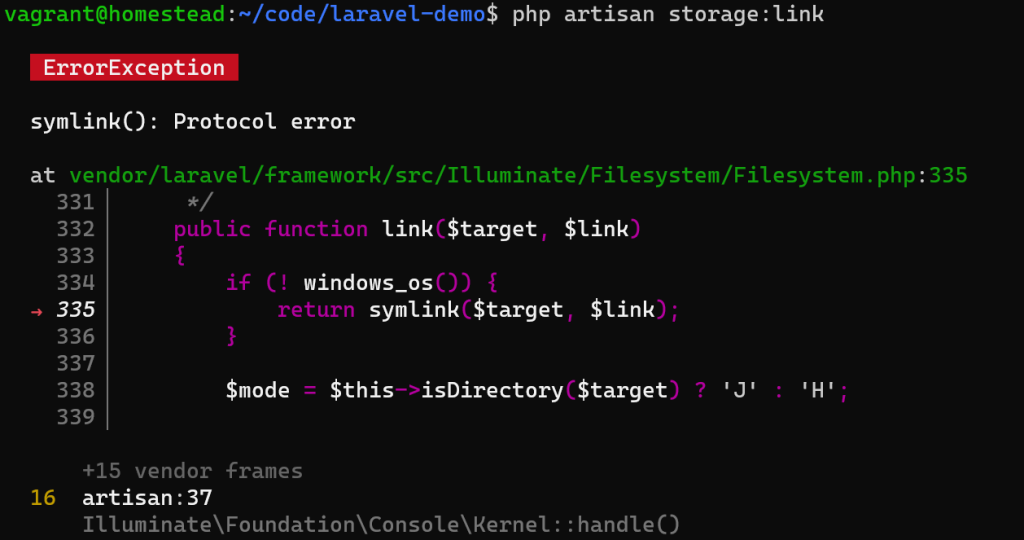
使用 Windows 操作系统和 Homestead, 如果遇到以下问题:

请以管理员身份运行终端(命令提示符cmd, Git Bash, Power Shell):

文件存储在实际项目中主要用于保存用户上传的文件(诸如头像、图片、文件等),保存文件的几种写法:

1
2
3
4
5
6
7
8
9
10
11
12
13
14
15
16
17
18
19
20
21
22
23
24
25
26
27
28
29
30
31
32
33
34
35
36
37
38
39
40
41
<?php

namespace App\Http\Controllers;

use Illuminate\Support\Facades\Storage;
use Illuminate\Support\Str;

class UserController extends Controller
{
public function avatar(Request $request)
{
/*
* store 方法:
* 参数1:指定目录
* 参数2:指定驱动
*
* 该方法将生成一个唯一的 ID 作为文件名
*
* 文件存储在 storage/app/public/avatars/ 目录下
*/
$path = $request->file('avatar')->store('avatars', 'public');

/*
* store 方法:
* 参数1:指定目录
* 参数2:指定文件名
* 参数3:指定驱动
*
* 文件存储在 storage/app/public/avatars/ 目录下
*/
$path = $request->file('avatar')->storeAs('avatars', Str::random().'.jpg','public');


$path = Storage::putFile('avatars', $request->file('avatar'), 'public');

$path = Storage::putFileAs('avatars', $request->file('avatar'), Str::random().'.jpg', 'public');


$url = Storage::disk('public')->url($path);
}
}

本篇文章可参考文档中的『文件存储』和『请求』中的文件上传部分学习。

Demo:https://github.com/hefengbao/laravel-demo

Laravel 入门:22-用户认证

laravel/ui 提供了认证相关的脚手架(Scaffold),使用 Artisan 命令快速实现相关功能:

1
php artisan ui bootstrap --auth

可在 app/Http/Controllers/Auth 目录下查看相关控制器 、在 resources/views/auth 目录下查看相关视图, 同时在 routes/web.php 中添加了路由组 Auth::routes();,可通过命令 php artisan route:list 查看:

1
2
3
4
5
6
7
8
9
10
GET|HEAD        login ................................................ login › Auth\LoginController@showLoginForm
POST login ................................................................ Auth\LoginController@login
POST logout ..................................................... logout › Auth\LoginController@logout
GET|HEAD password/confirm .............. password.confirm › Auth\ConfirmPasswordController@showConfirmForm
POST password/confirm ......................................... Auth\ConfirmPasswordController@confirm
POST password/email ................ password.email › Auth\ForgotPasswordController@sendResetLinkEmail
GET|HEAD password/reset ............. password.request › Auth\ForgotPasswordController@showLinkRequestForm
POST password/reset ............................. password.update › Auth\ResetPasswordController@reset
GET|HEAD password/reset/{token} .............. password.reset › Auth\ResetPasswordController@showResetForm
GET|HEAD register ................................ register › Auth\RegisterController@showRegistrationForm

查看 app/Http/Controllers/HomeController.php

1
2
3
4
5
6
7
8
9
10
11
12
13
class HomeController extends Controller
{
public function __construct()
{
// 根据情况使用下列的任意一个
// 所有方法都需要认证
$this->middleware('auth');
// 指定需要认证的方法
$this->middleware('auth', ['only'=>[]]);
// 指定不需要认证的方法
$this->middleware('auth', ['except' => []]);
}
}

还可以在路由中设置:

1
2
3
4
5
<!--comment0-->

Route::middleware(['auth'])->group(function (){
// 定义路由
});

访问 http://laravel-demo.test/home 查看。

获取认证的用户:

1
2
3
4
5
6
7
8
9
10
11
12
13
14
15
16
17
18
19
20
21
22
23
24
<?php

namespace App\Http\Controllers;

use Illuminate\Http\Request;
use Illuminate\Support\Facades\Auth;

class HomeController extends Controller
{
public function authUser(Request $request){

// 获取当前的认证用户信息 ...
$user = Auth::user();
// 或者
$user = \auth()->user();
// 或者
$user = $request->user();

// 获取当前的认证用户id ...
$id = Auth::id();
// 或者
$id = \auth()->id();
}
}

在一些场景下,比如系统接入了统一身份认证或者微信等第三方登录,那就不需要我们处理登录相关逻辑,但是用户登入系统,我们仍然需要用 session 保存用户状态,那么可以这么做:

1
2
3
4
5
6
7
8
9
10
11
12
13
14
15
16
17
18
19
20
21
22
<?php

namespace App\Http\Controllers;

use Illuminate\Support\Facades\Auth;

class HomeController extends Controller
{
public function scanLogin($token){
// 假设用户表中有个 wechat_token 字段,保存微信登录的 token
$user = User::where('wechat_token', $token)->first();

Auth::login($user);
// 或者
\auth()->login($user);
// 或者
Auth::loginUsingId($user->id);
// 或者
\auth()->loginUsingId($user->id);
}
}

参考:https://github.com/laravel/ui

Laravel 入门:21-缓存

在项目中,对于一些查询比较频繁的数据可以使用缓存,以加速响应,减少数据库查询。本篇文章说说 redis 作为驱动的缓存系统。清除缓存,Clear Cache, body = 在项目中,对于一些查询比较频繁的数据可以使用缓存,以加速响应,减少数据库查询。本篇文章说说 redis 作为驱动的缓存系统。

Redis 作为缓存驱动

首先安装 predis/predis

1
composer require predis/predis

使用示例:

1
2
3
4
5
6
7
8
9
10
11
12
13
14
15
16
17
18
19
20
21
22
23
24
25
26
27
28
29
30
31
32
33
34
35
36
37
38
39
40
41
42
43
44
45
46
47
48
49
50
51
52
53
54
55
56
57
58
<?php

namespace App\Http\Controllers;

use Illuminate\Http\Request;
use Illuminate\Support\Facades\Cache;
use Illuminate\Support\Facades\Redis;

class CacheController extends Controller
{
public function index()
{
/*
* 参数 key: 缓存标识
* 参数 value: 缓存值,
* 参数 ttl: 缓存时间,单位为秒,默认为null,表示无限期存储
*/
Cache::put('active_user_count', 10, 24 * 60 * 60);

/*
* 和 Cache::put() 等同
*/
\cache('active_user_count', 10, 24 * 60 * 60);

/*
*参数 key: 缓存标识
* 参数 default: 指定默认值
*/
Cache::get('active_user_count', 0);

\cache('active_user_count', 0);

/**
* 如果 active_user_count 缓存不存在,则返回闭包中的结果
*/
Cache::get('active_user_count', function (){
return \Illuminate\Support\Facades\DB::select('select count(*) from uses where active = 1');
});
}

public function redis()
{
/*
* 用户 1 今日签到
*/
Redis::sAdd('sign:2023:user:1', date('Y-m-d'));

/*
* 用户 1 今日是否已签到签到
*/
Redis::sIsMemeber('sign:2023:user:1', date('Y-m-d'));

/*
* 用户 1 2023 年签到天数
*/
Redis::sCard('sign:2023:user:1');
}
}

需要学习 Redis 相关知识。

清除缓存

使用 Artisan 命令行工具

1
2
3
4
5
6
7
8
9
10
11
# 清除所有缓存
php artisan cache:clear

# 清除路由缓存
php artisan route:clear

# 清除配置缓存
php artisan config:clear

# 清除编译的视图缓存
php artisan view:clear

通过浏览器删除缓存

1
2
3
4
Route::get('/clear-cache', function() {
$exitCode = Artisan::call('cache:clear');
return 'Application cache has been cleared';
});

访问示例:http://127.0.0.1:8000/clear-cache

Demo:https://github.com/hefengbao/laravel-demo

Laravel 使用 Redis

1
2
3
4
5
6
7
8
9
10
11
12
13
14
15
\Redis::set('str','123');

$data = \Redis::get('library');
$data = \Redis::del('library');
$da = \Redis::exists('library');
\Redis::append('str','_123');
\Redis::get('str');
\Redis::strlen('str');
\Redis::rename('str','str2');
\Redis::expire('str2',10);
$data = \Redis::ttl('str2');//获取缓存时间
$data = \Redis::substr('str2',0,2);//获取第一到第三位字符,结果为123
$data = \Redis::keys('st*');//模糊搜索
$data = \Redis::lindex('str2',1);
dd($data);
1
2
3
4
5
6
7
8
9
10
11
12
13
14
15
16
17
18
//队列
$data = [1,2,3,4,5,6,'wa','oo','op','bar1','bar0'];
\Redis::expire('set2',10);//设置过期时间为10秒
\Redis::rpush('list1','bar1');
\Redis::rpush('list1','bar0');
\Redis::rpush('list1',$data);
$data = \Redis::lpop('list1');//随机取一个值
$data = \Redis::llen('list1');//获取长度
$data = \Redis::lrange('list1',0,-1);//获取队列中所以的值
$data = \Redis::lindex('list1',9);//返回指定下标的队列元素
\Redis::ltrim('list1',0,3);//只保留队列前4个元素,其余的都删掉。
$data = \Redis::lrange('list1',0,-1);//结果显示为0,1,2,3,4
\Redis::rpush('list2','ab1');
\Redis::rpoplpush('list1','list2');//从list1中取最后一个元素,放入list2的首位
\Redis::rpoplpush('list2','list2');
\Redis::linsert('list2','before','ab1','123');//在队列list2中的ab1之前插入123
\Redis::linsert('list2','after','ab1','456');//在队列list2中的ab1之后插入456
$data = \Redis::lrange('list2',0,-1);
1
2
3
4
5
6
7
//set无序集合操作
\Redis::sadd('set1','ab');
\Redis::sadd('set1','cd');
\Redis::sadd('set1','ef');
\Redis::srem('set1','ef');//移除set1集合中的ef这个元素
\Redis::smove('set1','set2','ab');//移动set1中的ab到set2返回true或者false
$data = \Redis::smembers('set2');//返回无序集合的所有值
1
2
3
4
5
6
7
8
9
10
//set有序集合操作
\Redis::zadd('zset1',1,'ab');
\Redis::zadd('zset1',2,'cd');
\Redis::zadd('zset1',10,'ef');
\Redis::zrem('zset1','ef');//移除ef这个元素
$data = \Redis::zrangebyscore('zset1',2,9);//返回cd,返回的是2到9这个区间的值
$data = \Redis::zcard('zset1');//统计元素的个数
$data = \Redis::zscore('zset1','ef');//获取ef这个元素的下标
\Redis::zremrangebyscore('zset1',0,2);//删除下标0到2之间的元素 返回ef
$data = \Redis::zrange('zset1',0,-1);//返回有序集合的所有值
1
2
3
4
5
6
7
8
9
10
11
12
13
14
15
16
// hash表操作
\Redis::hset('hash1','key1',123);
\Redis::hdel('hash1','key1');//删除key1这个key对应的元素
$data = \Redis::hget('hash1','key1');//取相应key对应的值
$data = \Redis::hlen('hash1');//返回hash1元素个数
\Redis::hsetnx('hash1','key1','v2');//增加一个元素,但不能重复
\Redis::hmset('hash1',$data);//添加数组
$data1 = [0,1,2,3,4,5,6,7,8,9];
$data = \Redis::hmget('hash1',$data1);//查询数组格式
$data = \Redis::hget('hash1','key1');
$data = \Redis::hgetall('hash1');//返回整个hash表元素
$data = \Redis::hvals('hash1');//返回hash表中的所有value值
\Redis::select(2);
\Redis::set('foo','bar');
\Redis::move('foo',2);
$data = \Redis::get('foo');
1
2
3
4
5
6
7
8
// 事务
\Redis::multi();
\Redis::set('book-name','Mastering C++ in 21 days');
\Redis::get('book-name');
\Redis::sadd('tag','c++','Programming','Mastering Series');
\Redis::smembers('tag');
\Redis::exec();
dd($data);
  1. 普通得set/get操作,set操作,如果键名存在,则会覆盖原有得值
1
2
3
4
5
6
7
8
9
10
11
12
13
14
15
16
17
18
19
$redis = app("redis.connection");

$redis->set('library' , 'phpredis');//存储key为library ,值phpredis得记录

$redis->get("library");//获取key为library得记录值

set/get 多个key-value

$mkv = array(
"user:001"=>'First user',

"user:002"=>"Second user",

"user:003"=>"Third user"
);

$redis->mset($mkv); // 存储多个key对应的value

$retval = $redis->mget( array_keys($mkv) );//获取多个key对应的value
  1. setex 存放带存储时效的记录
1
$redis->setex("library" , 10 , 'phpredis');  //存储key为library,值为phpredis的记录,有效时长为10秒

add 操作,不会覆盖已有值

1
2
3
$redis->setnx("foo" , 12); //返回true, 添加成功  存在不做任何操作  否则创建

$redis->setnx('foo' , 34); //返回false ,添加失败,因为存在键名foo的记录
  1. getset 是 set 的变种,结果返回替换前的值
1
$redis->getset('foo' , 56);//返回12;如果之前不存在记录,则返回null
  1. incrby/incr/decrby/decr 对值得递增和递减
1
2
3
$redis->incr('foo'); //返回57 ,递增 阶梯为1

$redis->incrby('foo' , 2); //返回59 递增 阶梯为2
  1. exists 检测是否存在 存在返回1 否则返回 0
1
$redis->exists("foo");
  1. type 类型检测,字符串返回 string ,列表返回 list , set表返回 set/zset ,hash表返回 hash
1
$redis->type('foo');
  1. append 连接到已存在字符串
1
2
3
$redis->get('str');//返回test

$redis->append('str' , "_123");
  1. setrange 部分替换操作,并返回字符串长度
1
2
3
$redis->setrange('str' , 0 , 'abc'); //返回3,第2个参数为0等同于set操作

$redis->setrange('str' , 2 , 'cd'); //返回4,表示从第2个字符后替换,这时‘str’ 为 ‘abcd’
  1. substr 部分获取操作
1
2
3
$redis->substr('str' , 0 , 2);//返回abc 表示从第0个起,取到第2个字符串

$redis->strlen('str'); // 返回4 此时‘str’ 为‘abcd’
  1. setbit 位存储
1
$redis->setbit('library' , 31 ,1); // 表示在第31位存入1

getbit 位获取

1
$redis->getbit('library' , 31); //返回1
  1. keys 模糊查找功能,支持 * 号 以及 ?号 (匹配一个字符)
1
2
3
4
5
6
7
$redis->set('foo1',123);

$redis->set('foo2' , 456);

$redis->keys('foo*'); //返回foo1和foo2的array

$redis->keys('f?0?'); // 同上
  1. randomkey 随机返回一个key
1
$redis->randomkey(); //可能是返回‘foo1’ 或者是foo2 及其它任何已存在的key
  1. rename/renamenx 方式对key进行改名,所不同的是renamenx不允许改成已存在的key
1
$redis->rename('str','str2'); // 把原先命名为 str 的key改成了 str2
  1. expire 设置key-value的时效性
1
2
3
4
5
6
7
8
9
ttl  获取剩余有效期

persist 重新设置为永久存储

$redis->expire('foo' , 10);//设置有效期为10秒

$redis->ttl('foo'); // 返回剩余有效期值10秒

$redis->persist("fool");//取消有效期,变为永久存储
  1. dbsize 返回redis当前数据库的记录总数
1
$redis->dbsize();
  1. 队列操作

rpush/rpushx 有序列表操作,从队列后插入元素;

lpush/lpushx 和 rpush/rpushx 的区别是插入到队列的头部,同上,‘x’含义是只对已存在的key进行操作

1
2
3
4
5
6
7
$redis->rpush('foolist' , 'bar1'); //返回列表长度1

$redis->rpush('foolist' , 'bar0'); // 返回列表长度2

$redis->rpushx('foolist' , 'bar2'); // 返回3 , rpushx只对已存在的队列做添加,否则返回0

$redis->llen('foolist'); //返回 3
  1. lrange 返回队列中一个区间的元素
1
2
3
$redis->lrange('foolist' , 0 , 1); //返回数组包含第0个至第1个,共2个元素

$redis->lrange('foolist' , 0 , -1);//返回第0个至倒数第一个,相当于返回所有元素
  1. lindex 返回指定顺序位置的list元素
1
$redis->lindex('foolist' , 1); //返回bar1
  1. lset 修改队列中指定位置的value
1
$redis->lset('foolist' , 1 ,'123'); // 修改位置1的元素,返回true
  1. lrem 删除队列中左起指定数量的字符
1
$redis->lrem("foolist" , 1 , '_'); //删除队列中左起(右起使用-1)1个字符‘_’(若有)
  1. lpop/rpop 类似栈结构地弹出(并删除)最左或最右的一个元素
1
2
3
$redis->lpop('foolist');//左侧返回

$redis->rpop('foolist'); // 右侧返回
  1. ltrim 队列修改,保留左边起若干元素,其余删除
1
$redis->ltrim('foolist' , 0 , 1);   //  保留左边起第0个至第1个元素
  1. rpoplpush 从一个队列中pop元素并push到另一个队列
1
2
3
4
5
6
7
8
9
10
11
$redis->rpush('list1' , 'ab0');

$redis->rpush('list1','ab1');

$redis->rpush('list2' , 'ab2');

$redis->rpush('list2' , "ab3");

$redis->rpoplpush('list1' , "list2");

$redis->rpoplpush('list2' , 'list2');
  1. linsert在队列的中间指定元素前或后插入元素
1
2
3
$redis->linsert('list2' , 'before' , 'ab1' , '123');//表示在元素 ‘ab1’ 之前插入‘123’

$redis->linser('list2' , 'after' , 'ab1' , "456");//表示在元素 ‘ab1’ 之后插入
  1. blpop/brpop 阻塞并等待一个队列不为空时,在pop出最左或最右的一个元素(这个功能在php以外可以说非常好用)
1
$redis->blpop('list3' , 10) ; //如果list3 为空则一直等待,知道不为空时将第一个元素弹出,10秒后超时
  1. set集合操作

sadd增加set集合元素,返回true,重复返回false

1
2
3
4
5
6
7
$redis->sadd('set1' , 'ab');

$redis->sadd('set1' , 'cd');

$redis->sadd('set1' , 'ef');

$redis->smembers("set1"); // 查看集合元素
  1. srem 移除指定元素
1
$redis->srem('set1' , 'cd');//删除‘cd’ 元素
  1. spop弹出首元素
1
$redis->spop("set1");//返回‘ab’
  1. smove移动当前set集合的指定元素到另一个set集合
1
2
3
$redis->sadd("set2",'123');

$redis->smove('set1','set2','ab');//移动set1中的ab到set2 ,返回true or false;此时 set1 集合不存在 ab 这个值
  1. scard 返回当前set表元素个数
1
$redis->scard('set2');//返回2
  1. sismember判断元素是否属于当前set集合
1
$redis->sismember('set2','123'); //返回true or false
  1. smembers返回当前set集合的所有元素
1
$redis->smember('set2'); //返回array(123,ab)
  1. sinter/sunion/sdiff 返回两个表中的交集/并集/补集
1
2
3
$redis->sadd('set1' , 'ab');

$redis->sinter('set2' , 'set1');//返回array('ab');

sinterstore/sunionstore/sdiffstore 将两个表交集/并集/补集元素copy到第三个表中

1
2
3
4
5
$redis->set('foo' , 0);

$redis->sinterstore('foo' , 'set1');//等同于将set1 的内容copy到foo中,并将foo转为set表

$redis->sinterstore('foo' , array('set1' , 'set2'));//将set1和set2中相同的元素copy到foo表中,覆盖foo原有内容

srandmember 返回表中一个随即元素

1
$redis->srandmember('set1');

有序 set 表操作

zadd 增加元素,并设置序号,成功返回true,重复返回false

1
2
3
4
5
$redis->zadd("zset1" , 1 , 'ab');

$redis->zadd('zset1' , 2 , 'cd');

$redis->zadd('zset1' , 3 , 'ef');

zincrBy对指定元素索引值的增减,改变元素排序次序

1
$redis->zincryBy('zset1' , 10 , 'ab');  //返回11

zrem 移除指定元素

1
$redis->zrem('zset1' , 'ef');//返回true  or  false

zrange按位置次序返回表中指定区间的元素

1
2
3
4
$redis->zrange("zset1" , 0 , 1);//返回位置0 和 1 之间(两个)的元素

$redis->zrange('zset1' , 1 , -1);//返回位置0和倒数第一个元素之间的元素(相当于所有元素)

zrevrange同上,返回表中指定区间的元素,按次序倒排

1
$redis->zrevrange('zset1' , 0 ,-1);//元素顺序和zrange相反

zrangeByscore/zrevrangeByscore 按顺序/降序返回表中指定索引区间的元素

1
2
3
4
5
6
7
$redis->zadd('zset1' , 3 , 'ef');

$redis->zadd('zset1' , 5 , 'gh');

$redis->zrangeByscore('zset1' , 2, 9);//返回索引值2-9之间的元素array('ef' , 'gh');

$redis->zrangeByscore('zset1' , 2 ,9 ,array('withscores'=>true, 'limit'=>array(1,2)));//返回索引值2-9之间的元素,withscores=>true表示包含索引值;limit=>array(1,2),表示偏移1,返回2条,结果为array(array('ef',3),array('gh',5))

zcount统计一个索引区间的元素个数

1
2
3
$redis->zcount('zset1' , 3 , 5);//返回2

$redis->zcount('zset1' , '(3' , 5 ) );//’(3‘ 表示索引的值在3-5之间但不含3,同理也可以使用’(5‘ 表示上限为5但不含5

zcard 统计元素个数

1
$redis->zcard('zset1');//返回4

zremrangeByscore删除一个索引区间的元素

1
$redis->zremrangeByscore('zset1' , 0 ,  2);//删除索引在0-2之间的元素(ab ,  cd),返回删除元素个数2

zrank/zrevrank返回元素所在表顺序/降序的位置(不是索引)

1
$redis->zrank('zset1' , 'ef');//返回0,因为它是一个元素;zrevrank则返回1(最后一个)

zremrangeByrank删除表中指定位置区间的元素

1
$redis->zremrangeByrank('zset1' , 0  ,  10);//删除位置为0-10的元素,返回删除的元素个数2

hash表操作

1
2
3
4
5
$redis->hset('hash1' , 'key1' , 'v1');//将key为key1,value为v1的元素存入hash1表

$redis->hset("hash1" , 'key2' , 'v2');

$redis->hget('hash1' , 'key1');//取出表hash1中的key key key1的值,返回v1

hexists返回hash表中的指定key是否存在

1
$redis->hexists("hash1" , 'key1');//true 或 false

hdel 删除hash表中指定key的元素

1
$redis->hdel('hash' , 'key2');//true  or  false

hlen 返回hash表元素个数

1
$redis->hlen('hash1'); // 返回1

hsetnx增加一个元素,但不能重复

1
2
3
$redis->hsetnx('hash1' , 'key1' , 'v2');

$redis->hsetnx('hash1' , 'key2' , 'v2');

hmset/hmget存取多个元素到hash表

1
2
3
$redis->hmset( 'hash1' , array('key3'=>'v3' , 'key4'=>'v4' ) );

$redis->hmget( 'hash1' , array('key3' , 'key4') );//返回响应的值 array('v3' , 'v4');

hincryby 对指定key进行累加

1
2
3
$redis->hincryBy('hash1' , 'key5' ,  3); //不存在,则存储并返回3 ;存在,即返回原有值 +3

$redis->hincryBy("hash1" , 'key5' , 10);//返回13

hkeys返回hash表中的所有key

1
$redis->hkeys('hash1'); // 返回array('key1' , 'key2' , 'key3' , 'key4' , 'key5');

hvals 返回hash表中的所有value

1
$redis->hvals('hash1'); // 返回array('v1' , 'v2' , 'v3' , 'v4' , 13);

hgetall返回整个hash表元素

1
$redis->hgetall('hash1');//返回hash1所有表元素

排序操作

sort排序

1
2
3
4
5
6
7
8
9
10
11
12
13
14
15
16
17
$redis->rpush('tab' , 3);

$redis->rpush('tab' , 2);

$redis->rpush('tab' , '17');

$redis->sort('tab');//返回array(2,3,17);

$redis->sort('tab' , array('sort'=>'desc'));//降序排序,返回array(17 , 3, 2)

$redis->sort('tab' , array('limit'=>array(1,2)));//返回顺序位置中1的元素2个(这里的2是指个数,而不是位置),返回array(3,17)

$redis->sort('tab' , array('limit'=>array('alpha'=>true)));//按首字符排序返回array(17 , 2 , 3 ),因为17的首字符是 1 所以排首位置

$redis->sort('tab' , array('limit'=>array('store'=>'ordered')));//表示永久性排序,返回元素个数

$redis->sort('tab' , array("limit"=>array('get'=>'pre_*')));//使用了通配符 * 过滤元素,表示只返回以pre开头的元素

Redis 管理操作

info显示服务当状态信息

1
$redis->info();

select指定要操作的数据库

1
$redis->select(4);//指定数据库的下标

flushdb清空当前库

1
$redis->flushdb();

move移动当库的元素到其它数据库

1
2
3
$redis->set('tomove' , 'bar');

$redis->move('tomove' , 4);

slaveof 配置从服务器

1
2
3
$redis->slaveof('127.0.0.1' , 80);//配置127.0.0.1端口80的服务器为从服务器

$redis->slaveof();//消除从服务器

同步保存服务器数据到磁盘

1
$redis->save();

异步保存服务器数据到磁盘

1
$redis->bgsave()

返回最后更新磁盘的时间

1
$redis->lastsave();

PHP Opcache

Ocache 配置项:

1
2
3
4
5
6
7
8
9
10
11
12
13
14
15
16
17
18
19
20
21
22
23
24
25
26
27
28
29
30
31
32
33
34
35
36
37
38
39
40
41
42
43
44
45
46
47
48
49
50
51
52
53
54
55
56
57
58
59
60
61
62
63
64
65
66
67
68
69
70
71
72
73
74
75
76
77
78
79
80
81
82
83
84
85
86
87
88
89
90
91
92
93
94
95
96
97
98
99
100
101
102
103
[opcache]
; 是否快开启opcache缓存。
;opcache.enable=1

; 是否在cli模式下开启opcache。
;opcache.enable_cli=1

; opcache共享内存的大小(单位是M)。
;opcache.memory_consumption=128

; 预留字符串的的内存大小(单位是M)。
;opcache.interned_strings_buffer=8

; 在hash表中存储的最大脚本文件数量,范围是200到1000000之间。实际的情况是在{ 223, 463, 983, 1979, 3907, 7963, 16229, 32531, 65407, 130987 }中找到第一个大于等于设置值的质数。最小范围是200。
;opcache.max_accelerated_files=10000

; 浪费内存的上线,如果超过这个上线,opcache将重新启动。
;opcache.max_wasted_percentage=5

; 如果启用,opcache将会在hash表的脚本键后面增加一个文件目录,避免吃同名的脚本产生冲突。禁用的话可以提高性能,但是也容易导致应用不可用。
;opcache.use_cwd=1

; 如果启用(1),opcache会每隔设置的值时间来判断脚本是否更新。如果禁用(0),则不会自动检测脚本更新,必须通过重启PHP服务,或者使用opcache_reset()、opcache_invalidate()函数来刷新缓存。
;opcache.validate_timestamps=1

; opcache检查脚本是否更新的时间周期(单位是秒),如果设置为0则会针对每一个请求进行检查更新,如果validate_timestamps=0,该值不会生效。
;opcache.revalidate_freq=60

; 如果禁用,在统一include_path下面已经缓存的文件将被重用,因此无法找到该路径下的同名文件。
;opcache.revalidate_path=0

; 是否保存PHP脚本中的注释内容。禁用,则不会缓存PHP代码中的注释,可以减少文件中的体积,但是一些依赖注释或者注解将无法使用。
;opcache.save_comments=1

; 如果启用,则会使用快速停止续发事件。 所谓快速停止续发事件是指依赖 Zend 引擎的内存管理模块 一次释放全部请求变量的内存,而不是依次释放每一个已分配的内存块。
; 在php7.2.0开始,被移除,这类说的事件将会在PHP中自动处理。
;opcache.fast_shutdown=1

; 如果启用,在调用file_exists()、is_file()和is_readable()函数时,不管文件是否被缓存,都会检测操作码。如果禁用,可能读取的内容是一些旧数据。
;opcache.enable_file_override=0

; 控制优化级别,是一个二进制的位的掩码。
;opcache.optimization_level=0xffffffff

; 不进行编译优化的配置文件路径。该文件中配置具体哪些不被编译的文件。如果文中每行的开头是";"开头,则会被视为注释。黑名单中的文件名,可以是通配符,也可以使用前缀。
; 例如配置文件的路径是"/home/blacklist.txt",则该配置的值就是该路径。
; 配置的内容可以是如下格式

; 这是一段注释,在解析的时候因为开头是;,则会被视为注释
;/var/www/a.php
;/var/www/a/b.php

;opcache.blacklist_filename=

; 以字节为单位的缓存的文件大小上限。设置为 0 表示缓存全部文件。
;opcache.max_file_size=0

; 每个N次请求会检查缓存校验和,0是不检查。该项对性能有较大影响,尽量在调试环境中使用。
;opcache.consistency_checks=0

; 如果缓存处于非激活状态,等待多少秒之后计划重启。 如果超出了设定时间,则 OPcache 模块将杀除持有缓存锁的进程, 并进行重启。
;opcache.force_restart_timeout=180

; 错误日志文件位置,不填写将默认输出到服务器的错误日志文件中。
;opcache.error_log=

; 错误日志文件等级。
; 默认情况下,仅有致命级别(0)及错误级别(1)的日志会被记录。 其他可用的级别有:警告(2),信息(3)和调试(4)。
; 如何设置的是1以上,在进行force_restart_timeout选项时,会将错误日志中插入一条警告信息。
;opcache.log_verbosity_level=1

; opcache首选的内存模块,不配置则自动选择。可以选择的值有mmap,shm, posix 以及 win32。
;opcache.preferred_memory_model=

; 保护共享内存,以避免执行脚本时发生非预期的写入。 仅用于内部调试。
;opcache.protect_memory=0

; 只允许指定字符串开头的PHP脚本调用opcache api函数,默认不做限制。
;opcache.restrict_api=

; 在 Windows 平台上共享内存段的基地址。 所有的 PHP 进程都将共享内存映射到同样的地址空间。 使用此配置指令避免“无法重新附加到基地址”的错误。
;opcache.mmap_base=

; 配置二级缓存目录并启用二级缓存。 启用二级缓存可以在 SHM 内存满了、服务器重启或者重置 SHM 的时候提高性能。 默认值为空字符串 "",表示禁用基于文件的缓存。
;opcache.file_cache=

; 启用或禁用在共享内存中的 opcode 缓存。
;opcache.file_cache_only=0

; 当从文件缓存中加载脚本的时候,是否对文件的校验和进行验证。
;opcache.file_cache_consistency_checks=1

; 在 Windows 平台上,当一个进程无法附加到共享内存的时候, 使用基于文件的缓存。需要开启opcache.file_cache_only选项。建议开启此选项,否则可能导致进程无法启动。
;opcache.file_cache_fallback=1

; 启用或者禁用将 PHP 代码(文本段)拷贝到 HUGE PAGES 中。 此项配置指令可以提高性能,但是需要在 OS 层面进行对应的配置。
;opcache.huge_code_pages=1

; 针对当前用户,验证缓存文件的访问权限。
;opcache.validate_permission=0

; 在 chroot 的环境中避免命名冲突。 为了防止进程访问到 chroot 环境之外的文件,应该在 chroot 的情况下启用这个选项。
;opcache.validate_root=0

参考:

如何更好的使用OPcache实现性能优化 | Laravel China 社区 (learnku.com)

通过 Let's Encrypt 申请 HTTPS证书

文档 - Let’s Encrypt - 免费的SSL/TLS证书 (letsencrypt.org)

1、Certbot 方式:

使用 Certbot (eff.org),先选择 HTTP 服务器和操作系统,我的是运行在 Ubuntu 上的 nginx:

查看是否安装了 snap:

1
snap --version 

没有安装,则:

1
sudo apt install snapd

确保 snapd 更新到最新:

1
sudo snap install core;sudo snap refresh core

安装 Certbot:

1
sudo snap install --classic certbot

添加 certbot 到命令行:

1
sudo ln -s /snap/bin/certbot /usr/bin/certbot

查看设否设置成功:

1
certbot --version

生成证书

首先应配置好站点,准确的说应在 /etc/nginx/sites-available/ 目录下配置站点信息,主要是域名信息, 并软连接到 /etc/nginx/sites-enabled/ 目录下,并重启 nginx, 运行:

1
sudo certbot --nginx

仅生成证书,不修改 Nginx 配置:

1
sudo certbot --nginx certonly

手动输入域名生成证书:

1
sudo certbot certonly --manual

生成的证书有效期 90 天,开启定时任务续订:

1
2
3
4
sudo crontab -u root -e
0 3 1 * * certbot renew --dry-run
#sudo systemctl reload crond
sudo service cron reload

Let’s Encrypt:用免费的 SSL 证书,让网站支持 HTTPS - 宁皓网 (ninghao.net)

2、acme.sh 方式

How to issue a cert · acmesh-official/acme.sh Wiki (github.com)

申请Let’s Encrypt通配符HTTPS证书 - 飞奔的萝卜 - OSCHINA - 中文开源技术交流社区

【转】GitHub Actions for Android developers

If you are developing Android apps, chances are you have confronted any sort of CI at some point in your career. If you thought Android fragmentation was a thing, the wide availability of CI systems will be familiar to you.

GitHub Actions was released around November 2019, and since then it has proved itself to be reliable for a production environment (one of our requirements before committing to any software system). Like many other CI/CD systems, GitHub actions ultimately let us define a workflow for our apps to automatically build, test and deploy them.

One of the shiniest aspects of GitHub Actions is its integration with GitHub. For repositories that are already hosted in GitHub, GitHub Actions allows us to automate the process in one single platform, without having to rely upon any external tools. Your code is on GitHub, your CI/CD runs on GitHub, and you can have also your distribution on GitHub if you wish.

Now, GitHub Actions provides thoughtful guides and documentation, although jumping initially onto it might be overwhelming for folks without previous experience with it. The documentation provides an example of a basic set-up for Android developers, but you might be wondering “where can I get some inspiration on things I can do with GitHub Actions?”. This post aims to provide a few answers based on my personal experience using GitHub Actions. I have been using it for an Android project, and hence my experience (and this post) is limited to this platform. Without any further delay, let’s go.

The structure of our config file

GitHub Actions requires a .yml file specifying all the steps for the CI/CD. YAML files are uncomfortable, especially when they become large (indentation problems might become unnoticed, and support from IDEs is rare). The files are stored in the folder .github/workflows/file.yml. A minimal example of how they look is the following:

1
2
3
4
5
6
7
8
9
10
11
12
13
# Workflow name
name: Buildon:
# When it will be triggered
# And in which branch
pull_request:
push:
branches:
- main
# Where will they run
jobs:
build:

runs-on: ubuntu-latest

Actions

Actions are a particular type of step that help us with the task of automating our CI/CD. Anybody can publish their Action as open-source, and they are browsable via GitHub. Many of the functionality we might want to implement is likely already here, so it is worth taking a look to avoid reinventing the wheel. And of course, it is possible to fork and modify existing actions or create our own ones.

Now, here is a list of some suggestions of operations we can perform in Android. As the name CI/CD, we typically want to start building and deploying apps, but there are some goodies that we can apply (notify certain channels or platforms, etc). Let’s get started.

Setting up our Android app

Initially, we will set up our environment, and in order to do that, we need to check out our project and set up our JDK. We will be using our first Action here, Checkout v2 to do a git checkout of our repository, and setup-java to prepare our Java environment.

1
2
3
4
5
6
7
8
## Checkout our repository ###
- name: Checkout
uses: actions/checkout@v2.3.3

- name: Set up our JDK environment
uses: actions/setup-java@v1.4.3
with:
java-version: 1.8

Building our artifacts

The foundation of every project is to compile all our artifacts to be uploaded and/or distributed. Android has often a particularity, and is that we might generate several APKs based on our Flavor or BuildTypes. Some of them are relevant (our release artifact that might go directly to our test team), some of them less relevant (our test artifacts that are just for development use) depending on your team structure. Luckily, we can call directly Gradle commands and generate the number of artifacts that are relevant. We will use the Action gradle-command-action to execute our Gradle command. An example can be the following:

1
2
3
4
5
6
7
8
9
10
## Build all our Build Types at once ##
- name: Build all artifacts
id: buildAllApks
uses: eskatos/gradle-command-action@v1.3.3
with:
gradle-version: current
wrapper-cache-enabled: true
dependencies-cache-enabled: true
configuration-cache-enabled: true
arguments: assembleRelease

The line arguments: assembleRelease is the relevant one here. We can easily substitute it with the Gradle command we want to execute.

Testing

There are several tests or analysis tool we might want to run on our CI/CD environment. Luckily, with GitHub actions we can directly run our Gradle commands. Starting for instance our tests or Lint can be done easily by directly calling the relevant Gradle command:

1
2
3
4
5
- name: Run Kotlin Linter
run: ./gradlew ktlintStagingDebugCheck

- name: Run Unit Tests
run: ./gradlew testStagingDebugUnitTest

We can also run our Espresso Tests on GitHub Actions. There are several actions that allow us to trigger them, we will showcase android-emulator-runner by Reactive Circus:

1
2
3
4
5
6
7
uses: reactivecircus/android-emulator-runner@v2
with:
api-level: 23
target: default
arch: x86
profile: Nexus 6
script: ./gradlew connectedCheck --stacktrace

Signing artifacts

Signing artifacts is the next natural step while creating our Android artifact, so they can be installed on a device.

1
2
3
4
5
6
7
8
9
10
11
12
13
14
15
16
## Sign our artifact##
- name: Sign artifact
id: signArtifact
uses: r0adkll/sign-android-release@v1.0.1
with:
releaseDirectory: app/build/outputs/apk/ourbuildtype/release
alias: ${{ secrets.KEYALIAS }}
signingKeyBase64: ${{ secrets.KEYSTORE }}
keyStorePassword: ${{ secrets.KEYSTORE_PASSWORD }}
keyPassword: ${{ secrets.KEY_PASSWORD }}

- name: Upload our APK
uses: actions/upload-artifact@v2.2.0
with:
name: Release artifact
path: app/build/outputs/apk/ourbuildtype/release/app-artifact-*.apk

Some further explanation of what is going on here:

The task named “Sign artifact” uses the sign-android-release Action. This is pretty straight-forward: we need to specify the information related to the key, so the APK gets signed. It is possible to specify different tasks if we need them (for instance, because we need to sign APKs with different keys).

The task “Upload our APK” uploads artifacts from our workflow, allowing us to share data between jobs and store data once a workflow is complete. It uses the Action upload-artifact. Note that on the path field we are using a wildcard app-artifact-*.apk.

With Gradle we can customize our configuration file to determine the name of our resulting APK. This results in a much more readable output, rather than always using the default APK name. For instance, the following code block changes the name of our Gradle file to a more readable format (app-{flavor}-{buildName}-{versionName}.apk:

1
2
3
4
5
android.applicationVariants.all { variant ->
variant.outputs.all {
outputFileName = "app-${variant.productFlavors[0].name}-${variant.buildType.name}-${variant.versionName}.apk"
}
}

Create Release

Something interesting offered in GitHub is the possibility to create a Release in GitHub itself, which we can later use to distribute our artifacts. For instance, see how the Release page for the version 1.4.2 of the Kotlin coroutines looks like:

Each of those releases can contain a number of artifacts, source code, documentation, etc. It is also possible to publish some CHANGELOG or notes for a particular release (more on creating this automatically later). It is certainly useful to have this automatically created with the entire process. This is the relevant section that will create the release in GitHub.

1
2
3
4
5
6
7
8
9
10
- name: Create Release
id: create_release
uses: actions/create-release@v1
env:
GITHUB_TOKEN: ${{ secrets.GITHUB_TOKEN }}
with:
tag_name: ${{ github.ref }}
release_name: Release ${{ github.ref }}
draft: false
prerelease: false

Upload our assets to GitHub

With the release being created, it is time to upload our own assets. We are going to use an auxiliary task in order to gather our APK names and paths (supposing we are having custom names for them, as explored before).

1
2
3
4
5
6
7
8
- name: Save name of our Artifact
id: set-result-artifact
run: |
ARTIFACT_PATHNAME_APK=$(ls app/build/outputs/apk/ourbuildtype/release/*.apk | head -n 1)
ARTIFACT_NAME_APK=$(basename $ARTIFACT_PATHNAME_APK)
echo "ARTIFACT_NAME_APK is " ${ARTIFACT_NAME_APK}
echo "ARTIFACT_PATHNAME_APK=${ARTIFACT_PATHNAME_APK}" >> $GITHUB_ENV
echo "ARTIFACT_NAME_APK=${ARTIFACT_NAME_APK}" >> $GITHUB_ENV

Note a couple of relevant points in this code block:

  • We are setting the name of our PATH and the artifact in environment variables, which are later on saved on GitHub. This is a fantastic way to store information in GitHub Actions.
  • We are running a command to determine the name of the APK (ls app/build/outputs/apk/ourbuildtype/release/*.apk | head -n 1). This is highly versatile, since we can essentially use Unix/Mac commands to determine a variety of things (and later on, store them on our PATH and reuse them in other steps).

With the names and PATHs already stored on an environment variable, we will now proceed to upload them to our release page. This uses the action upload-release-asset:

1
2
3
4
5
6
7
8
9
10
- name: Upload our Artifact Assets
id: upload-release-asset
uses: actions/upload-release-asset@v1
env:
GITHUB_TOKEN: ${{ secrets.GITHUB_TOKEN }}
with:
upload_url: ${{ steps.create_release.outputs.upload_url }}
asset_path: ${{ env.ARTIFACT_PATHNAME_APK }}
asset_name: ${{ env.ARTIFACT_NAME_APK }}
asset_content_type: application/zip

This has created our artifacts on GitHub, and we are ready to distribute them. There are a bunch of notification mechanisms we can use. For instance, if we have a Slack group we could notify a particular channel that our release is ready, using act10ns/slack:

1
2
3
4
5
6
- name: Notify on Slack
uses: act10ns/slack@v1.0.9
with:
status: ${{ job.status }}
steps: ${{ toJson(steps) }}
if: always()

There is a good number of options already available as GitHub actions, including notifications on Telegram, via E-Mail or Discord. If you can think of a particular platform you need, there is likely a GitHub action that covers it.

We could give it a last touch, and this would be to automatically fill the CHANGELOG taking some information that is already available. As you can imagine, there is already a GitHub action that solves this. This one takes the information from a CHANGELOG.md file according to keepchangelog.com, but it would not be hard to do it using git log –pretty=oneline, or a similar format.

Summary

GitHub Actions is one more CI/CD engine in the market. If you are using GitHub already, it provides a very decent integration with your code, issues and release workflow. It is highly customizable, providing APIs to create your own actions as you need them, or accessing them from the GitHub marketplace. As with any cloud based solution (or any tech solution, for what it matters), there are several factors to weigh in before deciding on whether it makes sense to adopt it, or not. I believe it is a comfortable solution that works out a wide range of requirements.

来源:

https://medium.com/google-developer-experts/github-actions-for-android-developers-6b54c8a32f55

dpkg: warning: files list file for package 'xxxx' missing; assuming package has no files currently installed

dpkg: warning: files list file for package ‘xxxx’ missing; assuming package has no files currently installed

最新的 Ubuntu 系统可以字形解决这些问题👍


2021-06-18,找到最佳的解决办法:

新建 dpkg-warning-fix.sh 文件,编辑内容:

1
2
3
4
5
6
7
8
9
10
11
12
13
14
15
16
17
18
19
20
21
22
23
24
25
26
27
28
29
30
31
32
33
34
#!/bin/bash
set -e


# Clean out /var/cache/apt/archives
apt-get clean
# Fill it with all the .debs we need
apt-get --reinstall -dy install $(dpkg --get-selections | grep '[[:space:]]install' | cut -f1)


DIR=$(mktemp -d -t info-XXXXXX)
for deb in /var/cache/apt/archives/*.deb
do
# Move to working directory
cd "$DIR"
# Create DEBIAN directory
mkdir -p DEBIAN
# Extract control files
dpkg-deb -e "$deb"
# Extract file list, fixing up the leading ./ and turning / into /.
dpkg-deb -c "$deb" | awk '{print $NF}' | cut -c2- | sed -e 's/^\/$/\/./' > DEBIAN/list
# Figure out binary package name
DEB=$(basename "$deb" | cut -d_ -f1)
# Copy each control file into place
cd DEBIAN
for file in *
do
cp -a "$file" /var/lib/dpkg/info/"$DEB"."$file"
done
# Clean up
cd ..
rm -rf DEBIAN
done
rmdir "$DIR"

原理是重新下载所有安装过的软件包,然后从中提取文件列表信息复制到info文件夹里。(所以请在网速较好的时候使用)

1
sudo ./dpkg-warning-fix.sh

参考:

[dpkg: warning: files list file for package `*****’-爱开源 (aikaiyuan.com)](https://www.aikaiyuan.com/9147.html)


经验不足,按网上的教程操作,把 /var/lib/dpkg/info/ 的文件删除了,之后安装软件就会频繁出现如下警告:

1
2
3
4
5
6
7
8
9
10
11
12
13
14
15
16
17
18
19
20
21
22
23
dpkg: warning: files list file for package 'python-apt-common' missing; assuming package has no files currently installed
dpkg: warning: files list file for package 'zerofree' missing; assuming package has no files currently installed
dpkg: warning: files list file for package 'aufs-tools' missing; assuming package has no files currently installed
dpkg: warning: files list file for package 'libnpth0:amd64' missing; assuming package has no files currently installed
dpkg: warning: files list file for package 'fdisk' missing; assuming package has no files currently installed
dpkg: warning: files list file for package 'libhtml-tagset-perl' missing; assuming package has no files currently installed
dpkg: warning: files list file for package 'iputils-ping' missing; assuming package has no files currently installed
dpkg: warning: files list file for package 'ubuntu-advantage-tools' missing; assuming package has no files currently installed
dpkg: warning: files list file for package 'libedit2:amd64' missing; assuming package has no files currently installed
dpkg: warning: files list file for package 'python3-cryptography' missing; assuming package has no files currently installed
dpkg: warning: files list file for package 'libpam-runtime' missing; assuming package has no files currently installed
dpkg: warning: files list file for package 'vim-tiny' missing; assuming package has no files currently installed
dpkg: warning: files list file for package 'libncurses5:amd64' missing; assuming package has no files currently installed
dpkg: warning: files list file for package 'libtool' missing; assuming package has no files currently installed
dpkg: warning: files list file for package 'libcom-err2:amd64' missing; assuming package has no files currently installed
dpkg: warning: files list file for package 'libgomp1:amd64' missing; assuming package has no files currently installed
dpkg: warning: files list file for package 'dmeventd' missing; assuming package has no files currently installed
dpkg: warning: files list file for package 'libpgm-5.2-0:amd64' missing; assuming package has no files currently installed
dpkg: warning: files list file for package 'libatomic1:amd64' missing; assuming package has no files currently installed
dpkg: warning: files list file for package 'libpython3-stdlib:amd64' missing; assuming package has no files currently installed
dpkg: warning: files list file for package 'liblxc1' missing; assuming package has no files currently installed

......

解决办法:

新建 dpkg-warning.txt 文件,并把上述提示全部拷贝到 该文件中:

1
vi dpkg-warning.txt

新建 dpkg-warning-fix.sh 文件,编辑内容:

1
2
3
4
5
6
#!/bin/bash

for package in $(cat dpkg-warning.txt | grep "dpkg: warning: files list file for package " | grep -Po "'[^']*'" | sed "s/'//g");
do
apt install --reinstall "$package";
done
1
chmod 777 dpkg-warning-fix.sh
1
./dpkg-warning-fix.sh

参考:

https://blog.csdn.net/taosera/article/details/79420257~~~