Laravel 入门:10-Telescope & dd 方法

一、Telescope

Telescope 是官方提供的调试工具,可以记录应用程序的请求、异常、日志条目、数据库查询、排队的作业、邮件、消息通知、缓存操作、定时计划任务、变量打印等。

1
2
3
4
5
composer require laravel/telescope --dev

php artisan telescope:install

php artisan migrate

Telescope 主要用于调试,一般在生产环境就可以不用安装, 所以上面安装时加了 --dev 参数,可以查看根目录下的 composer.json 文件,laravel/telescope 添加在 require-dev 中:

1
2
3
4
5
"require-dev": {
...
"laravel/telescope": "^4.10",
...
},

所以需要做一些额外的设置,编辑 config/app.php

1
2
3
4
5
6
'providers' => [

// 找到这一句并删除
App\Providers\TelescopeServiceProvider::class,

];

然后编辑 app/Providers/AppServiceProvider.php 文件:

1
2
3
4
5
6
7
8
public function register()
{
// 添加如下内容
if ($this->app->environment('local')) {
$this->app->register(\Laravel\Telescope\TelescopeServiceProvider::class);
$this->app->register(TelescopeServiceProvider::class);
}
}

最后编辑 composer.json

1
2
3
4
5
6
7
8
"extra": {
"laravel": {
"dont-discover": [
// 添加
"laravel/telescope"
]
}
},

访问 http://laravel-demo.test/telescope 探索具体用法,比如查询构造器生成的 sql 具体是什么样的 😄。

二、dd()

dd() 是个有用的辅助调试方法:

1
2
3
4
5
6
7
8
9
class UserController extends Controller
{
public function index()
{
$user = User::find(1);

dd($user);
}
}

访问 http://laravel-demo.test/users 查看效果。

dd() 方法会终止他后面的代码执行:

1
2
3
4
5
6
7
8
9
10
11
class UserController extends Controller
{
public function index()
{
$user = User::find(1);

dd($user);

echo 'Hello World';
}
}

程序不会输出 Hello World 。

Demo:https://github.com/hefengbao/laravel-demo
Laravel 入门:09-查询构造器 & 检索模型

Laravel 的查询构造器提供了一种方便的链式方法,让我们方便的编写数据库查询。需要基本的数据库知识作为基础,才能更好的理解相关的内容。

比如要查询 id 为 1 的 user,相应的 sql 语句:

1
select * from users where id = 1

如果使用原生 PHP ,则要连接数据库、查询、关闭数据库连接等一系列操作,在 Laravel 框架中就不用这么麻烦了,使用 DB facade 提供的相关方法就可以获取所需的数据库连接:

1
2
3
4
5
6
7
8
9
10
11
12
13
14
15
16
17
18
19
20
21
<?php

namespace App\Http\Controllers;

use App\Models\User;
use Illuminate\Http\Request;
use Illuminate\Support\Facades\DB;
use Illuminate\Support\Facades\Hash;
use Illuminate\Support\Str;

class UserController extends Controller
{
public function index()
{
$user = DB::table('users')->find(1);
// 如果 users 数据表不是存在设置的默认数据库中,则应指定数据库连接
$user = DB::connection('mysql')->table('users')->find(1);

return $user;
}
}

在实际的开发过程中,大多数情况下,* 对数据库的操作是通过模型(model)来完成的 *,上面的代码相当于:

1
2
3
4
5
6
7
8
9
10
11
12
13
14
15
16
17
18
	<?php

namespace App\Http\Controllers;

use App\Models\User;
use Illuminate\Http\Request;
use Illuminate\Support\Facades\Hash;
use Illuminate\Support\Str;

class UserController extends Controller
{
public function index()
{
$user = User::find(1);

return $user;
}
}

这便是所谓的模型检索。

查询构造器提供的方法都可用于模型,知识点比较多,结合文档、项目不断的理解,找到最优的使用方法。

文档已足够详细,这里就不赘言了。

参考文档:

查询构造器:https://learnku.com/docs/laravel/9.x/queries/12246

检索模型:https://learnku.com/docs/laravel/9.x/eloquent/12251#d66211

Demo:https://github.com/hefengbao/laravel-demo
Laravel 入门:11-视图 & Blade 模板

视图在 resources/views 目录下,默认已存在 welcome.blade.php 视图,可知 Laravel 视图文件的扩展名是 .blade.php ,这便是 Blade 模板。可以使用官方扩展包 laravel/ui: Laravel UI utilities and presets. (github.com) 开启学习,本篇博客使用 bootstrap 作为前端预设,要学习下面的内容,你要熟悉 bootstrap 的基本语法:

1
2
3
4
5
6
composer require laravel/ui

php artisan ui bootstrap --auth

# 😓我遇到的问题:使用 Homestead 虚拟机,在虚拟机中遇到报错,没找到好的解决办法,可以在自己主机打开运行下面命令
npm install && npm run dev

如果 npm install && npm run dev 无论如何都搞不定的话,修改 resources/views/layouts/app.balde.php

1
2
3
4
5
6
7
8
 // 删除
@vite(['resources/sass/app.scss', 'resources/js/app.js'])

//添加
<link href="https://cdn.jsdelivr.net/npm/bootstrap@5.2.3/dist/css/bootstrap.min.css" rel="stylesheet" integrity="sha384-rbsA2VBKQhggwzxH7pPCaAqO46MgnOM80zW1RWuH61DGLwZJEdK2Kadq2F9CUG65" crossorigin="anonymous">
<script src="https://cdn.jsdelivr.net/npm/bootstrap@5.2.3/dist/js/bootstrap.bundle.min.js" integrity="sha384-kenU1KFdBIe4zVF0s0G1M5b4hcpxyD9F7jL+jjXkk+Q2h455rYXK/7HAuoJl+0I4" crossorigin="anonymous"></script>

// 使用其他的 CDN 也行

一个网站或者一个系统的 UI,往往有一些各个页面共有的元素,比如顶部导航、侧边栏、页脚等,把这些元素可以抽象出来作为总体布局,resources/views/layouts/app.balde.php 就是这样一个总体布局:

1
2
3
4
5
6
7
8
9
10
11
12
13
14
15
16
17
18
19
20
// 代码做了简化

<!doctype html>
<head>
<!--comment0-->
<title>@yield('title')</title>
</head>
<body>
<div id="app">
<nav class="navbar navbar-expand-md navbar-light bg-white shadow-sm">
<!--comment1-->
</nav>

<!--comment2-->
<main class="py-4">
@yield('content')
</main>
</div>
</body>
</html>

一些可变内容可以用 yield 指令占位,然后在子布局中用 section 指令替换,比如创建一个显示用户列表的界面 resources/views/users/index.blade.php

1
2
3
4
5
6
7
8
9
10
11
12
13
14
15
16
17
18
19
20
21
22
23
24
<!--comment3-->
@extends('layouts.app')

<!--comment4-->
@section('title')
用户列表
@endsection

<!--comment5-->
@section('content')
<div class="card">
<div class="card-body">
<table class="table table-bordered">
<thead>
<tr>
<th>ID</th>
<th>姓名</th>
<th>邮箱</th>
</tr>
</thead>
</table>
</div>
</div>
@endsection

访问 http://laravel-demo.test/users 查看。

在控制器中渲染视图:

1
2
3
4
5
6
7
8
9
10
11
12
13
14
15
16
17
18
19
<?php

namespace App\Http\Controllers;

use App\Models\User;
use Illuminate\Http\Request;
use Illuminate\Support\Facades\Hash;
use Illuminate\Support\Str;

class UserController extends Controller
{
public function index()
{
return view('users.index');

//或者
return view('users/index');
}
}

把数据传递到视图,使用 compact

1
2
3
4
5
6
7
8
9
10
class UserController extends Controller
{
public function index()
{
$users = User::all();


return view('users/index', compact('users'));
}
}

修改视图:

1
2
3
4
5
6
7
8
9
10
11
12
13
14
15
16
17
18
19
20
21
22
23
24
25
26
<!--comment6-->

@section('content')
<div class="card">
<div class="card-body">
<table class="table table-bordered">
<thead>
<tr>
<th>ID</th>
<th>姓名</th>
<th>邮箱</th>
</tr>
</thead>
<tbody>
@foreach($users as $user)
<tr>
<td>{{ $user->id }}</td>
<td>{{ $user->name }}</td>
<td>{{ $user->email }}</td>
</tr>
@endforeach
</tbody>
</table>
</div>
</div>
@endsection

这里使用了 foreach 指令,和 php 的 foreach 方法是类似的,只是在 Blade 模板中不能用 {} 来定义方法体范围, 而是使用成对出现的指令来界定,比如 @section@endsection@foreach@endsection 等。

其他的指令请结合文档学习。

Demo:https://github.com/hefengbao/laravel-demo
Laravel 入门:13-表单验证

一个重要的原则,不要用户提交的信任内容,这意味着需要对用户提交的内容做验证,以避免出现不必要的错误。

最直接的做法就是在控制器中直接验证, Illuminate\Http\Request 提供了 validate 方法:

1
2
3
4
5
6
7
8
9
10
11
12
13
14
15
16
17
18
19
20
21
22
23
24
<!--comment0-->

<?php
namespace App\Http\Controllers;

use App\Models\User;
use Illuminate\Http\Request;

class UserController extends Controller
{
public function store(Request $request)
{
$this->validate($request, [
'name' => 'required|max:10',
'email' => 'required|email:rfc,dns|unique:users'
]);

// 或者使用数组而不是 | 分割
$this->validate($request, [
'name' => ['required', 'max:10'],
'email' => ['required', 'email:rfc,dns', 'unique:users']
]);
}
}

验证失败时,应用会返回到表单界面,如果不做处理,将会是空白的表单,用户需要重新填写,显然不够友好,较好的做法是,把旧的数据显示出来并提示哪里验证不通过:

1
2
3
4
5
6
7
8
9
10
11
12
13
14
15
16
17
18
19
20
21
22
23
24
25
26
27
28
29
<!--comment1--> 

<div class="card">
<div class="card-body">
@if($errors->any())
<div class="alert alert-danger">
<ul>
@foreach ($errors->all() as $error)
<li>{{ $error }}</li>
@endforeach
</ul>
</div>
@endif
<form action="{{ route('users.store') }}" method="POST">
@csrf
<div class="mb-3">
<label for="name" class="form-label">用户名</label>
<input type="text" class="form-control" id="name" name="name" value="{{ old('name') }}" required>
</div>
<div class="mb-3">
<label for="email" class="form-label">邮箱</label>
<input type="email" class="form-control" id="email" name="email" value="{{ old('email') }}" required>
</div>
<div class="mb-3">
<button class="btn btn-primary" type="submit">保存</button>
</div>
</form>
</div>
</div>

注意 old()errors 的使用 。

还可以定义单独的验证文件:

1
php artisan make:request UserCreateRequest
1
2
3
4
5
6
7
8
9
10
11
12
13
14
15
16
17
18
19
20
21
22
23
24
25
26
27
28
29
30
<!--comment2-->

class UserCreateRequest extends FormRequest
{
public function authorize()
{
// 这里要改为 true
return true;
}

public function rules()
{
return [
'name' => ['required', 'max:10'],
'email' => ['required', 'email:rfc,dns', 'unique:users']
];
}

// 自定义验证错误提示信息
public function messages()
{
return [
'name.required' => '用户名不能为空',
'name.max' => '用户名不能超过10个字符',
'email.required' => '邮箱不能为空',
'email.email' => '不是有效的邮箱',
'email.unique' => '该邮箱已注册'
];
}
}
1
2
3
4
5
6
<!--comment3-->

public function store(UserCreateRequest $request)
{
// 保存逻辑
}

Demo:https://github.com/hefengbao/laravel-demo
Laravel 入门:12-请求 & CSRF 保护

以添加用户、更新用户为例来说明。

编辑 resources/views/users/create.blade.php

1
2
3
4
5
6
7
8
9
10
11
12
13
14
15
16
17
18
19
20
21
@extends('layouts.app')

@section('content')
<div class="card">
<div class="card-body">
<form action="{{ route('users.store') }}" method="POST">
<div class="mb-3">
<label for="name" class="form-label">用户名</label>
<input type="text" class="form-control" id="name" name="name" placeholder="" required>
</div>
<div class="mb-3">
<label for="email" class="form-label">邮箱</label>
<input type="email" class="form-control" id="email" name="email" placeholder="" required>
</div>
<div class="mb-3">
<button class="btn btn-primary" type="submit">保存</button>
</div>
</form>
</div>
</div>
@endsection

编辑 app/Http/Controllers/UserController.phpcreate 方法:

1
2
3
4
5
6
7
class UserController extends Controller
{
public function create()
{
return view('users.create');
}
}

访问 http://laravel-demo.test/users/create ,输入数据,点击保存,会发现报错 419 PAGE EXPIRED,这是因为 Laravel 框架 Web 请求默认开启了 * CSRF *(跨站点请求伪造)保护, 编辑 resources/views/users/create.blade.php

1
2
3
4
5
6
7
8
9
10
11
12
13
14
15
16
17
18
19
20
21
22
@extends('layouts.app')

@section('content')
<div class="card">
<div class="card-body">
<form action="{{ route('users.store') }}" method="POST">
@csrf
<div class="mb-3">
<label for="name" class="form-label">用户名</label>
<input type="text" class="form-control" id="name" name="name" placeholder="" required>
</div>
<div class="mb-3">
<label for="email" class="form-label">邮箱</label>
<input type="email" class="form-control" id="email" name="email" placeholder="" required>
</div>
<div class="mb-3">
<button class="btn btn-primary" type="submit">保存</button>
</div>
</form>
</div>
</div>
@endsection

仅仅只是添加了 @csrf 指令,相当于添加了

1
<input type="hidden" name="_token" value="{{ csrf_token() }}" />

参考文档 https://learnku.com/docs/laravel/9.x/csrf/12211 学习。

编辑 app/Http/Controllers/UserController.phpstore 方法 :

1
2
3
4
5
6
7
8
9
10
11
12
13
14
15
16
17
 <?php

namespace App\Http\Controllers;

use App\Models\User;
use Illuminate\Http\Request;

class UserController extends Controller
{
public function store(Request $request)
{
dd($request);

// 或者
$request->dd();
}
}

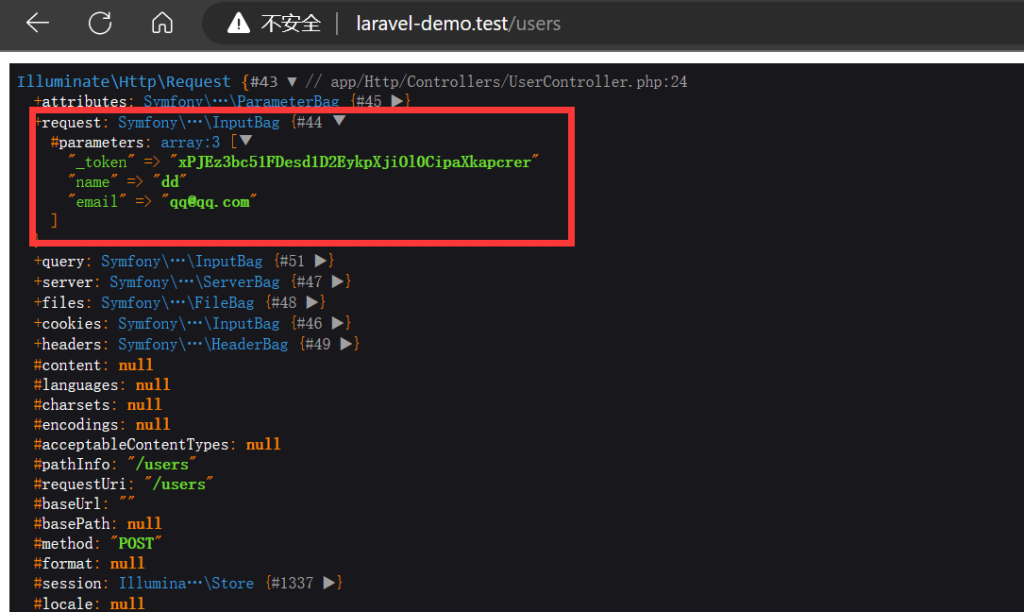
提交数据查看:

post request

如上图标注的,就是请求参数,接下来说明如何获取请求参数:

1
2
3
4
5
6
7
8
9
10
11
 class UserController extends Controller
{
public function store(Request $request)
{
$name = $request->name;
// 或者
$name = $request->input('name');
// 或者
$name = $request->input('name', '默认用户名'); // 在 name 参数为 null 时指定默认值
}
}

完善代码:

1
2
3
4
5
6
7
8
9
10
11
12
13
14
15
16
17
18
19
20
21
22
23
24
25
26
class UserController extends Controller
{
public function store(Request $request)
{
// 如果参数不做任何处理
// 需要在 User 模型中指定 $fillable
User::create($request->except('_token'));

// 或者
// 需要对参数进行处理,比如加密
// 需要在 User 模型中指定 $fillable
User::create([
'name' => $request->input('name'),
'email' => $request->input('email')
]);

// 或者
// 需要对参数进行处理,比如加密
$user = new User();
$user->name = $request->input('name');
$user->email = $request->input('email');
$user->save();

return redirect()->route('users.index');
}
}

创建并编辑 resources/views/users/edit.blade.php

1
2
3
4
5
6
7
8
9
10
11
12
13
14
15
16
17
18
19
20
21
22
23
@extends('layouts.app')

@section('content')
<div class="card">
<div class="card-body">
<form action="{{ route('users.update', $user->id) }}" method="POST">
@csrf
@method('PUT')
<div class="mb-3">
<label for="name" class="form-label">用户名</label>
<input type="text" class="form-control" id="name" name="name" value="{{ $user->name }}" required>
</div>
<div class="mb-3">
<label for="email" class="form-label">邮箱</label>
<input type="email" class="form-control" id="email" name="email" value="{{ $user->email }}" required>
</div>
<div class="mb-3">
<button class="btn btn-primary" type="submit">更新</button>
</div>
</form>
</div>
</div>
@endsection

要点:@method('PUT') ,对于 PUT/PATCHDELETE 等请求,需要在表单中通过 method 指令指明。

1
2
3
4
5
6
7
8
9
10
11
12
13
14
15
16
17
18
19
20
21
class UserController extends Controller
{
public function edit($id)
{
$user = User::findOrFail($id);

return view('users.edit', compact('user'));
}

public function update(Request $request, $id)
{
$user = User::findOrFail($id);

$user->update([
'name' => $request->input('name'),
'email' => $request->input('email')
]);

return redirect()->route('users.index');
}
}

参考文档:https://learnku.com/docs/laravel/9.x/requests/12213。

完善 resources/views/users/index.balde.php

1
2
3
4
5
6
7
8
9
10
11
12
13
14
15
16
17
18
19
20
21
22
23
24
25
26
27
28
29
@section('content')
<div class="card">
<div class="card-header">
<a href="{{ route('users.create') }}" class="btn btn-primary">添加用户</a>
</div>
<div class="card-body">
<table class="table table-bordered">
<thead>
<tr>
<th>ID</th>
<th>姓名</th>
<th>邮箱</th>
<th></th>
</tr>
</thead>
<tbody>
@foreach($users as $user)
<tr>
<td>{{ $user->id }}</td>
<td>{{ $user->name }}</td>
<td>{{ $user->email }}</td>
<td><a href="{{ route('users.edit', $user->id) }}" class="btn btn-warning">编辑</a></td>
</tr>
@endforeach
</tbody>
</table>
</div>
</div>
@endsection

Demo:https://github.com/hefengbao/laravel-demo

Laravel 入门:15-中间件

中间件提供了一种方便的机制来检查和过滤进入应用程序的 HTTP 请求。

在项目的 app/Http/Middleware 目录下可以看到 Laravel 预定义好的中间件,我们通过 php artisan make:middleware 创建的中间件也会存放到该目录下。

查看 app/Http/Kernel.php 文件:

1
2
3
4
5
6
7
8
9
10
11
12
class Kernel extends HttpKernel
{
// 定义全局中间件
protected $middleware = [];

protected $middlewareGroups = [
// 应用在 routes/web.php 中定义的路由
'web' => [],
// 应用在 routes/api.php 中定义的路由
'api' => []
]
}

查看 app/Providers/RouteServiceProvider.php 文件:

1
2
3
4
5
6
7
8
9
10
11
12
public function boot()
{
$this->routes(function () {
// 这里的 api 中间间就是上面代码中 middlewareGroups 定义的 api, 下同
Route::middleware('api')
->prefix('api')
->group(base_path('routes/api.php'));

Route::middleware('web')
->group(base_path('routes/web.php'));
});
}

开头说了中间件用来检查和过滤进入应用程序的 HTTP 请求,比如我们我禁止黑名单 IP 地址访问,就可以通过中间件来实现:

1
php artisan make:middleware BlacklistIpDenyMiddleware
1
2
3
4
5
6
7
8
9
10
11
12
13
14
15
16
17
18
19
20
21
<?php

namespace App\Http\Middleware;

use Closure;
use Illuminate\Http\Request;

class BlacklistIpDenyMiddleware
{
public function handle(Request $request, Closure $next)
{
// 从数据库或缓存中获取
$blacklistIps = [];

if (in_array($request->ip(), $blacklistIps)){
abort(403, 'Access Denied.');
}
return $next($request);
}
}

这里应用在 web 路由中:

1
2
3
4
5
6
 protected $middlewareGroups = [
'web' => [
...
\App\Http\Middleware\BlacklistIpDenyMiddleware::class,
],
}

还可以更细粒度的使用中间件,比如应用系统除开登录、注册等请求,其他的请求要求用户必须登录:

1
2
3
4
5
<!--comment0-->

Route::middleware('auth')->group(function (){
Route::resource('/users', \App\Http\Controllers\UserController::class);
});

还有更细粒度的角色权限控制:

1
2
3
4
5
6
<!--comment1-->

Route::middleware('auth')->group(function (){

Route::get('/settings',[ \App\Http\Controllers\SettingController::class, 'index] )->middleware(['role:admin']);
});

还可以在控制器的 __construct 方法中使用中间件:

1
2
3
4
5
6
7
8
9
10
11
12
13
class HomeController extends Controller
{
public function __construct()
{
$this->middleware('auth'); // 访问该控制器中的所有方法都需要用户已登录

// 或者
$this->middleware('auth')->only(['edit','destroy]]); // 仅用于 edit、destroy 方法

// 或者
$this->middleware('auth')->except(['edit','destroy]]); // 不用于 edit、destroy 方法
}
}

Demo:https://github.com/hefengbao/laravel-demo

Laravel 入门:14-模型关联

稍微复杂点的项目,数据必然不可能存放在一张数据表中,数据表的设计一般通过外键来关联。对应到 Laravel 的模型,就是本篇文章要说的模型关联,是一个比较重要的知识点。

理解或使用模型关联,先选定一个模型作为主体,然后在和其他模型关联,以此理解所谓的 一对一一对多多对多 等关联模式。一般情况下,可以以默认的 User 模型作为主体开始。

一对一

对于用户表(User)用来保存频繁查询的账户信息,而对于用户的其他信息(比如个人简介、地址等)则保存在用户资料表中(Profile),那么 User 模型则与 Profile 模型建立一对一的关系。

1
2
3
4
5
6
7
8
9
10
11
12
13
<?php

namespace App\Models;

use Illuminate\Database\Eloquent\Relations\HasOne;

class User extends Authenticatable
{
public function profile(): HasOne
{
return $this->hasOne(Profile::class);
}
}

查询用户资料:

1
2
3
4
5
6
7
8
9
10
11
class UserController extends Controller
{
public function show($id)
{
$user = User::find($id);

$profile = $user->profile;

return $profile;
}
}

$user->profile 这样, profile 就可以作为 User 模型的一个属性来使用,其他形式的关联也一样,在那个模型中定义了关联关系,那就可以作为该模型的一个属性直接使用。

相对应的,一条用户资料属于某一个用户:

1
2
3
4
5
6
7
8
9
10
11
12
13
14
15
<?php

namespace App\Models;

use Illuminate\Database\Eloquent\Relations\BelongsTo;

class Profile extends Model
{
use HasFactory;

public function user(): BelongsTo
{
return $this->belongsTo(User::class);
}
}

一对多

比如在一个博客项目中,一个用户(User)可以发布多篇文章(Post),那么 User 模型和 Post 模型可以建立一对多的关系:

1
2
3
4
5
6
7
8
9
10
11
12
13
<?php

namespace App\Models;

use Illuminate\Database\Eloquent\Relations\HasMany;

class User extends Authenticatable
{
public function posts(): HasMany
{
return $this->hasMany(Post::class);
}
}

但是一篇文章则属于某一个作者:

1
2
3
4
5
6
7
8
9
10
11
12
13
<?php

namespace App\Models;

use Illuminate\Database\Eloquent\Relations\BelongsTo;

class Post extends Model
{
public function user(): BelongsTo
{
return $this->belongsTo(User::class);
}
}

多对多

一个常见的应用场景就是系统的角色(Role)权限(Permission)功能,比如一个用户可以有多个角色(一个用户既可以是管理员,也可以是作者),而一个角色也可以属于多个用户(管理员可以有多个人),要保存它们之间的关系,则需要第三张数据表 role_user(一般按模型的首字母顺序) ,当然也可以是其他命名方式,参考文档学习(自定义中间表模型 https://learnku.com/docs/laravel/9.x/eloquent-relationships/12252#c1c3db):

1
php artisan make:migration create_role_user_table

编辑 create_role_user_table

1
2
3
4
5
6
7
8
9
10
11
12
13
14
15
16
17
18
19
20
<?php

use Illuminate\Database\Migrations\Migration;
use Illuminate\Database\Schema\Blueprint;
use Illuminate\Support\Facades\Schema;

return new class extends Migration
{
public function up()
{
Schema::create('role_user', function (Blueprint $table) {
$table->unsignedBigInteger('user_id');
$table->unsignedBigInteger('role_id');
});
}
public function down()
{
Schema::dropIfExists('role_user');
}
};

定义关联关系:

1
2
3
4
5
6
7
8
9
10
11
12
13
<?php

namespace App\Models;

use Illuminate\Database\Eloquent\Relations\BelongsToMany;

class User extends Authenticatable
{
public function roles(): BelongsToMany
{
return $this->belongsToMany(Role::class);
}
}
1
2
3
4
5
6
7
8
9
10
11
12
13
<?php

namespace App\Models;

use Illuminate\Database\Eloquent\Relations\BelongsToMany;

class Role extends Model
{
public function uses(): BelongsToMany
{
return $this->belongsToMany(User::class);
}
}

多态关系

文档比较详细,一对一多态(morphOne )和一对多多态(morphMany ),逻辑是一样的,而多对多多态关联类似多对多关联,需要增加一张数据表来保存关联数据。

保存数据

一对一(hasOne)、一对多(hasMany)、一对一多态(morphOne )和一对多多态(morphMany )等,可使用 save()create() 方法:

1
2
3
4
5
6
7
8
9
10
11
12
13
14
15
16
17
18
19
20
21
22
23
24
25
26
27
28
29
30
31
32
class UserController extends Controller
{
public function profile(Request $request)
{
// 做法 1
$user = User::find(1);

$user->profile()->create([
'gender' => '男',
'bio' => '哈哈~'
]);


// 做法 2
$user = User::find(1);

$profile = new Profile([
'gender' => '男',
'bio' => '哈哈~'
]);

$user->profile()->save($profile);

// 做法 3
$user = User::find(1);
$profile = new Profile();
$profile->gender = '男';
$profile->bio = '哈哈~';
$profile->user()->associate($user);
$profile->save();
}
}

多对多(belongsToMany)、多对多多态(morphToMany)使用 attach 方法:

1
2
3
4
5
6
7
8
9
10
11
12
13
14
15
16
17
18
19
20
21
22
23
<?php

namespace App\Http\Controllers;

use App\Models\Post;
use Illuminate\Http\Request;

class PostController extends Controller
{
public function store(Request $request)
{
$user = $request->user();

$post = $user->post()->create([
'title' => $request->input('title'),
'body' => $request->input('body')
]);

$post->tags()->attach($request->input('tagIds'));

return $post;
}
}

Demo:https://github.com/hefengbao/laravel-demo

Laravel 入门:16-事件系统

Laravel 的事件系统基于观察者模式,由事件(Event)和监听者(Listener),事件类保存在 app/Events 目录下,监听者类存储在 app/Listeners 目录下, 我们可通过 php artisan make:eventphp artisan make:listener 创建。

比如博客项目中文章被评论就可以产生一个事件 PostCommented , 监听到 PostCommented 事件,就可在监听者类PostCommentedNotification 中做一些操作,例如给文章作者发通知邮件。

创建事件类 PostCommented

1
php artisan make:event PostCommented
1
2
3
4
5
6
7
8
9
10
11
12
13
14
15
16
17
18
19
<?php

namespace App\Events;

class PostCommented
{
use Dispatchable, InteractsWithSockets, SerializesModels;

public function __construct()
{
//
}

public function broadcastOn()
{
return new PrivateChannel('channel-name');
}
}

创建监听者类 PostCommentedNotification

1
php artisan make:listener PostCommentedNotification --event=PostCommented
1
2
3
4
5
6
7
8
9
10
11
12
13
14
15
16
17
<?php

namespace App\Listeners;

class PostCommentedNotification
{
public function __construct()
{
//
}

public function handle(PostCommented $event)
{
//
}
}

注册事件和监听器:

1
2
3
4
5
6
7
8
9
class EventServiceProvider extends ServiceProvider
{
protected $listen = [

PostCommented::class => [
PostCommentedNotification::class
]
];
}

继续完善代码:

1
2
3
4
5
6
7
8
9
10
11
12
13
14
15
16
17
18
19
<!--comment0-->

<?php>

namespace App\Events;

use App\Models\Comment;

class PostCommented
{
use Dispatchable, InteractsWithSockets, SerializesModels;

public Comment $comment;

public function __construct(Comment $comment)
{
$this->comment = $comment;
}
}
1
2
3
4
5
6
7
8
9
10
11
12
13
14
15
16
17
18
<!--comment1-->

<?php

namespace App\Listeners;

use App\Events\PostCommented;

class PostCommentedNotification
{
public function handle(PostCommented $event)
{
$comment = $event->comment;

// TODO 发送邮件通知
}
}

保存评论时触发事件:

1
2
3
4
5
6
7
8
9
10
11
12
13
14
15
16
17
18
19
20
21
22
23
24
25
26
27
<!--comment2-->

<?php

namespace App\Http\Controllers;

use App\Events\PostCommented;
use App\Models\Post;
use Illuminate\Http\Request;

class PostController extends Controller
{
public function comment($id, Request $request)
{
$post = Post::findOrFail($id);

$comment = $post->comment()->create([
'body' => $request->body
]);

// 触发事件
event(new PostCommented($comment));

return redirect()->route('post.show', $id);
}
}

Demo:https://github.com/hefengbao/laravel-demo

Laravel 入门:17-发送邮件

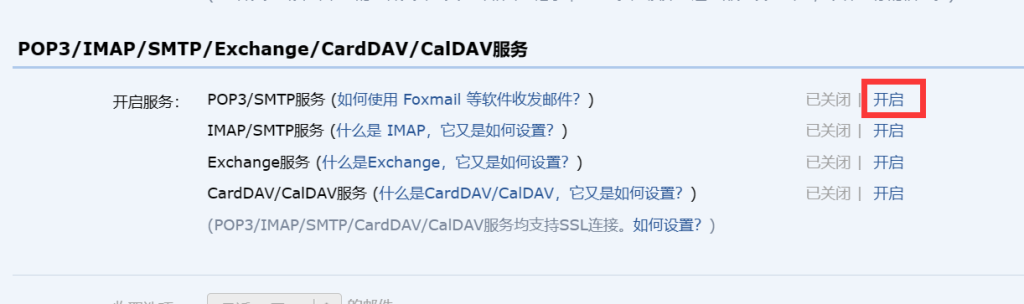
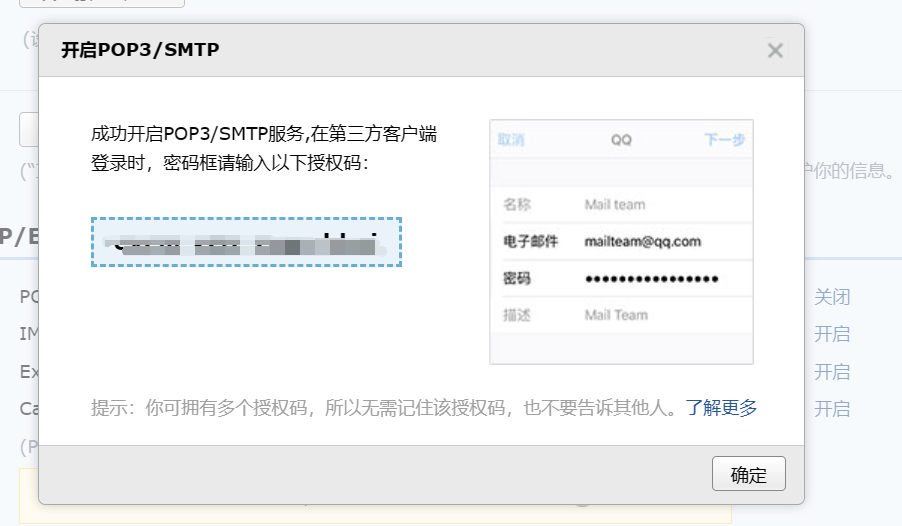
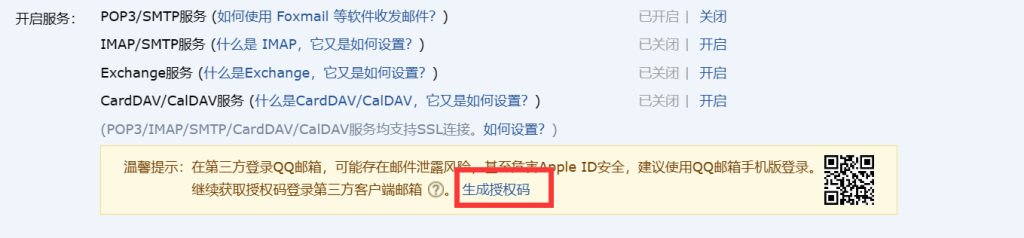
Laravel 提供了多种邮件发送驱动,但主要还是是国外的商业产品,这里说一下以 SMTP 驱动发送邮件。使用 QQ 邮箱,登陆邮箱,进入“设置” ->“账号”,按如下操作:

开启 SMTP:

生成授权码:

重新生成授权码:

.env 中配置:

1
2
3
4
5
6
7
MAIL_MAILER=smtp
MAIL_HOST=smtp.qq.com
MAIL_PORT=587
MAIL_USERNAME=QQ号
MAIL_PASSWORD=生成的授权码
MAIL_ENCRYPTION=null
MAIL_FROM_ADDRESS="QQ号@qq.com"

创建邮件通知类:

1
php artisan make:mail PostCommented

编辑 app/Mail/PostCommented.php

1
2
3
4
5
6
7
8
9
10
11
12
13
14
15
16
17
18
19
20
21
22
23
24
25
26
27
28
29
30
31
32
33
34
35
36
37
38
39
40
41
42
43
<?php

namespace App\Mail;

class PostCommented extends Mailable
{
use Queueable, SerializesModels;

public $comment;

public function __construct( Comment $comment)
{
$this->comment = $comment;
}

/**
* 邮件标题
* @return Envelope
*/
public function envelope()
{
return new Envelope(
subject: '您的文章《'.$this->comment->post->title.'》有新的评论',
);
}

/**
* 邮件正文
*
* view 指定邮件视图
* with 传递到视图的数据,以数组形式
* @return \Illuminate\Mail\Mailables\Content
*/
public function content()
{
return new Content(
view: 'mails.post_commented',
with: [
'comment' => $this->comment
]
);
}
}

编辑 resources/views/mails/post_commented.blade.php

1
2
<p>{{ $comment->user->name }} 评论了您的文章《{{ $comment->post->title }}》</p>
<i>{{ $comment->body }}</i>

routes/web.php 中创建路由:

1
Route::get('mail/post-commented', function (){});

渲染邮件(查看邮件效果):

1
2
3
4
5
6
7
8
9
10
11
12
13
Route::get('mail/post-commented', function (){
$post = \App\Models\Post::find(1);

$user = \App\Models\User::find(1);

$comment = new \App\Models\Comment();
$comment->body = '评论测试';
$comment->user()->associate($user);
$comment->post()->associate($post);
$comment->save();

return new \App\Mail\PostCommented($comment);
});

访问 http://laravel-demo.test/mail/post-commented

发送邮件:

1
2
3
4
5
6
7
8
9
10
11
12
13
Route::get('mail/post-commented', function (){
$post = \App\Models\Post::find(1);

$user = \App\Models\User::find(1);

$comment = new \App\Models\Comment();
$comment->body = '评论测试';
$comment->user()->associate($user);
$comment->post()->associate($post);
$comment->save();

\Illuminate\Support\Facades\Mail::to('.env 中配置的 MAIL_FROM_ADDRESS')->send(new \App\Mail\PostCommented($comment));
});

再次访问 http://laravel-demo.test/mail/post-commented

Demo:https://github.com/hefengbao/laravel-demo

Laravel 入门:18-队列

在项目中,为了快速相应,对于一些耗时的任务(比如,发送邮件)或者实时性要求不那么高的操作(比如写日志),可以后台队列排队处理。

.env 中配置:

1
QUEUE_CONNECTION=redis

参考 config/queue.php, Laravel 提供的队列驱动有 “sync”, “database”, “beanstalkd”, “sqs”, “redis”, “null”,实际项目中一般选择异步队列,使用 redis 驱动。

还是以文章被评论时给作者发通知邮件为例,创建 Job:

1
php artisan make:job PostCommented

编辑 app/Jobs/PostCommented.php

1
2
3
4
5
6
7
8
9
10
11
12
13
14
15
16
17
18
19
20
21
22
23
24
25
26
27
28
29
30
31
32
33
34
35
<?php

namespace App\Jobs;

class PostCommented implements ShouldQueue
{
use Dispatchable, InteractsWithQueue, Queueable, SerializesModels;

public $comment;

public function __construct(Comment $comment)
{
/**
* 在 Queueable trait 中定义的
* 这里可以覆盖全局设定, 即 .env 中的 QUEUE_CONNECTION 设置
* @var string
*/
$this->connection = 'redis';

/**
* 在 Queueable trait 中定义的
* 指定使用 emails 队列, 可选项, 默认使用 default
* @var string
*/
$this->queue = 'emails';

$this->comment = $comment;
}

public function handle()
{
// 发送通知邮件
Log::info('这里要发送通知邮件');
}
}

调度任务:

1
2
3
4
5
6
7
8
9
10
11
12
13
Route::get('mail/post-commented', function (){
$post = \App\Models\Post::find(1);

$user = \App\Models\User::find(1);

$comment = new \App\Models\Comment();
$comment->body = '评论测试';
$comment->user()->associate($user);
$comment->post()->associate($post);
$comment->save();

\App\Jobs\PostCommented::dispatch($comment);
});

访问 http://laravel-demo.test/mail/post-commented

然后在控制台运行 php artisan queue:work --queue=emails 命令:

在生产环境,我们需要确保 php artisan queue:work 一直处于运行状态, 可以通过 Supervisor 和官方的 Horizon 队列管理工具 来实现。

Demo:https://github.com/hefengbao/laravel-demo