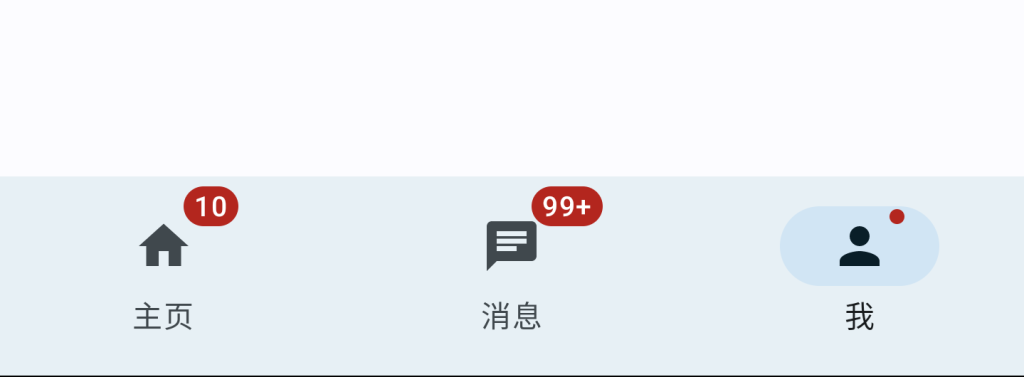
2024-06-09 JetpackCompose Jetpack Compose 入门:NavigationBar & Badge NavigationBar 实现底部导航栏,一般建议放置 3~ 5 个菜单,通过 BadgedBox(Badge) 显示消息数目(提示)。 12345678910111213141516171819202122232425262728293031323334353637383940414243444546474849505152535455565758596061626364656667686970@OptIn(ExperimentalMaterial3Api::class)@Composablefun NavigationBarScreen( modifier: Modifier = Modifier) { val list = listOf( NavigationItem(icon = Icons.Default.Home, label = "主页", hasNew = false, count = 10), NavigationItem(icon = Icons.Default.Chat, label = "消息", hasNew = false, count = 100), NavigationItem(icon = Icons.Default.Person, label = "我", hasNew = true, count = null), ) var selectedItem by remember { mutableStateOf(0) } Scaffold( topBar = {}, bottomBar = { NavigationBar { list.forEachIndexed { index, navigationItem -> NavigationBarItem( selected = selectedItem == index, onClick = { selectedItem = index }, icon = { if (navigationItem.hasNew || navigationItem.count != null) { BadgedBox( badge = { if (navigationItem.count != null) { Badge { Text( text = if (navigationItem.count >= 100){ "99+" }else{ navigationItem.count.toString() } ) } } else { Badge() } } ) { Icon(imageVector = navigationItem.icon, contentDescription = null) } } }, label = { Text(text = navigationItem.label) } ) } } } ) {paddingValues -> Box( modifier = modifier .padding(paddingValues) .fillMaxSize(), contentAlignment = Alignment.Center ){ Text(text = list[selectedItem].label) } }}data class NavigationItem( val icon: ImageVector, val label: String, val hasNew: Boolean = false, val count: Int? = null) Demo:https://github.com/hefengbao/jetpack-compose-demo Neuer Jetpack Compose 入门:AlertDialog Älter Jetpack Compose 入门:权限请求