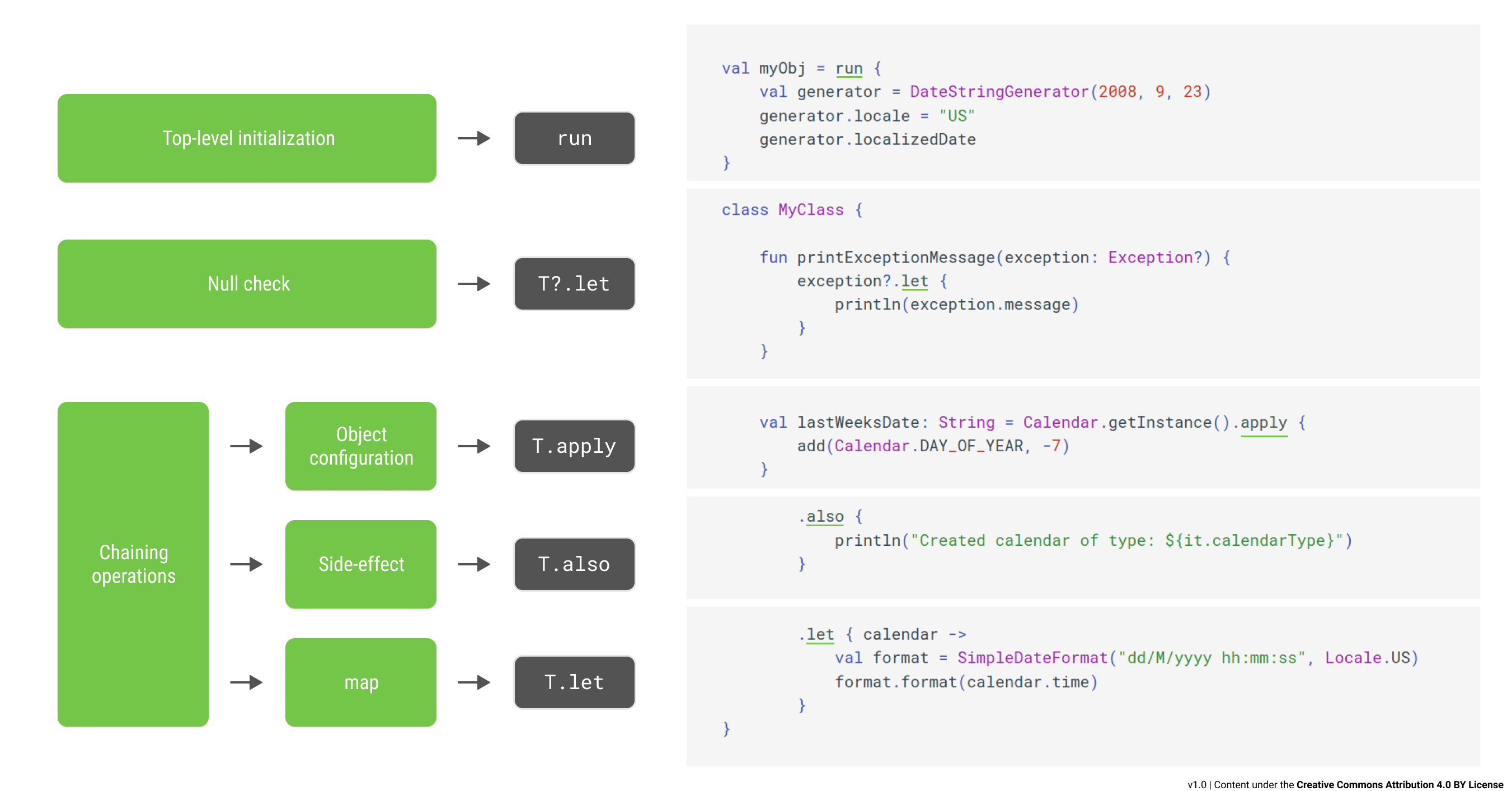
Kotlin Receivers
Before continuing with the rest, let’s first explain what a receiver is in the Kotlin language, because the functions let, also, apply, and run are extension functions that operate on their receiver.
Nowadays, in modern Object Oriented Programming terminology, our code calls a method on an instance of a class. This executes a function (method) in the context of an object (instance of a class), usually referenced by the optional keyword this.
In older Object Oriented Programming parlance (Smalltalk), the function is often referred to as the message, while the instance is referred to as the receiver. The call sends the message to the receiver.
The receiver is the object on which a function is executed and, in Kotlin, this function can be a plain old instance method or it can be an extension function.
1 | val arguments = ... |
Now let’s dive into how we can choose the correct one.
Note: The code-snippets are hosted on https://play.kotlinlang.org, which show up as embedded and runnable code in blog posts. You may need to click Show Embed and then accept the data-collection policy by clicking **Y**.
Use ‘apply’ for building or configuring objects
1 | inline fun <T> T.apply(lambda: T.() -> Unit): T |
1 | typealias Bundle = HashMap<String, Any> |
1 | Notification(style=Notification$InboxStyle@2ff4acd0, extras={extra_max_items=20, extra_id=ID}) |
Uses ‘apply’ for building a Bundle and configuring a Notification Builder
The apply function takes a lambda-with-receiver and…
- Provides its receiver to the lambda’s receiver
Inside the lambda, the receiver can be used through the optional keyword**this**. - Calls the lambda
The code in the lambda configures or ‘builds’ the receiver. - Returns its receiver
The returned value is the configured/built receiver.
Use ‘also’ for executing side-effects on objects
1 | inline fun <T> T.also(lambda: (T) -> Unit): T |
1 | typealias Bundle = HashMap<String, Any> |
1 | Notification(style=Notification$InboxStyle@2ff4acd0, extras={extra_max_items=20, extra_id=ID}) |
Uses ‘also’ to print the ‘notification’ object
The also function takes a lambda with one parameter and…
- Provides its receiver to the lambda’s parameter
Inside the lambda, the receiver can be used through the keyword**it**. - Calls the lambda
The code in the lambda executes side-effects on the receiver. Side-effects can be logging, rendering on a screen, sending its data to storage or to the network, etc. - Returns its receiver
The returned value is the receiver, but now with side-effects applied to it.
Use ‘run’ for transforming objects
1 | inline fun <T, R> T.run(lambda: T.() -> R): R |
1 | fun main() { |
1 | Map has 2 keys [key1, key2] and values [4, 20] |
Uses ‘run’ to transform the Map into a printable String of our liking
The run function takes a lambda-with-receiver and…
- Provides its receiver to the lambda’s receiver
Inside the lambda, the receiver can be used through the optional keyword**this**. - Calls the lambda and gets the its result of the lambda
The code in the lambda calculates a result based on the receiver. - Returns the result of the lambda
This allows the function to transform the receiver of typeTinto a value of typeRthat was returned by the lambda.
Use ‘let’ for transforming nullable properties
1 | inline fun <T, R> T.let(lambda: (T) -> R): R |
1 | class Mapper { |
1 | Map has 2 keys [key1, key2] and values [4, 20] |
Uses ‘let’ to transform the nullable property of Mapper into a printable String of our liking
The let function takes a lambda with one parameter and…
- Provides its receiver to the lambda’s parameter
Inside the lambda, the receiver can be used through the keyword**it**. - Calls the lambda and gets its result
The code in the lambda calculates a result based on the receiver. - Returns the result of the lambda
This allows the function to transform the receiver of typeTinto a value of typeRthat was returned by the lambda.
As we can see, there is no big difference between the usage of run or let.
We should prefer to use let when
- The receiver is a nullable property of a class.
In multi-threaded environments, a nullable property could be set to null just after a null-check but just before actually using it. This means that Kotlin cannot guarantee null-safety even afterif (myNullableProperty == null) { ... }is true. In this case, usemyNullableProperty**?.let** { ... }, because theitinside the lambda will never benull. - The receiver
thisinside the lambda ofrunmay get confused with anotherthisfrom an outer-scope or outer-class. In other words, if our code in the lambda would become unclear or too muddled, we may want to uselet.
Use ‘with’ to avoid writing the same receiver over and over again
1 | inline fun <T, R> with(receiver: T, block: T.() -> R): R |
1 | class RemoteReceiver { |
1 |
Use ‘with’ to avoid writing ‘remoteControl.’ over and over again
The with function is like the run function but it doesn’t have a receiver. Instead, it takes a ‘receiver’ as its first parameter and the lambda-with-receiver as its second parameter. The function…
- Provides its first parameter to the lambda’s receiver
Inside the lambda, the receiver can be used through the optional keyword**this**. - Calls the lambda and get its result
We no longer need to write the same receiver over and over againbecause the receiver is represented by the optional keywordthis. - Returns the result of the lambda
Although the receiver of typeTis transformed into a value of typeR, the return value of awithfunction is usually ignored.
Use ‘run’ or ‘with’ for calling a function with multiple receivers
Earlier we discussed the concept of a receiver in Kotlin. An object not only can have one receiver, an object can have two receivers. For a function with two receivers, one receiver is the object for which this instance function is implemented, the other receiver is extended by the function.
Here’s an example where adjustVolume is a function with multiple (two) receivers:
1 | interface AudioSource { |
1 | 16.0 and 16.0 |
In the above example of adjustVolume, this@AVReceiver is the instance-receiver and this@adjustVolume is the extended-receiver for theAudioSource.
The instance-receiver is often called the context. In our example, the extension-function adjustVolume for an AudioSource can be called in the context of an AVReceiver.
We know how to call a function on a single receiver. Just write **receiver**.myFunction(param1, param2) or something similar. But how can we provide not one but two receivers? This is where run and with can help.
Using run or with, we can call a receiver’s extension-function in the contextof another receiver. The context is determined by the receiver of run, or the first parameter of with.
1 | interface AudioSource { |
1 | 16.0 and 16.0 |
The ‘adjustVolume’ is called on an AudioSource in the context of an AVReceiver
Quick Recap
The return values and how the receivers are referenced in the lambda
The function apply configures or builds objects
The function also executes side-effects on objects
The function run transforms its receiver into a value of another type
The function let transforms a nullable property of a class into a value of another type
The function with helps you avoid writing the same receiver over and over again
- Bonus Points -
There are few more Standard Library Kotlin functions defined besides the five we talked about just now. Here is a short list of the other ones:
inline fun **TODO**(reason: String = " ... ") : Nothing
Todo throws an exception with the provided, but optional, reason. If we forget to implement a piece of code and don’t remove this todo, our app may crash.
inline fun **repeat**(times: Int, action: (Int) -> Unit): Unit
Repeat calls the provided action a given number of times. We can write less code using repeat instead of a for loop.
inline fun <T> T.**takeIf**(predicate: (T) -> Boolean) : T?
TakeIf returns the receiver if the predicate returns true, otherwise it returns null. It is an alternative to an if (...)expression.
inline fun <T> T.**takeUnless**(predicate: (T) -> Boolean) : T?
TakeUnless returns the receiver if the predicate returns false, otherwise it returns null. It is an alternative to an if(**!**...) expression.
If we need to code something like if (long...expression.predicate()), we may need to repeat the long expression again in the then or else clause. Use TakeIf or TakeUnless to avoid this repetition.
参考:
https://blog.csdn.net/u013064109/article/details/78786646
https://medium.com/the-kotlin-chronicle/lets-also-apply-a-run-with-kotlin-on-our-minds-56f12eaef5e3